Just over a week ago I wrote about how Flash has been confirmed for the iPhone. There are conflicting reports about whether or not we will see Flash, but for those with jailbroken iPhone, the option has been out for a while now. The plugin is called iMobileCinema and it’s available via Cydia.
iMobileCinema is great if you spend time on bus or subway, and want to waste time by watching endless videos. Sure, YouTube is great but what if you could check out clips from CollegeHumor, Vimeo, Google Video, QIK, and more?
How to Install iMobileCinema on your Jailbroken iPhone
1. Jailbreak your iPhone (remember, Apple says it’s illegal).
2. Launch Cydia, search for iMobileCinema, and install it.
3. Now, visit any website that requires Flash and cross your fingers that iMobileCinema will work!
I tested out iMobileCinema with a few video sites and here are my impressions:
CollegeHumor: audio works, video laggy
Vimeo: audio works, laggy video
Google Video: audio and video works great
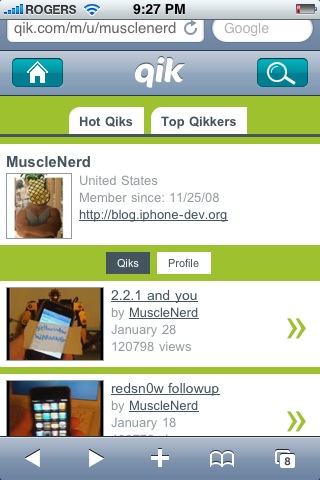
QIK: audio and video works great
I know there are some other random flash video sites that might work too, so let’s hear what you’re watching. iMobileCinema is definitely a work in progress but it’s a great start in the right direction for those looking to check out more Flash intensive websites on the iPhone.
Check out the following screenshots:
…Oh, and if you haven’t seen the following video, titled “Cellphone Reunion” you gotta watch!
Want to see more of our stories on Google?
P.S. Want to keep this site truly independent? Support us by buying us a beer, treating us to a coffee, or shopping through Amazon here. Links in this post are affiliate links, so we earn a tiny commission at no charge to you. Thanks for supporting independent Canadian media!
Subscribe
38 Comments
Oldest
NewestMost Voted
Jorelle
17 years ago
Installing it right now. I’m curious if flash games work.
loading side videos on sites will use up more battery and bandwith so if u dont wanna watch the flash stuff much then you can just turn it off until u have a use for it
jack
17 years ago
IMOBILECINEMA 2.X MESSED MY PHONE I HAD TO RESTORE AND UNLOCK
SSK13
17 years ago
haha that video is awesome!
Ali Khan
17 years ago
this works amazingly well i tried megavideo exxcellent video and audo quality
well it’s a bit late for this news because i have this plugin for a while now!
but hey thanx anyway!
gotta restore my iphone tonight :'(
hama
17 years ago
well it’s a bit late for this news because i have this plugin for a while now!
but hey thanx anyway!
gotta restore my iphone tonight :'(
dashparr
17 years ago
If you have SBSettings, you can download the imobilecinema toggle. Although, I’m not sure why you would want to turn it off…
Andrew
17 years ago
loading side videos on sites will use up more battery and bandwith so if u dont wanna watch the flash stuff much then you can just turn it off until u have a use for it
jack
17 years ago
IMOBILECINEMA 2.X MESSED MY PHONE I HAD TO RESTORE AND UNLOCK
SSK13
17 years ago
haha that video is awesome!
Ali Khan
17 years ago
this works amazingly well i tried megavideo exxcellent video and audo quality
Ali Khan
17 years ago
this works amazingly well i tried megavideo exxcellent video and audo quality
More Rewards, the loyalty program run by Pattison Food Group, says customer personal information was accessed after unauthorized activity on one of its servers. This is the latest in a run of Canadian retail incidents, after the Canadian Tire breach last year and the Loblaw network breach in March. That's according to an email sent...
SpaceXSI (formerly SpaceXAI) has rolled out a big update to Grok Bot, adding more app integrations, email support, better voice calls and the ability to work with messages on X. The company announced eight updates on Friday, with changes to how Grok Bot looks, works and handles everyday tasks. For starters, the interface has been...





Installing it right now. I’m curious if flash games work.
That flash Cellphone Reunion is funny.
Feel free to comment about it in the forums… https://www.iphoneincanada.ca/forums/showthread.php?t=4540 😉
just installed it on my Iphone ,,
will see if it works …
thank for the tip !
Thanks for the tip m8!
didnt work too well on Vimeo .. qik was ok
well it’s a bit late for this news because i have this plugin for a while now!
but hey thanx anyway!
gotta restore my iphone tonight :'(
If you have SBSettings, you can download the imobilecinema toggle. Although, I’m not sure why you would want to turn it off…
loading side videos on sites will use up more battery and bandwith so if u dont wanna watch the flash stuff much then you can just turn it off until u have a use for it
IMOBILECINEMA 2.X MESSED MY PHONE I HAD TO RESTORE AND UNLOCK
haha that video is awesome!
this works amazingly well i tried megavideo exxcellent video and audo quality
for poker enthusiasts http://www.cardplayertube.com
Should there be an iMobileCinema icon on my iPhone home screen after downloading it?
thanks for the tip!
Installing it right now. I’m curious if flash games work.
Installing it right now. I’m curious if flash games work.
That flash Cellphone Reunion is funny.
That flash Cellphone Reunion is funny.
just installed it on my Iphone ,,
will see if it works …
thank for the tip !
Thanks for the tip m8!
Thanks for the tip m8!
Feel free to comment about it in the forums… https://www.iphoneincanada.ca/forums/showthread.php?t=4540 😉
Feel free to comment about it in the forums… https://www.iphoneincanada.ca/forums/showthread.php?t=4540 😉
didnt work too well on Vimeo .. qik was ok
didnt work too well on Vimeo .. qik was ok
well it’s a bit late for this news because i have this plugin for a while now!
but hey thanx anyway!
gotta restore my iphone tonight :'(
well it’s a bit late for this news because i have this plugin for a while now!
but hey thanx anyway!
gotta restore my iphone tonight :'(
If you have SBSettings, you can download the imobilecinema toggle. Although, I’m not sure why you would want to turn it off…
loading side videos on sites will use up more battery and bandwith so if u dont wanna watch the flash stuff much then you can just turn it off until u have a use for it
IMOBILECINEMA 2.X MESSED MY PHONE I HAD TO RESTORE AND UNLOCK
haha that video is awesome!
this works amazingly well i tried megavideo exxcellent video and audo quality
this works amazingly well i tried megavideo exxcellent video and audo quality
for poker enthusiasts http://www.cardplayertube.com
Should there be an iMobileCinema icon on my iPhone home screen after downloading it?
Should there be an iMobileCinema icon on my iPhone home screen after downloading it?
thanks for the tip!