
You Can Now Jailbreak iOS 16.4.1 with Palera1n 2.0.0 Beta 6
Codenamed Bakepale, the latest v2.0.0 beta 6 update to jailbreak tool Palera1n has just been released, which fully supports iOS 16.4 - iOS 16.4.1 jailbreak.
Hey everybody!!
I think I’m a little late finding the Backgrounder app for jailbroken iPhones, but when I found out about it recently I was really excited to try it out. I use Google Talk to chat with my buddy who has a BlackBerry and it drives me crazy that it runs in the background for him. He gets nice little notifications and I’m stuck making sure my iPhone doesn’t go to sleep so I don’t get logged out while I’m waiting for him to write back.
You can enable Backgrounder for any running iPhone app by holding the “Home” button until the Backgrounding Enabled pop up appears. Release the “Home” button and your app is now running in the background. To quit the background application, re-launch it , then press and hold the “Home” button until the Backgrounding Disabled pop up appears.
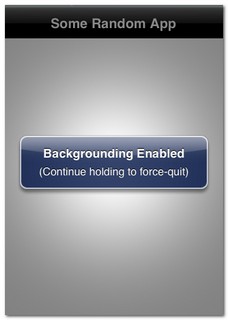
Testing with Google Talk
Once I installed Backgrounder via Cydia I of course tested it by chatting with my buddy using Google Talk. I launched Google Talk, held the “Home” button until it was running in the background and then started surfing the web, sending text messages, and sending emails. Google Talk played a sound and vibrated to let me know a message was waiting for me. It works great, my only pet peeve is if you let your iPhone go to sleep you will lose your wifi connection and you won’t get the notification that you have a message. As soon as you wake your iPhone and it reconnects to wifi, you will get the notification that you have a message. This isn’t ideal but it’s better than the alternative, not using Backgrounder and being completely logged out when your iPhone goes to sleep.
The Real Benefits
Where I found the Backgrounder app came in extremely useful was for using your favorite Internet radio app. I use the Corus radio app constantly at work, at home, even when I’m walking my dog, and I hate it when I try to reply to an incoming text message and the Corus radio app shuts down. Now I can launch Corus, enable it to run in the background and feel free to reply to a text messages or do whatever I want while my music keeps playing.
Until push notifications come with iPhone OS 3.0, Backgrounder is going to become a very useful app for me!!
Want to see more of our stories on Google?

P.S. Want to keep this site truly independent? Support us by buying us a beer, treating us to a coffee, or shopping through Amazon here. Links in this post are affiliate links, so we earn a tiny commission at no charge to you. Thanks for supporting independent Canadian media!


There have been a few updates in the past few days. Anyone notice any significant changes? I haven’t tested the new changes yet…
Handy app, only use it once in a while…
To keep the wifi conection alive, download SB Settings and KeepAwake in that order from cydia
Insomnia (Cydia) does the trick of maintaining connections as well.
The latest update adds a (beta) task list mode that you can enable in Backgrounder’s settings. Now when you hold the home button a list of running apps pops up letting you easily switch between apps. Sliding your finger over an app also lets you quit them.
Are you sure you can close an app this way? doesn’t seem to work for me and I don’t see it documented anywhere.
I used to use this app a long time ago and decided I was draining my battery too much. Sometimes you would leave an app running in the background and forget to disable it. Takes up more memory too. Did come in handy when playing music for sure.
There have been a few updates in the past few days. Anyone notice any significant changes? I haven’t tested the new changes yet…
Handy app, only use it once in a while…
Handy app, only use it once in a while…
To keep the wifi conection alive, download SB Settings and KeepAwake in that order from cydia
To keep the wifi conection alive, download SB Settings and KeepAwake in that order from cydia
Insomnia (Cydia) does the trick of maintaining connections as well.
Insomnia (Cydia) does the trick of maintaining connections as well.
The latest update adds a (beta) task list mode that you can enable in Backgrounder’s settings. Now when you hold the home button a list of running apps pops up letting you easily switch between apps. Sliding your finger over an app also lets you quit them.
The latest update adds a (beta) task list mode that you can enable in Backgrounder’s settings. Now when you hold the home button a list of running apps pops up letting you easily switch between apps. Sliding your finger over an app also lets you quit them.
I used to use this app a long time ago and decided I was draining my battery too much. Sometimes you would leave an app running in the background and forget to disable it. Takes up more memory too. Did come in handy when playing music for sure.
I used to use this app a long time ago and decided I was draining my battery too much. Sometimes you would leave an app running in the background and forget to disable it. Takes up more memory too. Did come in handy when playing music for sure.
Are you sure you can close an app this way? doesn’t seem to work for me and I don’t see it documented anywhere.
Are you sure you can close an app this way? doesn’t seem to work for me and I don’t see it documented anywhere.