With the release of the iPhone 3G S worldwide, a lot of people are transitioning from either an iPhone 2G/3G to the 3G S. If this is your first time upgrading to a newer iPhone, a popular question you might have is, “how do I sync my data from my old iPhone to my new iPhone 3G S?”
The answer is quite simple, and I’m going to explain how to accomplish this feat if you’ve never done it before. Ready? LET’S GO PEOPLE (as Diddy would say on twitter)!
How to Sync your iPhone 2G/3G Data to Your New iPhone 3G S
The best way to do this is once your iPhone 3G S is brand new, with no new data on it.
1. Launch iTunes. Plugin your iPhone 2G/3G and press SYNC (the backup as you know, takes forever).
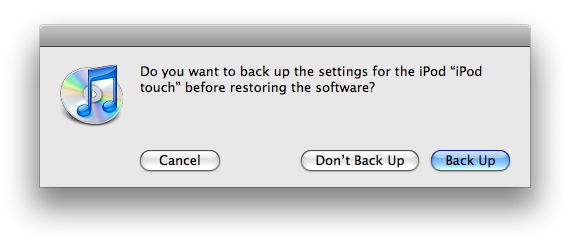
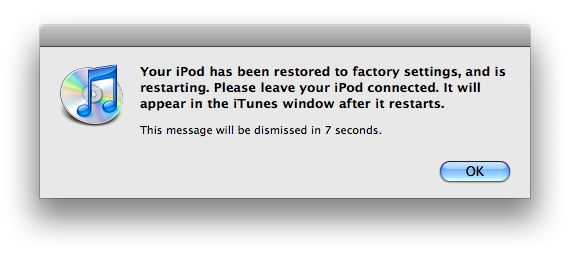
2. Once the sync is complete, eject your iPhone 2G/3G and plugin your iPhone 3G S. You are going to press RESTORE. This will format your iPhone 3G S. If you’ve just synced, you don’t need to back up again when the prompt appears.


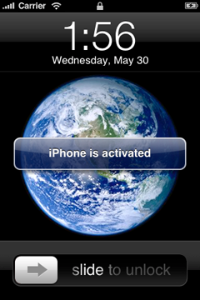
3. One the restore is complete, your iPhone will reboot and be activated.

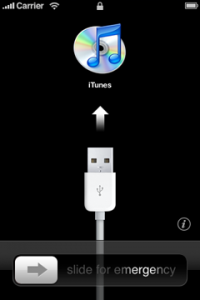
Your iPhone will show the USB icon and iTunes logo, then it will be activated:

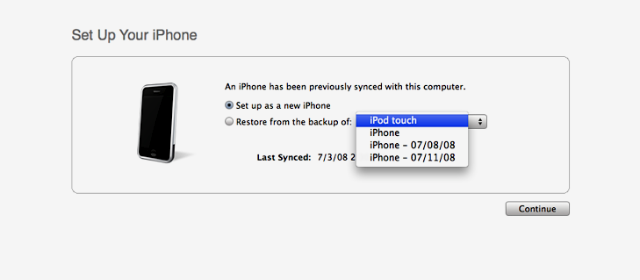
4. iTunes will prompt you to “Set Up your iPhone”. This is where you will select “Restore from the backup of” and select your latest backup from either your 2G or 3G from Step 1.

5. Click continue, the iPhone will restore, and now your iPhone 3G S will have all the same settings, contacts, pictures, songs, etc as your previous iPhone! Voila!
The above procedure is what I did to transfer all of my iPhone 3G settings to my iPhone 3G S. It also worked for transferring our 2G backup to our 3G as well. Let me know how this goes for you!





Thanks! Wasn’t exactly sure how to.
Be warned though, restoring will delete any photos or videos that you have taken before the restore, so make sure to save them to your computer. Luckily, I figured that was probably the case and did so before restoring mine.
I usually will just SSH my info back onto the iPhone lol But right now I need to wait for jailbreak with iPhone 3GS. I also do the same way as posted above, works good 🙂
Thanks amigo!
i was just wondering if i need to backup my apps as well?
GUYS NOOO!! there is a much easier way to do it! Hold shift then click on the iPhone 3g (right click) in itunes and you have the option to backup the data from your older model
In the article you mentioned music, but does it work for sure? On my iTunes I have it set to manually manage music and don’t have the music on my iTunes. Is there a way to manually sync the music? (don’t want to have to manually put back on 15GB of music plus sort them etc.)
question: after you transfer everything and activate your new iPhone, if you wipe the old iPhone clean (using General->Reset->Erase All Content and Settings), will the old phone still function as an iPod with no SIM card installed? I think recall hearing that the wipe restores the phone to pre-activation state. just wondering if the old phone can still be used for non-phone functions until it finds a new owner
yes
I’m also looking for some practical information about what will happen to my 3G after I upgrade to the 3GS. Can I sync my apps to both devices? Can both phones sync from the same iTunes?
sell your iphone 3G!
Great instructions! At what point do you move the SIM card over? Before you restore the 3Gs? or after? Also, when you are all done and want to sell the 3G can a buyer only use on the Rogers network or is it considered “unlocked”?
Before
If you sell it, the device is still locked to Rogers. So you will have to unlock it
I am also curious about the unanswered before and after questions above (e.g. SIM card, is old phone usable as an iPod touch afterwards, can you still sync both devices, etc.).
Yes you can use the old iPhone has anything you want and if you put a SIM in, service will simply resume
Hi,
I was wondering if you could help me!!!
I had an iphon 3g for literally a year, and it got stolen off of me in broad daylight on the 2nd of July. However through insurance (thank god), I recieved a new phone and sim the following day… now the problems start…
I synced the phone to itunes 8.2 and it said the iphone could not restore back up, as the software is too old (my old phone was 3.0 and the new one obviously 2.2.1).
It then said I needed to set the phone up as a new iphone, which I did. However, after doing this and choosing to restore back up, it only gives me the option of restoring iphone to “Jahangeer’s iphone” and one restoring date, 10th april 09! How can that be when I only last synched and backed up my old iphone 3g a week before it was stolen?!
I’m pulling my hair out trying to figure out how to solve the problem. Any ideas/help would extremely be appreciated!!!
Jay
Is it possible to transfer data from cancelled 3g to an already activated 3gs with different providers, then clear 3g for resale?
Is it possible to transfer data from cancelled 3g to an already activated 3gs with different providers, then clear 3g for resale?
Thanks! Wasn’t exactly sure how to.
Thanks! Wasn’t exactly sure how to.
Thanks! Wasn’t exactly sure how to.
Be warned though, restoring will delete any photos or videos that you have taken before the restore, so make sure to save them to your computer. Luckily, I figured that was probably the case and did so before restoring mine.
Be warned though, restoring will delete any photos or videos that you have taken before the restore, so make sure to save them to your computer. Luckily, I figured that was probably the case and did so before restoring mine.
I usually will just SSH my info back onto the iPhone lol But right now I need to wait for jailbreak with iPhone 3GS. I also do the same way as posted above, works good 🙂
Thanks amigo!
i was just wondering if i need to backup my apps as well?
GUYS NOOO!! there is a much easier way to do it! Hold shift then click on the iPhone 3g (right click) in itunes and you have the option to backup the data from your older model
In the article you mentioned music, but does it work for sure? On my iTunes I have it set to manually manage music and don’t have the music on my iTunes. Is there a way to manually sync the music? (don’t want to have to manually put back on 15GB of music plus sort them etc.)
In the article you mentioned music, but does it work for sure? On my iTunes I have it set to manually manage music and don’t have the music on my iTunes. Is there a way to manually sync the music? (don’t want to have to manually put back on 15GB of music plus sort them etc.)
question: after you transfer everything and activate your new iPhone, if you wipe the old iPhone clean (using General->Reset->Erase All Content and Settings), will the old phone still function as an iPod with no SIM card installed? I think recall hearing that the wipe restores the phone to pre-activation state. just wondering if the old phone can still be used for non-phone functions until it finds a new owner
question: after you transfer everything and activate your new iPhone, if you wipe the old iPhone clean (using General->Reset->Erase All Content and Settings), will the old phone still function as an iPod with no SIM card installed? I think recall hearing that the wipe restores the phone to pre-activation state. just wondering if the old phone can still be used for non-phone functions until it finds a new owner
question: after you transfer everything and activate your new iPhone, if you wipe the old iPhone clean (using General->Reset->Erase All Content and Settings), will the old phone still function as an iPod with no SIM card installed? I think recall hearing that the wipe restores the phone to pre-activation state. just wondering if the old phone can still be used for non-phone functions until it finds a new owner
I’m also looking for some practical information about what will happen to my 3G after I upgrade to the 3GS. Can I sync my apps to both devices? Can both phones sync from the same iTunes?
I’m also looking for some practical information about what will happen to my 3G after I upgrade to the 3GS. Can I sync my apps to both devices? Can both phones sync from the same iTunes?
I’m also looking for some practical information about what will happen to my 3G after I upgrade to the 3GS. Can I sync my apps to both devices? Can both phones sync from the same iTunes?
I’m also looking for some practical information about what will happen to my 3G after I upgrade to the 3GS. Can I sync my apps to both devices? Can both phones sync from the same iTunes?
sell your iphone 3G!
sell your iphone 3G!
sell your iphone 3G!
sell your iphone 3G!
Great instructions! At what point do you move the SIM card over? Before you restore the 3Gs? or after? Also, when you are all done and want to sell the 3G can a buyer only use on the Rogers network or is it considered “unlocked”?
I am also curious about the unanswered before and after questions above (e.g. SIM card, is old phone usable as an iPod touch afterwards, can you still sync both devices, etc.).
Yes you can use the old iPhone has anything you want and if you put a SIM in, service will simply resume
Before
If you sell it, the device is still locked to Rogers. So you will have to unlock it
yes
Hi,
I was wondering if you could help me!!!
I had an iphon 3g for literally a year, and it got stolen off of me in broad daylight on the 2nd of July. However through insurance (thank god), I recieved a new phone and sim the following day… now the problems start…
I synced the phone to itunes 8.2 and it said the iphone could not restore back up, as the software is too old (my old phone was 3.0 and the new one obviously 2.2.1).
It then said I needed to set the phone up as a new iphone, which I did. However, after doing this and choosing to restore back up, it only gives me the option of restoring iphone to “Jahangeer’s iphone” and one restoring date, 10th april 09! How can that be when I only last synched and backed up my old iphone 3g a week before it was stolen?!
I’m pulling my hair out trying to figure out how to solve the problem. Any ideas/help would extremely be appreciated!!!
Jay