Hey, RoryPiper here. One of the gripes most people have about thier iPhones, is the limited number of tones that come with the OS. Especially, the SMS tones, as there are only 6. Well, with this tutorial, I will show you how to create, and install, multiple SMS tones, on your iPhone. This is gonna take a bit of skill, on your part, but I’m going to walk you through it, as best as I can.
You will need a jailbroken iPhone, with OpenSSH and Winterboard installed. On your computer, you will need an FTP program and some simple audio editting software, something that can export to AIFF. In this tutorial, I’ll be using a Mac with Filezilla, and Audacity. There are Windows versions of both of these, if you prefer the lesser of the operating systems ;). Both Filezilla and Audacity are free to download.
There are 3 steps involved: 1. Creating the Tone. 2. Packaging the tone for Winterboard and, 3. Installing the tone on your iPhone.
1. Create Your Tone
First, you need to pick a sound you want for your tone. It can be a WAV or MP3, or any sound file your software can handle. Just do a Google search for “free wav”, and you’ll find something. I have chosen “Hooah!”, from Scent of a Woman. Using Audacity, simply drag and drop the file into the program. You can edit it, if it’s too long. You should keep it short. This one is just right, so we’ll export it.
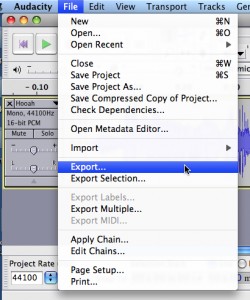
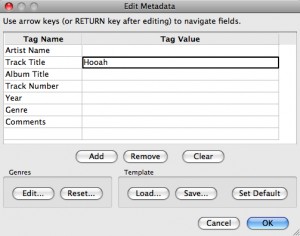
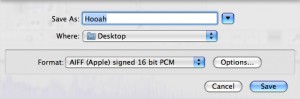
Go to File, then Export. In the pop-up, name the track. Then in the drop-down, leave the name the same, and choose desktop, as your location. It is important to get the file type correct. In the scroll down menu, choose AIFF. Then, click save. The new file will show up on the desktop as “Hooah.aiff”.


2. Package Your Tone for Winterboard
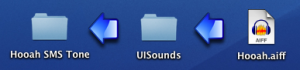
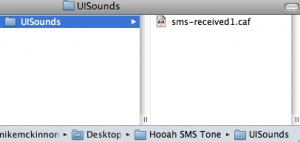
Now that we have the sound created, we need to package it for Winterboard. On your desktop, create a new folder, and name it appropriately. Mine is called “Hooah SMS Tone”. Then within that folder, create another folder and name it “UISounds”. This one is case sensitive, so make sure you spell it: capital u, capital i, and capital s on sounds. All together, with no spaces. Then, Â drag and drop your tone into the “UISounds” folder.

Next, we have to change the name and extension of the file, so the iPhone can recognize it as a SMS tone. All SMS tones on the iPhone are named sms-received, 1 through 6, with the extension .caf. We will be replacing the Tri-tone, so we will use number 1. Name the file “sms-received1.caf”. (In Windows you may need to change your folder settings: make sure “Hide Extensions” is unchecked, to be able to edit your extensions).

If you’re having trouble, you can donwload my example here.
3. Install on Your iPhone and Apply as SMS Tone
With the tone packaged for Winterboard, we now need to put it on your iPhone. This is where your FTP program and OpenSSH come into play. What was that? Did you just say: “FTP? SSH? WTF?!”. Well, this might be a little tricky for some of you, so if you’re new to OpenSSH, you can search YouTube for a full tutorial.
This has to be done over a WiFi network that both your iPhone and your computer are connected to. Open Filezilla, and log in to your iPhone. For the host, type in the IP address of your iPhone (huh?: Go into Settings, tap WiFi, then tap the arrow to right of your selected network). The username is “rootâ€, the password is “alpineâ€, and you want to use port 22. It may take a few tries to get in, if you’ve never used OpenSSH before, so have patience.

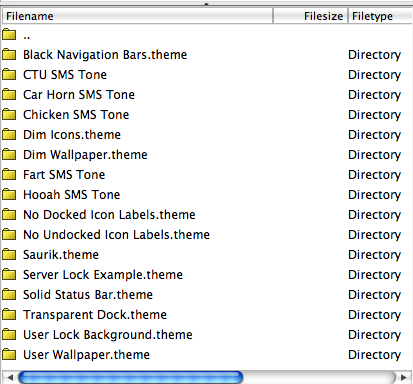
In your local folders(your computer), navigate to your desktop, so that you can see the “Hooah SMS Tone” folder we created earlier. In your remote folders (your iPhone), you need to navigate to Library > Themes. Then drag and drop your folder from your local to your remote. Be careful not to mess around with anything else on your iPhone, unless you know what your doing. You don’t want to change something crucial, by accident, and then have to restore your phone. The right folder should look something like this:

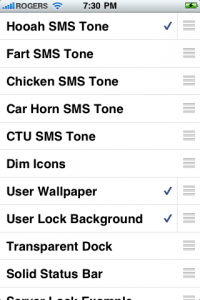
The only thing left to do is make the new SMS tone active. Open Winterboard, on your iPhone. You should see your new tone in the list. Select it, and exit Winterboard. Your iPhone will respring.

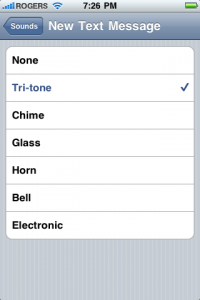
Once your lock screen comes back up, go into Settings > Sounds > New Text Message, and select “Tri-toneâ€. You should hear your new tone!
The great thing about this method is, you can create and install as many tones as you like, while never losing your original Tri-tone sound. If you want to use a different tone, just go back into Winterboard, select a new tone, unselect the old tone, and exit Winterboard. If you want your Tri-tone back, just unselect all SMS tones in Winterboard.
Well, there you go. You are now an iPhone hacker! Kinda. I hope this wasn’t too overwhelming. I have tested this method on the 1st gen iPhone and the iPhone 3G, on fw2.x.x and fw3.0. Hope it works for you!
I’ll be back next Sunday, but in the mean time, you can visit me at Green Candy, and follow me on Twitter: @RoryPiper




Sweet! The life long mystery has been solved. 😉 Apple really needs to introduce new ringtones and SMS sounds because when you’re at a party and you hear the “tri tone” sound, you see about 5-6 heads look down to their phones!
Good work on the How To! U should post this in the forums for other users to learn from 😉
Awesome and well thought tutorial. It was great to read something in depth fir a change rather than a review of an app that looked like it wad paid by the author (just saying the reviews are generally way too positive, I’ve bought apps only to discover they are complete junk based on reviews here).
Nice!! But guys i’m having an issue putting vcustom ringtones on my iPhone with 3.0 os. I used to do it with iTunes with the older os and it worked easily. Is it only me experiencing this problem or is it an 3.0 os issue? Because in my ringtones folder in iTunes under my iPhone I get to see the ringtones, but nothing in my iPhone 3G
U don’t need a jailbroken phone! I did it on 3.0 locked phone! Goto audiko.net from desktop computer. U can make your own ringtones or browse the thousands on there. Free! Just add those to iTunes, and sync. I have about 30 custom ringtones on a locked 32gb 3gs running 3.0
That is correct. For ringtones, you do not need a jailbroken device. You can go to Audiko.net, but if you want to create you own ringtones, just shorten any MP3 to 30 seconds or less. Then convert to AAC. Rename the extension from m4a, to m4r. Import to iTunes, then sync to you iPhone.
Ringtones are the easy part, it’s the SMS tones that are the problem.
Been searching all over for a way to change the SMS ringtones??? Has anyone discovered a way to do this yet??? (on a NON-Jailbroken device) thanks for any info
@Nick: Unfortunately, there is no way to change the SMS tones, besides this method. Non-jailbroken iPhones are stuck with the 6 default tones.
So I followed the directions and am capable of hearing the new SMS tone while in the settings menu where the tones are selected, however, when I actually receive a text it plays the actual default sound. I am running a 3GS with 3.1.2 on a Jailbreak with Blackrain and Winterboard. Everything I use in Winterboard, i.e. themes and utilities work great. Just can't get the SMS tones to work. Any advice??
Also, I installed some SMS tones from Cydia as well and these too I can hear in the sound settings menu but still only get the default sound when a text is received. Thanks for any help.
Ok, so I figured out the problem. When using iBlacklist with the SMS privacy setting turned on, only the default sound will play so matter what other settings I try. Does anyone know how to get a custom SMS tone to play with the iBlacklist SMS privacy setting turned on?
So I have solved my own question but thought I would post the results incase anyone else is having this issue. I am using a 3GS ver. 3.1.2, Jailbreaked with blackrain using Cydia, Winterboard, iBlacklist, iREALSMS, and many others. The problem was while using the iBlacklist SMS privacy setting the custom SMS tone would not play only the default sounds would, however, I want my SMS privacy (as Iam sure others of you do too). So I disabled iBlacklist SMS privacy setting and am using the iREALSMS SMS privacy setting and now my custom SMS tone works. No pop up in the lock screen or the springboard, only a little icon on the status bar and my custom SMS tone. Hope this helps someone else.
Worked 100%…thanks
does this include msm tones??
NVM solved the problem
had to go to root>var>stash>themes i don't know if that is only for 3.1.3 set up
IT WORKS with is path
Thanks for the tutorial
Hi i can't see the theme folder on my iphone any suggestions???
I have Iphone 3G jailbroken via Spirit for firmware 3.1.3
I have connected via filezilla and have openssh active on the iphone.
NVM solved the problem
had to go to root>var>stash>themes i don't know if that is only for 3.1.3 set up
IT WORKS with is path
Thanks for the tutorial
Hi i can't see the theme folder on my iphone any suggestions???
I have Iphone 3G jailbroken via Spirit for firmware 3.1.3
I have connected via filezilla and have openssh active on the iphone.
Sweet! The life long mystery has been solved. 😉 Apple really needs to introduce new ringtones and SMS sounds because when you’re at a party and you hear the “tri tone” sound, you see about 5-6 heads look down to their phones!
Sweet! The life long mystery has been solved. 😉 Apple really needs to introduce new ringtones and SMS sounds because when you’re at a party and you hear the “tri tone” sound, you see about 5-6 heads look down to their phones!
Good work on the How To! U should post this in the forums for other users to learn from 😉
Good work on the How To! U should post this in the forums for other users to learn from 😉
Awesome and well thought tutorial. It was great to read something in depth fir a change rather than a review of an app that looked like it wad paid by the author (just saying the reviews are generally way too positive, I’ve bought apps only to discover they are complete junk based on reviews here).
Nice!! But guys i’m having an issue putting vcustom ringtones on my iPhone with 3.0 os. I used to do it with iTunes with the older os and it worked easily. Is it only me experiencing this problem or is it an 3.0 os issue? Because in my ringtones folder in iTunes under my iPhone I get to see the ringtones, but nothing in my iPhone 3G
U don’t need a jailbroken phone! I did it on 3.0 locked phone! Goto audiko.net from desktop computer. U can make your own ringtones or browse the thousands on there. Free! Just add those to iTunes, and sync. I have about 30 custom ringtones on a locked 32gb 3gs running 3.0
U don’t need a jailbroken phone! I did it on 3.0 locked phone! Goto audiko.net from desktop computer. U can make your own ringtones or browse the thousands on there. Free! Just add those to iTunes, and sync. I have about 30 custom ringtones on a locked 32gb 3gs running 3.0
That is correct. For ringtones, you do not need a jailbroken device. You can go to Audiko.net, but if you want to create you own ringtones, just shorten any MP3 to 30 seconds or less. Then convert to AAC. Rename the extension from m4a, to m4r. Import to iTunes, then sync to you iPhone.
Ringtones are the easy part, it’s the SMS tones that are the problem.
Been searching all over for a way to change the SMS ringtones??? Has anyone discovered a way to do this yet??? (on a NON-Jailbroken device) thanks for any info
@Nick: Unfortunately, there is no way to change the SMS tones, besides this method. Non-jailbroken iPhones are stuck with the 6 default tones.
I have iOS4.1 and cannot find the Themes folder on my iPhome using Filezilla. Any suggestions?
Oops, stumbled onto it i /private/var/stash
This works for Iphone 4 32GB :)!!!!!!!!!!!!! Great explanation, easy to follow baby steps 🙂 Thank You VERY MUCH
omg it worked! i’m a hacker kinda! thanks for your help! (:
i followed each step exactly to a T and i cant seem to get it to work. i made the folders and correct case sensitive spelling and changed the file type for the actual sms tone. but once i put the folder into where it says to it does show up in my winterboard but does not work when activated,. any help would be great. thank you
i followed each step exactly to a T and i cant seem to get it to work. i made the folders and correct case sensitive spelling and changed the file type for the actual sms tone. but once i put the folder into where it says to it does show up in my winterboard but does not work when activated,. any help would be great. thank you
i followed each step exactly to a T and i cant seem to get it to work. i made the folders and correct case sensitive spelling and changed the file type for the actual sms tone. but once i put the folder into where it says to it does show up in my winterboard but does not work when activated,. any help would be great. thank you
if the tone that is created is too long or too big of a file will that cause it not to work properly?
This worked perfectly, but it was in: /private/var/stash just like Lucario said.
The only other thing you should know is that if you are just installing OpenSSH you have to turn off your phone and then turn it back on so it will be in listening mode.
I learned that from another site after I could not connect with FileZilla about 5 times.
Turned my phone on and off and, as my 6 year old nephew says, wa-la!
This worked perfectly, but it was in: /private/var/stash just like Lucario said.
The only other thing you should know is that if you are just installing OpenSSH you have to turn off your phone and then turn it back on so it will be in listening mode.
I learned that from another site after I could not connect with FileZilla about 5 times.
Turned my phone on and off and, as my 6 year old nephew says, wa-la!
same here have you found a fix yet…
Very helpful, even now. Thanks a bunch!
So, I followed the instructions exactly, I think. And when I go to select the sound, it’s still the same ‘ol Tri-tone. It may have something to do with the audio file, since it’s no longer an Audacity file, even though it’s in there.