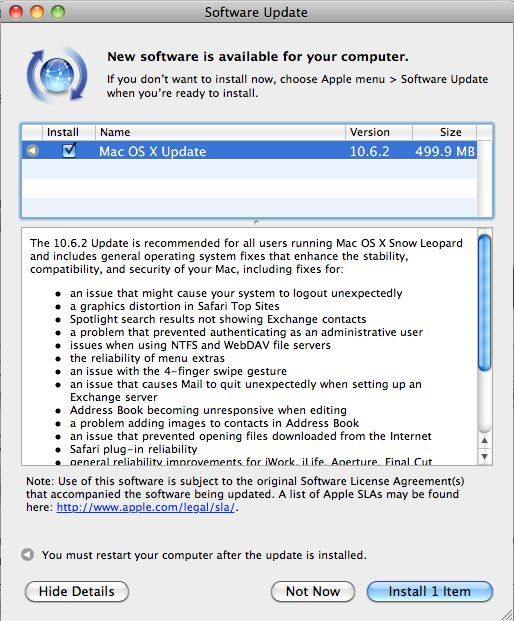
Today Apple released numerous Mac OS X fixes, among them the final release of OS 10.6.2. The update is recommended for all Mac OS 10.6/10.6.1 owners and is available via software update on your Mac.
Aside from the final release of 10.6.2, Apple also released updates for Mac OS Server 10.6.2, a 10.6.2 combo update, and an OS X Server combo update.
For 10.5 Leopard users, Apple released Security Update 2009-006 Client which plugs the guest account security hole in Mac OS X 10.5.
The massive list of OS 10.6.2 updates are below (from Apple):
General operating system fixes provided for:
- an issue that caused data to be deleted when using a guest account
- an issue that might cause your system to logout unexpectedly
- Spotlight search results not showing Exchange contacts
the reliability of menu extras
- an issue in Dictionary when using Hebrew as the primary language
- shutter-click sound effect when taking a screenshot
- an issue with the four-finger swipe gesture
- an issue adding images to contacts in Address Book
- an issue in Front Row that could cause sluggish or slow frame rates while watching videos
- creation of mobile accounts for Active Directory users
- reliability and duration of VPN connections
- general reliability improvements for iWork, iLife, Aperture, Final Cut Studio, MobileMe, and iDisk
- overall improvements to VoiceOver performance
- this update addresses video playback and performance issues for iMac (21.5-inch, Late 2009) and iMac (27-inch, Late 2009) computers that may occur in some situations while AirPort is turned on
Fonts fixes provided for:
- an issue with font spacing
- an issue in which some Fonts are missing
- font duplication issues
- an issue with some PostScript Type 1 fonts not working properly
Graphics fixes provided for:
- an issue when connecting monitors to DVI and Mini DisplayPort adapters
- an issue in which the brightness setting may not be remembered on restart
- addresses functionality with specific display models
- general reliability and performance improvements when using some applications
Mail fixes provided for:
- a situation in which Mail’s unread count may not update properly as messages are read on another computer
- an issue in which deleted RSS feeds may return
- an issue in which Mail cannot preview or Quick Look attachments when composing a new message
- an issue that can cause Address Book and/or Mail to stop responding when opened
- an issue in which email messages received from an Exchange Server are not formatted correctly
- an issue in which Mail reports “Account exceeded bandwidth limits” for some Gmail accounts
MobileMe fixes provided for:
- performance when accessing files from iDisk via the Finder and syncing iDisk files
- an issue in which syncing iDisk files does not proceed beyond “checking items”
- reliability and performance when syncing contacts, calendars, and bookmarks with MobileMe (syncing with iTunes and iSync are also improved)
- an issue that prevents some users from logging into MobileMe via the MobileMe System Preference pane
Network file systems fixes provided for:
- compatibility with third-party AFP servers
- file synchronization for portable home directories
Printing and faxing fixes provided for:
- automatic printer updates improvements
- Print dialog allowing you to enter and send to more than one fax recipient
Safari fixes provided for:
- a graphics distortion issue in Safari Top Sites
- Safari plug-in reliability
Update:
Safe for Jailbreaking iPhones, according to MuscleNerd Via Twitter:
Looks like today’s OS X 10.6.2 update is safe…no curious DFU “incompatibilities”, no effect on jailbreaks or unlocks



Lots of fixes! Good to see.
Installed this last night. Smooth as butter, thanks Apple.
Installed this last night. Smooth as butter, thanks Apple.