When I got my iPhone 3G back in July 2008, the first thing I did was jailbreak it. I did this because of all of the awesome stuff you could do which I had learned from jailbreaking/unlocking my iPhone 2G. When the iPhone 3GS came out, I chose not to jailbreak simply because most of the reasons that I did jailbreak before were now standard features on the iPhone 3GS…all except one feature.
One of the most useful jailbroken apps I enjoyed was creating blank icons on my home screen. I like to keep my home screens neat and organized with as few used home screens as possible. With blank icons, I could put apps and games on the same home screen and simply separate the two categories with blank home screen icons. Well now you can do this on a non-jailbroken iPhone/iPod Touch!
To create blank home screen icons on your iPhone/iPod Touch, simply follow the steps below:
1.) Connect to the Internet either through your Data plan or WiFi and then launch Safari.

2.) In Safari, navigate to: “http://blank.appleiphone.fr“

3.) When the web site is loaded, click on the “+” (plus) symbol on the bottom of the display

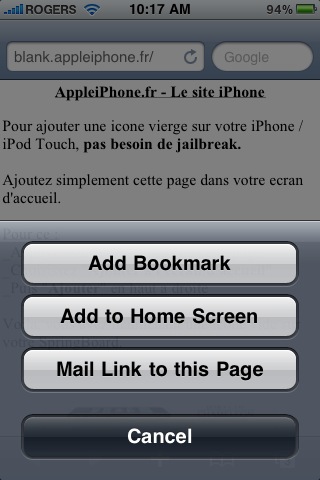
4.) Click on “Add to Home Screen”
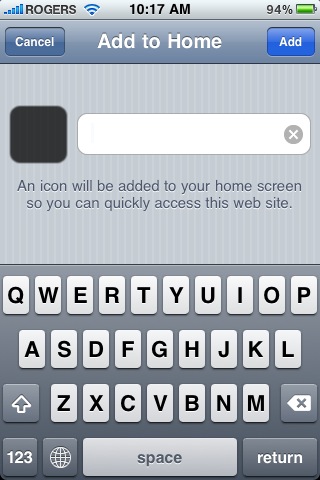
5.) At the next screen, do not type anything and only tap “Add” in the top right corner. If “Add” is greyed out, it is because you tried typing something. Redo steps 1 – 5 above.
Try it out and let me know what you think!
[iHackintosh]






This is really cool for Non-Jailbreakers. Im used to iBlank from Cydia, but I don't really like the blank icons idea and prefer Categories for keeping a clean and organized screen.
Sorry, I don't quite get the purpose of blank icons. Why can't you use the iTunes application manager to rearrange the icons whichever way you like? Must faster and easier, just drag and drop.
But let's say you want a row of games on the top line and then on the
same home screen a row of normal apps on the bottom.
iTunes can't do that.
Hello !
You should use the original website that provided this service first : iEmpty !
(iempty.tooliphone.net)
Appleiphone.fr made a copy of the iempty website when he discovered it, just the day after its official release… instead of making an article about iEmpty on his blog… (!)
iEmpty provide a nice iPhone-like user interface, and is available in english language.
You can see the screenshots and the youtube video on the website.
Let's try it… you will adopt it !! 😉
To the author of this article : could you please make an article on the original iEmpty website, or add the iempty address on this article ?
I think your users will prefer using an english website with a nice user interface !
Thank you in advance.
iEmpty's webmaster
Hello !
You should use the original website that provided this service first : iEmpty !
(iempty.tooliphone.net)
Appleiphone.fr made a copy of the iempty website when he discovered it, just the day after its official release… instead of making an article about iEmpty on his blog… (!)
iEmpty provide a nice iPhone-like user interface, and is available in english language.
You can see the screenshots and the youtube video on the website.
Let's try it… you will adopt it !! 😉
To the author of this article : could you please make an article on the original iEmpty website, or add the iempty address on this article ?
I think your users will prefer using an english website with a nice user interface !
Thank you in advance.
iEmpty's webmaster
Anyone know if this is still working? I couldn’t get it to work on 4.3.1
The bookmark is black… Pretty disturbing if you want that blank icon to be able to look at your beautiful background
Didn’t work
Or let’s say you want your first page to be free of icons completely. I don’t get how anyone could possibly “not get” why anyone could want this. Iphones are *known* for their unpleasant-looking, cluttered interfaces.
The way that works for me is by moving icons to make 4 screens (not including the far left search Iphone one…disregard that screen.The only icon I move to the far left screen (to the right of the search iphone screen) is the newstand icon.Then I move the newstand icon somewhere to a right screen, scroll back to the now empty left screen (still to the right of the far left (search iphone screen, push button at bottom of the phone so no icons are shaking and this gives me a free empty screen.
Accidental easy way I found without jailbreaking
Great Posts Guys, Thanks a lot….you gave me helpful ideas!!!
Any update for this now? T