
How to Restore iPhone if You Forget Your Passcode [VIDEO]
If you can't use Passcode Reset, you can then reset your iPhone or iPad without a computer to regain access to your Apple device.
With this mornings announcement of iOS 4.2, Apple also made their Find My iPhone free to all current generation iDevices.
Find My iPhone is designed to assist users with locating lost iOS devices using GPS. The feature is now available for free to all users of the iPad, iPhone 4, and fourth-generation iPod touch.
Previously, access to this feature required a $109/year subscription which among Find My iPhone, also gave users other syncing related services.
To set up your free Find My iPhone account, follow the steps below: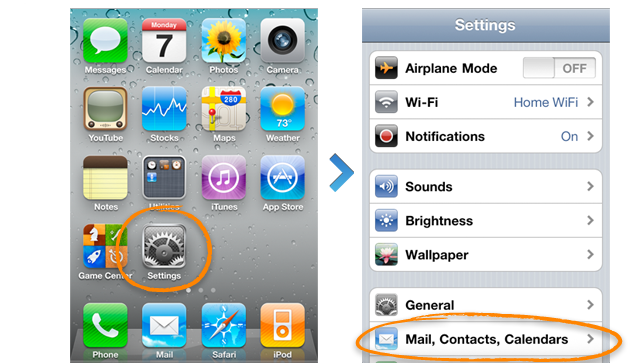
1.) Update your iPhone 4 or fourth-generation iPod touch to iOS 4.2 later today.
2.) Tap on Settings > Mail, Contacts Calendars and then Tap on “Add Accountâ€.
3.) Tap on MobileMe and input your existing Apple ID 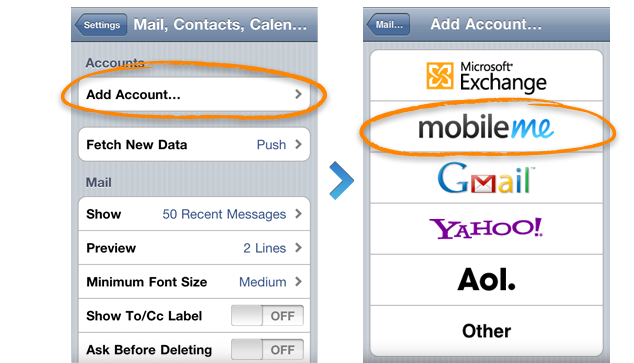 (iTunes Store ID) or MobileMe member name. If you don’t have one, you can create one using the Create Apple ID option.
4.) Verify your account via email.
5.) Go back to Settings > Mail, 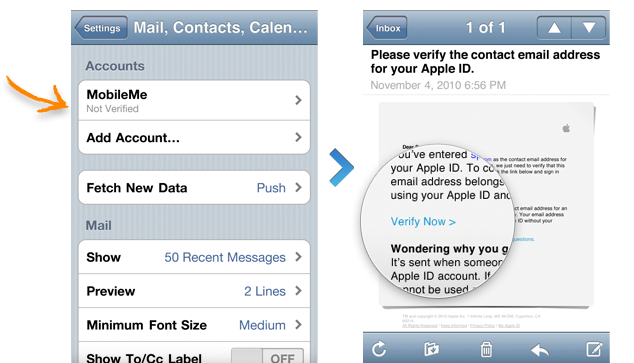 Contacts, Calendars > MobileMe and toggle on “Find my iPhoneâ€. Then tap “Allowâ€.
After set up, users can make use of the feature on Me.com or download the free Find My iPhone app from the App Store.
If you don’t have an iPhone 4, iPad or fourth-generation iPod touch, you may still be able to get Find My iPhone for free as long as you know someone with the latest iDevice.
According to Apple, if you create your free Find My iPhone account on a new iPhone 4, iPad, or fourth-generation iPod touch, you will be able to use that account on other iOS 4.2 devices.
Create a free Find My iPhone account on any iPhone 4, iPad, or iPod touch (4th generation) running iOS 4.2. Once you create an account on a qualifying device, use your Apple ID and password to enable Find My iPhone on your other devices running iOS 4.2.
In other words, who ever you know that owns the latest iDevice, just get them to log in Find My iPhone on your device and voilà !
Want to see more of our stories on Google?

P.S. Want to keep this site truly independent? Support us by buying us a beer, treating us to a coffee, or shopping through Amazon here. Links in this post are affiliate links, so we earn a tiny commission at no charge to you. Thanks for supporting independent Canadian media!


Nice! Im going to return my MobileMe box then since I only needed it for Find my iPhone 😉
How will this work if I share my Apple ID (specifically for App Store purchases) with my wife? Will we both be able to take advantage of Find My iPhone?
Just sign in on all devices with the same Apple ID
So no use to 3G users?
Is 4.2 out yet? Wondering because I have the 4.2.1GM build installed right now and update isn’t showing me anything yet.
installed 4.2 and set up free find my phone pretty cool 🙂
No good for 3g users. Boo
Make that 3GS users even
It won’t show you an update. You’re good to go with the GM version of the OS. You can create your find my iPhone account as per the above instructions. Worked on my iPad perfectly and it’s still running 4.2.1 GM as the OS. Enjoy.
Nope. Once again Apple is “encouraging” everyone to buy a new device. Bastards!!!
Does the address need to be @me.com? I mean I have an apple account with hotmail and it doesn’t seem to sync… Am I doing something wrong?
But it works fine with the paid service…
Why did they remove it if the thing works fine on iPhone 3G….
So this update is pretty much useless for anyone who doesn’t have the current gen iProducts? Elitism.
Done everything on my iPod Touch with OS4.2 installed but got “This device does not support Find My , , ,”
I’m in Canada: is there a problem
Not exactly, the service still works but you need to have a 2010 iDevice to set it up and then add a pre-2010 iDevice and it works fine.
If you do not have a 4th Gen iPod touch… Or any 2010 iDevice then you must find a 2010 iDevice and set up the account for that, then add a pre-2010 device to that account and it works.
Your Apple ID account should work fine, just give it sometime as the servers are busy and makes authentication difficult.
Your Apple ID account should work fine, just give it sometime as the servers are busy and makes authentication difficult.
I’m loving this awesome feature! I dont have another iDevice, but I can use the Find My iPhone service from my PC. Works perfectly!
Why 3GS not supported? it still als new and just 15 months in the market? is that old enough to give them a reason to ignire it? i feel that is not fair, so by that iphone 4 user will enjoy it this few months only till the next one come…
So I have it loaded on my iPhone 4 and it let me log in with my iTunes account info.
I have an iMac, but on my mac it won’t let me log in to MobileMe with that same info.
How do I use my iMac to find my lost iPhone??
Please help.
But… if I get a friend with an iPhone 4 to log in to Find my iPhone on my 3GS iPhone with their account… won’t the device then “belong” to THEIR account and not mine? How is that useful?
Thanks for this tutorial. Now that 4.2.1 is jailbreakable I was finally able to set this up. I have a question though. I already have three email accounts synced with my iPhone. Now that I have Find My iPhone set up and working, can I delete the mail account or deactivate it on my iPhone? I don’t want the extra MobileMe account to show when I open the native mail app on the phone.