
Ming-Chi Kuo Refutes Claims of Massive Apple Chip Bottleneck
Supply chain analyst Ming-Chi Kuo has refuted claims that TSMC is sitting on $1 billion worth of unfinished Apple 2nm chips due to memory shortages.
Early today we posted a patent that Apple has filed regarding inductive charging through headphones and earlier we told you about a WSJ report about charging. But what about some other possibilities?
Two that I want to bring up are WiTricity and uBeam.
Rumours have come up that Apple is interested in WiTricity. This company is developing a wireless charging solution. It is similar to the patent revealed today but you wouldn’t wrap anything around a paper towel tube in order for it to charge. The energy is transmitted through magnetic fields in the air. It is reported that this is safe as long as you pay attention to the intensity of the magnetic field.
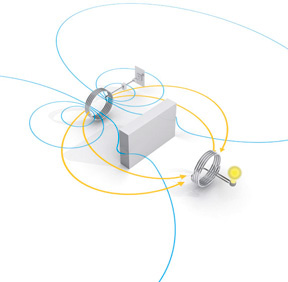
Here’s a short TED talk about WiTricitiy:
The other technology being developed that I think is really cool is by uBeam.
This doesn’t use magnetic fields or induction to charge – it uses sound. But wouldn’t that be annoying int he house? No because they use a frequency too high for the human ear to register – ultrasound.
Their charging station plugs into the wall and emits this ultrasound which is absorbed by an adapter that can be on a multitude of devices. This adapter converts the sound into electrical energy using piezoelectric material – it converts variations in air pressure into electricity.
Imagine a speaker-like device on your ceiling that will allow multiple devices to charge at the same time. I think it could be kind of cool.
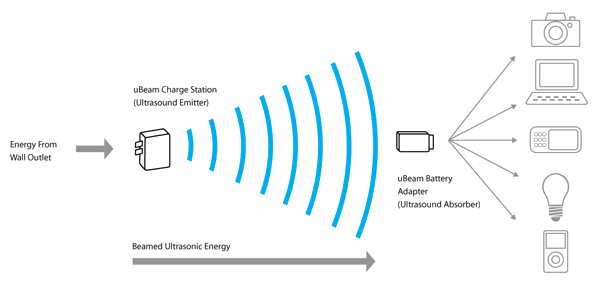
There is another video about uBeam on their website, check it out here.
If the price is right, I would be very eager to install one of these since the main reason I still plug my phone in is to charge it. Would you be interested?
Want to see more of our stories on Google?

P.S. Want to keep this site truly independent? Support us by buying us a beer, treating us to a coffee, or shopping through Amazon here. Links in this post are affiliate links, so we earn a tiny commission at no charge to you. Thanks for supporting independent Canadian media!


Sounds great can’t wait to see pricing
Sounds great can’t wait to see pricing
Sounds great can’t wait to see pricing
You mentioned that the only reason you still plug in your phone is to charge. What about syncing data with your computer? Through WiFi? How? It will be great to know if I can sync with my computer through WiFi so I don’t need to plug it in to my computer every night.
You mentioned that the only reason you still plug in your phone is to charge. What about syncing data with your computer? Through WiFi? How? It will be great to know if I can sync with my computer through WiFi so I don’t need to plug it in to my computer every night.
You mentioned that the only reason you still plug in your phone is to charge. What about syncing data with your computer? Through WiFi? How? It will be great to know if I can sync with my computer through WiFi so I don’t need to plug it in to my computer every night.
You mentioned that the only reason you still plug in your phone is to charge. What about syncing data with your computer? Through WiFi? How? It will be great to know if I can sync with my computer through WiFi so I don’t need to plug it in to my computer every night.
Just download the wifisync app.
Just download the wifisync app.
Oh! Thanks! I thought it was part of the built in functions. No wonder I couldn’t find it.
But it is JB app and will cost $10! I am still hesitated to pay for any JB app because I have to reinstall everything every time I update the phone. Who knows maybe one day I won’t be able to get it back. I guess I will just wait until Apple has it built in or Apple Store version is available.
Thanks for the info anyway.
Oh! Thanks! I thought it was part of the built in functions. No wonder I couldn’t find it.
But it is JB app and will cost $10! I am still hesitated to pay for any JB app because I have to reinstall everything every time I update the phone. Who knows maybe one day I won’t be able to get it back. I guess I will just wait until Apple has it built in or Apple Store version is available.
Thanks for the info anyway.
where have you been, thatts a feature coming in iOS 5 just wait for it to be released in september, also cydia storebis simaler to app store, you can download cydia apps on your iOS device using your google or Facebook account. Even if you update your phone.
where have you been, thatts a feature coming in iOS 5 just wait for it to be released in september, also cydia storebis simaler to app store, you can download cydia apps on your iOS device using your google or Facebook account. Even if you update your phone.
iOS 5 has WIFI syncing silly people.
iOS 5 has WIFI syncing silly people.
Sounds like now I am not only waiting for iPhone 5, the coming iOS 5 will also fill in my needs as well. Cool!
Sounds like now I am not only waiting for iPhone 5, the coming iOS 5 will also fill in my needs as well. Cool!
Well if you JB your phone it won’t cost you anything. You also don’t have to re-install everything when you update. Just install appsync and xbackup to backup your cydia apps.
Well if you JB your phone it won’t cost you anything. You also don’t have to re-install everything when you update. Just install appsync and xbackup to backup your cydia apps.
Well if you JB your phone it won’t cost you anything. You also don’t have to re-install everything when you update. Just install appsync and xbackup to backup your cydia apps.
Well if you JB your phone it won’t cost you anything. You also don’t have to re-install everything when you update. Just install appsync and xbackup to backup your cydia apps.
Well if you JB your phone it won’t cost you anything. You also don’t have to re-install everything when you update. Just install appsync and xbackup to backup your cydia apps.
Well if you JB your phone it won’t cost you anything. You also don’t have to re-install everything when you update. Just install appsync and xbackup to backup your cydia apps.
Well if you JB your phone it won’t cost you anything. You also don’t have to re-install everything when you update. Just install appsync and xbackup to backup your cydia apps.
Something new to me again. Thanks!!
Something new to me again. Thanks!!