
Google Arts & Culture Overhaul Lets You Chat With Dead Artists
Google Arts & Culture turns 15 with a major mobile app redesign featuring AI-powered conversational search and interactive historical tools.
Update 2: The OTA update has appeared after following Apple’s instructions below. Others were lucky and didn’t have to erase all content and settings. Downloading!
Update 1: The OTA update is still making its away out…nothing in Canada for me here at least. Some users have been able to get it. Stay tuned!
Screen thanks to @rfrancey:
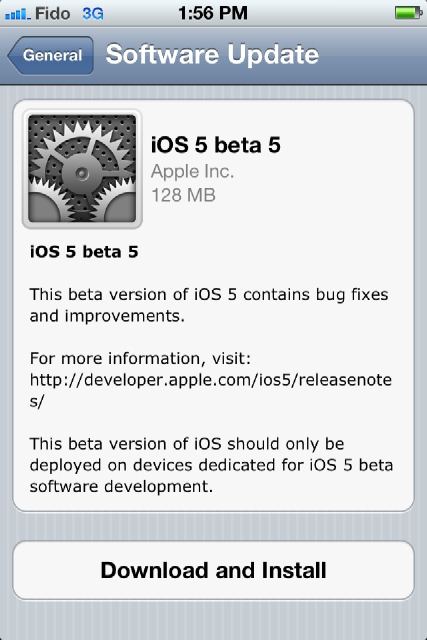
Apple has just released iOS 5 Beta 5 to developers. Build 9A5288d comes in at 787MB, along with new beta versions of iTunes, Apple TV software, and Xcode.
Want to install iOS 5 over the air? Here’s how to do it:
To install iOS 5 beta 5 using over the air software update, you must first erase all content and settings on your device by choosing Settings > General > Reset > Erase All Content and Settings. Over the air software update can be initiated on devices running iOS 5 beta 3 and later by choosing Settings > General > Software Update.

Thanks to Elise for sending this in!
Want to see more of our stories on Google?

P.S. Want to keep this site truly independent? Support us by buying us a beer, treating us to a coffee, or shopping through Amazon here. Links in this post are affiliate links, so we earn a tiny commission at no charge to you. Thanks for supporting independent Canadian media!


1:55 PM EST – Still nothing (iPhone and iPad)
1:55 PM EST – Still nothing (iPhone and iPad)
1:55 PM EST – Still nothing (iPhone and iPad)
1:55 PM EST – Still nothing (iPhone and iPad)
1:55 PM EST – Still nothing (iPhone and iPad)
3:14 PM EST – Still nothing (iPhone)
:(!
3:14 PM EST – Still nothing (iPhone)
:(!
4pm EST… Downloading OTA now
4pm EST… Downloading OTA now
4pm EST… Downloading OTA now
I hope they won’t do the same mistake as android and release the updates within different timeframes according to the country and whatever other crap!!
I hope they won’t do the same mistake as android and release the updates within different timeframes according to the country and whatever other crap!!
DOWNLOAD NOW AVAILABLE!
DOWNLOAD NOW AVAILABLE!
Downloading now OTA. I had to do the restore for it to appear.
Apple does not do that 😉
Downloading now OTA. I had to do the restore for it to appear.
Apple does not do that 😉
The OTA update is quite small at only 128mb. Compared that to the huge 787mb ipsw file that you have to download if you want to update via iTunes. And not to mention the added time needed to restore all your apps, songs, videos, etc…
OTA updates don’t need to do that. Just download and it installs without removing anything at all.
Good job Apple. Now release iOS 5 to the public!!
The OTA update is quite small at only 128mb. Compared that to the huge 787mb ipsw file that you have to download if you want to update via iTunes. And not to mention the added time needed to restore all your apps, songs, videos, etc…
OTA updates don’t need to do that. Just download and it installs without removing anything at all.
Good job Apple. Now release iOS 5 to the public!!
The OTA update is quite small at only 128mb. Compared that to the huge 787mb ipsw file that you have to download if you want to update via iTunes. And not to mention the added time needed to restore all your apps, songs, videos, etc…
OTA updates don’t need to do that. Just download and it installs without removing anything at all.
Good job Apple. Now release iOS 5 to the public!!
A little bit weird if we have if we have to erase everything to get the ota update
Worked for me 😀 and without erasing all the settings 😉
Worked for me 😀 and without erasing all the settings 😉
Both of my iPhones (3Gs and 4) are still showing as up to date even if the are running beta 4… Both were updated OTA from beta 3 to beta 4…
Will check again tomorrow morning and if the OTA update is not available, I will update direct on my Mac…
Both of my iPhones (3Gs and 4) are still showing as up to date even if the are running beta 4… Both were updated OTA from beta 3 to beta 4…
Will check again tomorrow morning and if the OTA update is not available, I will update direct on my Mac…
Both of my iPhones (3Gs and 4) are still showing as up to date even if the are running beta 4… Both were updated OTA from beta 3 to beta 4…
Will check again tomorrow morning and if the OTA update is not available, I will update direct on my Mac…
Too friggin’ late at night to download the updates and sync my phone to my Mac. Â OTA update not available at this point here in Hamilton. Â Going to bed.
Too friggin’ late at night to download the updates and sync my phone to my Mac. Â OTA update not available at this point here in Hamilton. Â Going to bed.
Too friggin’ late at night to download the updates and sync my phone to my Mac. Â OTA update not available at this point here in Hamilton. Â Going to bed.
Hmm, I had to erase content on my iphone 4 in order to see the update, but on my wife’s iphone 3gs it showed up without any erasing anything. It must be one of the settings 😀
Hmm, I had to erase content on my iphone 4 in order to see the update, but on my wife’s iphone 3gs it showed up without any erasing anything. It must be one of the settings 😀
Hmm, I had to erase content on my iphone 4 in order to see the update, but on my wife’s iphone 3gs it showed up without any erasing anything. It must be one of the settings 😀