Cloud2go by phaps websolutions is the only CloudApp client available for iPhone & iPod touch in the App Store and frankly speaking, it is as comprehensive as it could be. Even though it is not an official CloudApp client, using Cloud2Go is a pleasure for any CloudApp service user. For those who are unaware, CloudApp is a useful file sharing service for Mac users that allows users to upload files and share them instantly with a http://cl.ly link. The service was launched back in April but the developers never bothered to release an official iOS solution until Matthias Plappert (@phaps) came up with this brilliant Cloud2go iOS app.

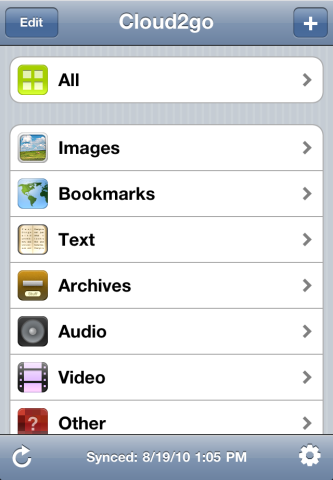
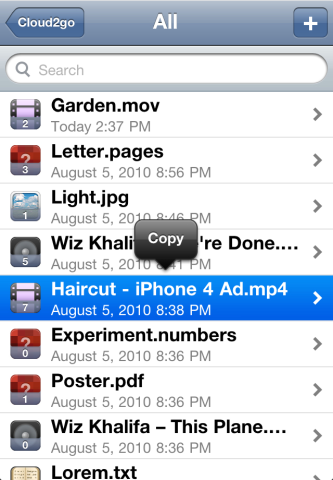
Cloud2Go ($2.99 in App Store) has a beautiful design and a pretty simple UI. You can either use your existing CloudApp account or create one for free. Once done, simply fire up the app, enter your login credentials and you are good to go! The app immediately begins to sync with your CloudApp account with full multitasking support meaning the sync continues even in the background. When sync is completed, you can see all items such as images, text documents, videos, and even audio files displayed nicely together or in a categories view. You can preview items, can copy text and save photos from there directly to your camera roll. You can also copy direct links for sharing with a couple of taps or delete / rename any items with a swipe gesture to free up your CloudApp storage. Good thing is, the app supports both portrait and landscape modes.

With Cloud2go, uploading documents, photos or videos and sharing direct links to them is blazing fast. The moment you add a file, it begins to upload which continues in the background even if you leave the app and want to do something else while the file uploads. As soon as the upload is finished, you’ll be notified with a vibration or a ‘ding’ sound. The app automatically copies the link to that file into your iPhone or iPod Touch’s clipboard for instant sharing with your contacts.
Lastly, Cloud2go also supports CloudApp’s “streaming API” which is a fantastic feature meaning you can see live how many people have viewed your upload any thing you upload via your Mac, it is instantly pushed to your iPhone or iPod touch. The app is also quite stable and I’ve experienced no crashes at all so far.
So, if you’re a CloudApp user and frequently share your stuff using an iPhone or iPod, Cloud2go is a must-have. It is a fantastic client with a great interface and excellent functionality.

Free Promo Codes Giveaway:
We have 5 App Store promo codes for Cloud2go to give away. You can enter the contest via Twitter for free in just two easy steps:
- Tweet this post by clicking on the “Tweet” button at the end of the post.
- Follow @iPhoneInCanada or @DrUsmanQ (thats me) on Twitter so we can send you the code via a Direct Message if you win. Otherwise we will have no other way to contact you directly.
NOTE: If you also leave a comment below, this will increase your chances of winning. Don’t forget to leave your Twitter ID with it.
We will announce the winners tomorrow!
[UPDATE] Giveaway Winners Announcement:
Here are the Twitter IDs of our 3 winners:
- @sands989
- @shelmart
- @NHazelrigg
- @agleung
- @donaldpwalker
Congratulations to our lucky winners and many thanks to everyone who participated.
Those who didn’t win, please don’t lose heart as we have more giveaways lined up for the next week. Stay tuned !





tweeted and following both, I’m ready for my promo code @sands989:twitter
Ok sweet. Done got it done.
Sound really great… I am waiting for my promocode… 🙂
Was already following @iphoneincanada, now following @DrUsmanQ; have tweeted this post. And if I win. I’m @shelmart on Twitter.
Tweeted by @MontyMon77 ;<}
Useful app on my laptop. Want to try it on the iPhone in preparation for the death of iDisk. @donaldpwalker
I entered as @Sylanel on Twitter!
Tweeted (@hollysisson), follow @iPhoneInCanada, looks like a cool app.
Sounds interesting, I,d like to try it.
Rmeridew
Sweet. Thanks for the app. I thinking going to like this. By the way. You posted 5 winning twitter ID’s not 3.
Thanks for the freebie,