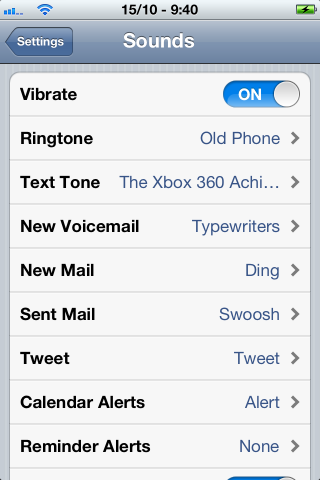
With the release of iOS 5, comes the ability to set pretty much any sound for anything, in your iPhone, iPod Touch, and iPad. Custom SMS tones has been a long awaited feature, but the tones in the iTunes Store are limited. Since text tones are now in .m4r format, the process to create your own is essentially the same as creating custom ringtones.
First, find a sound you want to have as your text tone. It should be something short, so your text tone isn’t going on and on long after you’ve already read your message. I found the XBOX 360 Achievement Unlocked Sound, on Major Nelson’s blog. He conveniently already had an iPhone version, but I’ll still show you how to convert a sound file, with iTunes, on a Mac in OSX Lion.
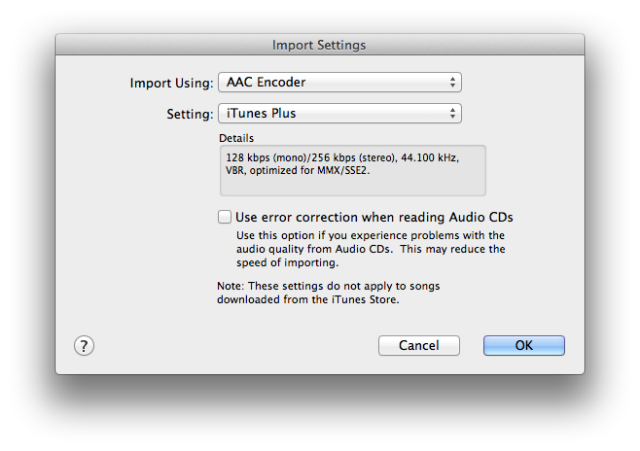
Import the sound to iTunes, then go to Preferences > General > Import Settings, and select ACC Encoder.
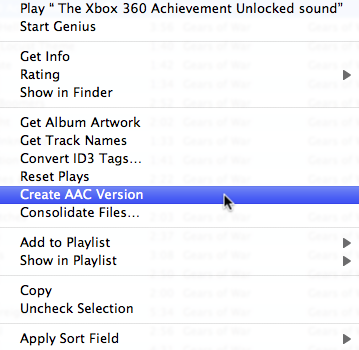
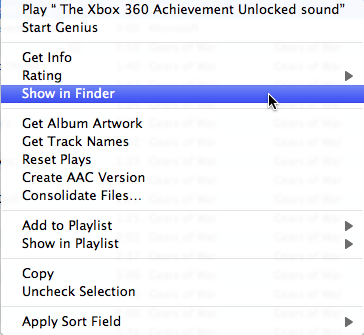
Now, select your sound in iTunes, right click on it, and go to Create ACC version. Then right click on the new file and select Show in Finder.


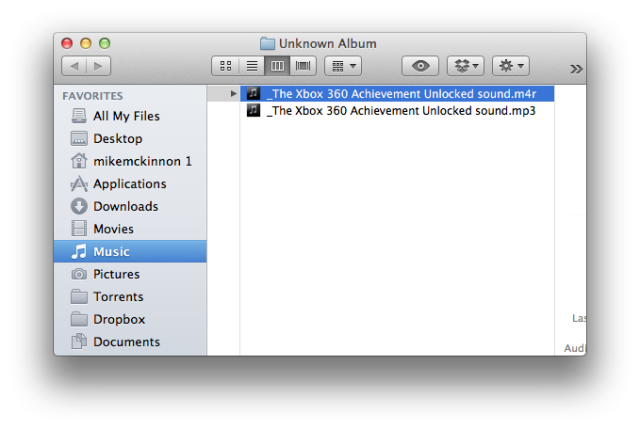
You’ll see 2 files, the original one (MP3, WAV, whatever you downloaded), and a new .m4a file. Select the .m4a file, click it 1 more time, and edit the extension to .m4r.

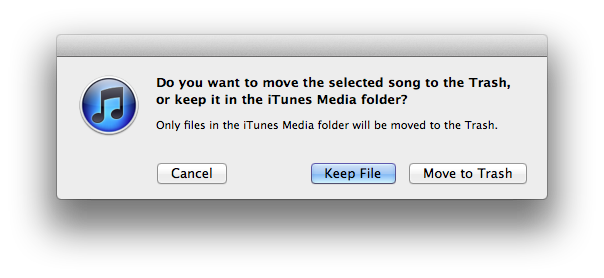
Now go back to your Music in iTunes, and select your sound again. We need to delete it from iTunes, but not from your Library. Right click the sound, select Delete, and on the pop up, select Keep File. (If you don’t want to lose your original file).

Then simply double click your .m4r file, in Finder, and your tone will import right into the Ringtone section of iTunes. You can then sync it to your device, and use it for any sound you want.

The process is somewhat similar, in Windows, but I think you have to make sure you’re running in Administrator, to be able to edit extensions. I could be wrong. If anyone has tips on how to do this in Windows, comment below, and we’ll update the post.



Even easier. Google Iringer. Neat little program. Been using it for years. 😉
Still a 40 limit on ringtones.
40 second limit
doesn’t work? tells me the ringtones cannot be played on the iPHONE.
You need to make sure that the ringtone is at the most 40 secs long.
And if it still not working then try a different audio file and see if it works. The steps listed are pretty clear so hopefully you aren’t skipping any parts
For windows you just need to right click the audio file, click create AAC version… then when the AAC version is created it will appear in iTunes, after that click show in Windows Explorer and edit the file extension (if not visible it is in the Folder Options from Control Panel to make visible to .m4r and re-import it into iTunes. It will now show as a ringtone. Sync and Enjoy.
So it’s the same steps as above…
Yep. Painlessly simple.
Yep. Painlessly simple.
Worked for me, thanks so much!
doing something wrong changed mp3 to acc mp4a the renamed to m4r inproted to ringtones folder in itunes sync to iphone all showing just as it should but on the phone no ringtone
I was able to get this to put the file on my iPhone and set it as the text tone which plays when I select it, but when someone texts me the sound does not play.
Thanks dude!
i did all that but it won’t play my the ringtone i set for my texts…any ideas?
That is what I have been doing. My only problem is, after the ringtones have been synced they don’t give me a option to use them as a sms tone like you said it is suppose….
disregard this message
thanx for wasting my time. this thing didn’t even show up on the phone
Worked for me no problem 🙂
When I try changing text tone it won’t play. It just plays the tweet tone I’ve used as text tone for awhile 🙁 anyone know what to do??
My new ringtone is now Derpy going, “I brought you a letter!” Ponifying my laptop and phone over summer vacation is a great way to spend it…
Worked great! Thanks! 🙂