Update 1: Here’s a full video tutorial on how to unlock with SAM:
A new software carrier unlock has been released in Cydia, and has been confirmed to work on the iPhone 4S by none other than the unlock wizard himself, Musclenerd. He also says this should work on any jailbroken iPhone on iOS 5.0 or higher.
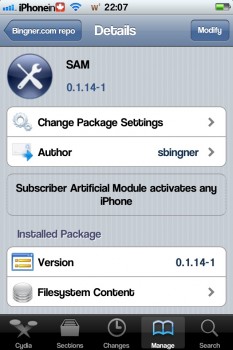
This new unlock is called SAM (Subscriber Activation Module), and has been detailed by some one called Laforet over at a blog called Singularity. The process seems fairly straight forward, but I have not tried this unlock. I don’t need to unlock my iPhone 4S, and I do not have microSIM from another carrier to try. Your iPhone 4S must be jailbroken to use this, and must be able to be activated in iTunes. You need iTunes installed on your computer and a working internet connection. You also need to know what carrier your iPhone is locked to. This has been tested successfully on iOS 5.0.1, and is expected to work on iOS 5.1 as well. This will unlock your iPhone for one SIM card at a time, so if you switch SIM cards, you’ll have to repeat this process.
Here’s the steps:
1. Step one: Install Sam Bingner’s SAM (Subscriber Artificial Module) package. I recommend that you get it from repo.bingner.com since older versions have a different interface and may not work for this purpose.
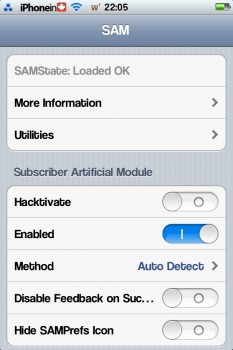
2. Enter SAM by either going through the settings menu or find the SAMPrefs icon on your springboard. You will need to have the SIM card you intend to use in your phone.
3. Go to utilities and select “De-Activate iPhone”, your ActivationState under “More Information” should now be “Unactivated”
4. With SAM enabled, choose “By Country and Carrier” in “Method”; find your carrier, for some carriers operating more than one Carrier ID you may need to select “SIM ID”; if you pick the wrong one this won’t work.
5. Go to More Information”, copy or write down the IMSI in “SAM Details”, then tap “Spoof Real SIM to SAM”.
6. Go back to the main SAM screen and change your “Method” to manual. Paste or enter the IMSI string we saved in Step 5.
7. Connect your iPhone to your computer and allow iTunes to activate it, double click “Phone Number” parameter at the main device screen and make sure that the ICCID matches that of your SIM card. If not you need to start over from Step 1.
8. Unplug your phone, close iTunes.
9. Disable SAM. The source article says to uninstall SAM and delete your lockdownd profiles; it’s unnecessary.
10. Connect your phone to iTunes again, you should get an error saying that your phone cannot be activated. This is normal. Just close iTunes and open it again.
11. You should see signal bars in a short time, congratulations.
12. Push notifications may stop working after this procedure but can be easily restored by “clear push” utility in SAM followed by connecting to iTunes.
Your phone will work normally with your SIM card and that SIM card ONLY since we tricked iTunes to accept that ICCID is one of the intended carrier’s. The phone can be rebooted and connected to iTunes freely without losing the “unlock”, at least for now.
Since it does not involved emergency numbers and test IMSI it will not have any of the issues associated with SIM interposers. Tested working on iOS 5.01 but should work with tethered 5.1 too.
Musclenerd says this method should work for a long time, so be sure to take note of your activation ticket. Again, I should say I have not used this unlock, so I can’t personally confirm that this method works, but I do trust the word of Musclenerd, of the iPhone Dev Team. He is the one who brought us the iPhone unlocks yellowsn0w and ultrasn0w, in the past. If you try this new unlock, let us know how it goes in the comments below.
Want to see more of our stories on Google?
P.S. Want to keep this site truly independent? Support us by buying us a beer, treating us to a coffee, or shopping through Amazon here. Links in this post are affiliate links, so we earn a tiny commission at no charge to you. Thanks for supporting independent Canadian media!
Well, you need to jailbreak the iPhone so that SAM can be installed. iOS 5.1 really needs an untethered jailbreak first.
@Richard_Hansen
14 years ago
Yah! I was able to unlock my Fido locked iPhone 4S to work on a Rogers SIM ( only tested with a call ). The only diff from the docs is that Fido does not show up as a carrier. So instead I picked “By Bundle Name”, then “Fido_??” … can’t remember what the “??” was.
I tried this steps on my iphone 4S locke to ATnT, after doun all d process, i got stuck on step 7. Iphone failed to activate. I restarted itunes several times, no success. Untill i removed sam and activated with my atnt sim. Pls what am i doing wrong?
If we have an iPhone 4 or 4s with a tethered jailbreak, will this unlock still work after a reboot even if the jailbreak does not work anymore (unless we jailbreak again when connected)?
I posted an other message… but for some reason, it did not appear yet…
I tried it with my iPhone 3Gs locked to Fido…
I unlocked it… and I was able to use it with my Koodo SIM…
after a reboot, I did not even have to “boot tethered”… it just worked (except that Cydia or SAM are not able to run)… so the unlock seems to stay even after a reboot…
just as Nancy replied I am taken by surprise that someone able to profit $6386 in one month on the computer. have you read this page ===>> seekwork2home.blogspot.com
Making money online is a dream for almost everyone as once your online work is up and running, you will need to devote only few hours regularly to keep your online business running and making you money while you sleep. My friend named David is started the work last month and brought 6500$ into his pocket, just see the details here??startbytoday.blogspot.com
I tried this unlock with my iPhone 3Gs locked to Fido…
I wanted to use it with Koodo… and it worked fine!!! it took a few minutes to connect to the network but it finally worked…
My iPhone 3Gs is running iOS 5.1… jailbreak is tethered… and the unlock still work after a reboot even if I don’t do the tethered jailbreak boot…
by the way for step 4, you have to select the original carrier of your iPhone… it wasn’t clear for me…
My phone is locked to koodo and I want to use my fido sim. so do i enter the koodo as my carrier or fido? and if koodo where can i find it cause its not under the carriers list.
Jimmy
14 years ago
Just wanted to confirm that IPhone 4 locked to Rogers on iOS 5.0.1 baseband 04.11.08 can be unlocked via this method. I am now on O2 – UK.
my iphone wont make it past the part where i unplug my iphone and close itunes and shut off sam, when i plug back in, it says it doesnt have a valid sim card, why??
Ricardo Garcia Castro
14 years ago
Hello, I have one question. How do I do this procedure if every time I insert the SIM I intend to use, the iPhone 4S resprings and shows me the activation wizard?
Guest
14 years ago
So if we want to keep switching sim cards can I? So say I go to the US every weekend, can I put in my AT&T sim then when I get back just pop my bell card back in or is it going to be a whole process every time I switch?
now its all working until i get to step 7, once i do that i get a messege that my phone cant be activated.
BrentonchiN
14 years ago
if i have ios5.1 and an iphone4, and jailbreak it on my current SIM… and then go to another country and replace the SIM, will my phone still be jailbroken so that I can unlock it?
The jailbreak and the unlock are two separate things. The unlock is tied to your SIM, so if you switch the SIM, you will have to unlock again, with the new SIM.
Little_mar_16
14 years ago
I did all the steps right, but when i go to “by country and carrier”, i choose canada, then for carrier there is no VIRGIN mobile. I know they use BELL towers so i choose “BELL mobility”, choose the carrier ID (there is only one). but still does not connect to itunes right, says wrong SIM, and still says no service… help please!
Im follow step by step. Im enter IMSI not working. Im stay at indonesia and my iphoen from canada. Plisss help me guys.
Robert Newhook
14 years ago
My iPhone had to be hacktivated and I already had SAM installed and set up so that I’m wildcard activated for use with my Gevey SIM. Where should I start and what should I do differently to get the unlock working for me. I’ve been trying a few things and can’t quite seem to get the unlock to work! (fortunately my previous activation was backed up using SAM so I’m able to just restore it each time)
Honeywinked
14 years ago
I have iPhone 4 with Rogers. Will this work with a Pay as you go sim card?
can any1 send me a working link (how-to) to jailbreak iphone 4s ios 5.1
thanks in advance.
Ed
14 years ago
I tried this on my Iphone4s IOS 5.0. Jailbroken my device doabloaded SAM but cant get pass STEP #7 when trying to activate it via itunes. The message is ” SIM card inserted in this Iphone does not seem to be supported” I am using microSIM from ROGERS that is being used by my brother.
Has any1 successfully unloacked their device using Rogers SIM card?
ANy advise from any1 here what I should try coz I tried it twice and cant seem to work.
Which provider did you use on step 4?
You have to use the provider that your iPhone is locked for… So if it’s bell, you have to chose bell even if you are using a Rogers sim
Update: I tried using a different SIM card–this time by FIDO and i still get the same issue. I cant get thru Step #7. with the message “I cant recognize” my FIDO SIM card. For Step#4, i can see the provider and can even get down to the SIM ID. Is it normal to see the same IMSI and ICCID on both SIM and SAM information? Coz that’s what i am seeing right now. What ‘s wrong with my process? Pls help me.
Check step 5 and 6. You got to copy the SAM info, then spoof the sim info to sam. Back now to the main menu, you got to paste what you copied before into the IMSI text box.
Yeah I have an issue with Rogers as well it doesn’t seem to want to be accepted. The phone activates, but I cannot seem to get it passed that on a Telus iPhone 4. It fails with Unrecognized Sim after disabling SAMPREF. For the first plug into iTunes use bundle option instead and it works fine, but the second plug into iTunes gives me the invalid sim error.
I tried it and I can get past the first part of the screen using the Carrier Bundle Option. The phone does activate at the end (using Rogers ATT micro-sim on Telus iPhone 4) but it still says No Service.
Can you explain further what you mean by “select Manual Method” What is the SIM ID that you used to unlock the phone?
wadekelly
14 years ago
Hi All,
I’m running into a few issues. I’m on Fido but will be traveling to NYC and using a Roam Mobility SIM. I’d like to make sure the unlock is working before I get to New York. I go through all the steps and it seems to be working but when I connect the iPhone to the computer and open iTunes I get the following warning “iTunes could not check for an update to the carrier settings for your iPhone. An unknown error occurred (1664).” Is this because I need to be in the states for the card to work and to therefore test the unlock? Thanks in advance!
I want to confirm something. I have an unlocked (but carrier locked to AT&T) iPhone 4 on iOS version 4.3.5 (Gevey unlocked). Would I be able to update to 5.1 and RE-unlock? I read somewhere that you only get a few chances to unlock before your phone locks permanently. The phone will be a gift, so I don’t want to be cavalier with it.
LasterPCB
14 years ago
I want to confirm something. I have an unlocked (but carrier locked to AT&T) iPhone 4 on iOS version 4.3.5 (Gevey unlocked). Would I be able to update to 5.1 and RE-unlock? I read somewhere that you only get a few chances to unlock before your phone locks permanently. The phone will be a gift, so I don’t want to be cavalier with it.
Ztauby
14 years ago
It all works till I get to step 9/10.
I disable it, and then plug back in comp and i never get the error message and obviously i dont get connection
ecotrend
14 years ago
This is a great solution. It worked on ios 5.0 Telus Canada. For those who are having problem, pay attention to copying of IMSI. You may need to push a “manual” method in other to paste the copied number. It turned out that way in my case.
For those who can’t connect with “repo.bingner.com”, try “ihackcydia.myrepospace.com” to get SAM. That’s what I used and it works perfectly.
Thank you to all solution providers that makes this possible.
Hi there can you help me out I am looking to unlock iphone 4s currently with telus to work on the rogers network. Can you tell me what is the exact SIM ID you used while selecting from the list. Thanks!
Outlost2003
14 years ago
I tried to unlock I get the signal bars but cannot take calls and this is an AT&T locked phone trying to use tnobile pls help
Ztauby
14 years ago
hey mike, every time i take out my sim it doesnt work anymore?
Amseagram
14 years ago
Do you think it would work if I started out with a telus sim card and then went to a Brazilian (vivo) sim card?
Jess
14 years ago
I’m trying to unlock a Bell phone to use with an AT&T sim card and I get to the point when you plug it into iTunes at which point it tells me “iPhone failed to activate. Try again later”
Is there any way to get around this???
noName
14 years ago
Hey just a quick question. If I have a locked rogers phone can I unlock it to Koodo here in Canada?
Guest
14 years ago
Koodo not listed what did you choose
jarrodj12
14 years ago
So I am trying to unlock my iphone 4 and No matter what i do everytime i click deactivate iphone the state is always at activated what is wrong.
Anish
14 years ago
This is probably a stupid question, but if I unlock my iPhone 4S and then unjailbreak my phone, will I also lose the unlock?
Also, does this work on all basebands? Thanks!
Mary.
14 years ago
I tried this several times… It won’t work.
My iPhone 4S is locked to Fido. There’s no options for Fido so I assume Rogers should work..
I’ve done all the steps correctly.. It still says it can not activate. What can I do?
Hi Guys
I need help please – please please please help……………. I am pulling my hair out with this.
I have an iphone 4s model number MD241C which was issued in Canada and the carrier is Rogers Wireless.
Would this process work if i wish to now use the phone in England. I have a three SIM card I wish to use. I beleive they are now called Hutchinson 3g.
I have asked a few people and they tell me that it cannot be done. This is a shame as I only purchased the phone a few months back.
I have scrolled through pages and pages of websites on the internet but cannot get a definative answer so i havent given up yet.
your help with this would be most helpful and fully apprecaited.
Regards
Leigh
JJ
14 years ago
At what point do you switch from your original to new sim?
cannot find fido on the list of carriers and dont have the previous fido sim card
marcalhon
13 years ago
Hi there,
I have a iPhone 4s from Fido Canada, and I can’t see FIDO in the providers list. Saw below that a user could pass this, but did not understood how he did it,
Can anyone please help me?
Thanks in advance
Roxy
13 years ago
Hi, how do I unlock my Bell iphone 4?
MultiSudz
13 years ago
okay i’m having an issue and i need help i have a virgin mobile phone and its locked to rogers but i do the carrier and country method and have tried the manual method but both of them didn’t work for me
anngie
11 years ago
what if my iphone doesnt have a currently working sim card? is there a way i can unlock it still?
Meta just announced two new AI models, Muse Wonder and Muse Wonder Full, built to handle more complicated tasks and remember what you've told it across conversations. Meta unveiled both on Monday and calls them its most capable models yet. They're aimed at AI agents for personal and work use, which means getting things done...
NordVPN's message protection is now available on iPhone, screening texts from unknown senders and flagging scams before you tap anything. That's according to NordVPN, which announced on Monday it's also bringing HangUp, its free call-blocking app, to iOS. Both were Android-only until now. Message protection lives inside the NordVPN app next to scam call protection,...




Only iPhone 4S? What about iPhone 4?
Should work on any iPhone, jailbroken on iOS 5 and up.
Well, you need to jailbreak the iPhone so that SAM can be installed. iOS 5.1 really needs an untethered jailbreak first.
Yah! I was able to unlock my Fido locked iPhone 4S to work on a Rogers SIM ( only tested with a call ). The only diff from the docs is that Fido does not show up as a carrier. So instead I picked “By Bundle Name”, then “Fido_??” … can’t remember what the “??” was.
Other than that, it worked great!
Next try, my wife’s iPhone 4.
I tried this steps on my iphone 4S locke to ATnT, after doun all d process, i got stuck on step 7. Iphone failed to activate. I restarted itunes several times, no success. Untill i removed sam and activated with my atnt sim. Pls what am i doing wrong?
Yeah it worked. After activating with atnt, i tried all over again and it just worked. !!!!!
It’s “Fido_ca”.
my fido is not working
my iphone was locked to at&t and after this process its unlocked!!! to orange israel btw ihave an iphone 4s ios 5.0.1
If we have an iPhone 4 or 4s with a tethered jailbreak, will this unlock still work after a reboot even if the jailbreak does not work anymore (unless we jailbreak again when connected)?
Yes. The unlock is tied to your SIM, so you need to “just boot tethered”, and you’ll be fine.
I posted an other message… but for some reason, it did not appear yet…
I tried it with my iPhone 3Gs locked to Fido…
I unlocked it… and I was able to use it with my Koodo SIM…
after a reboot, I did not even have to “boot tethered”… it just worked (except that Cydia or SAM are not able to run)… so the unlock seems to stay even after a reboot…
Yes. The unlock is “untethered”, but you still have to “just boot tethered” for your jailbreak apps and tweaks to work again.
just as Nancy replied I am taken by surprise that someone able to profit $6386 in one month on the computer. have you read this page ===>> seekwork2home.blogspot.com
Making money online is a dream for almost everyone as once your online work is up and running, you will need to devote only few hours regularly to keep your online business running and making you money while you sleep. My friend named David is started the work last month and brought 6500$ into his pocket, just see the details here??startbytoday.blogspot.com
I tried this unlock with my iPhone 3Gs locked to Fido…
I wanted to use it with Koodo… and it worked fine!!! it took a few minutes to connect to the network but it finally worked…
My iPhone 3Gs is running iOS 5.1… jailbreak is tethered… and the unlock still work after a reboot even if I don’t do the tethered jailbreak boot…
by the way for step 4, you have to select the original carrier of your iPhone… it wasn’t clear for me…
My phone is locked to koodo and I want to use my fido sim. so do i enter the koodo as my carrier or fido? and if koodo where can i find it cause its not under the carriers list.
Just wanted to confirm that IPhone 4 locked to Rogers on iOS 5.0.1 baseband 04.11.08 can be unlocked via this method. I am now on O2 – UK.
Yes. It will work.
my iphone wont make it past the part where i unplug my iphone and close itunes and shut off sam, when i plug back in, it says it doesnt have a valid sim card, why??
Hello, I have one question. How do I do this procedure if every time I insert the SIM I intend to use, the iPhone 4S resprings and shows me the activation wizard?
So if we want to keep switching sim cards can I? So say I go to the US every weekend, can I put in my AT&T sim then when I get back just pop my bell card back in or is it going to be a whole process every time I switch?
The unlock is for one SIM card at a time, so you have to do this process every time you switch SIMs.
I believe once you’ve done it for a particular SIM, that SIM is good
Is this unlock baseband dependent?
I don’t think so…
I upgraded to the lastest iOS 5.1 on my iPhone 3Gs… I didn’t use a special IPSW to preserve the baseband… and it worked fine.
it does not unlock the baseband… it tricks iTunes that the inserted SIM is from the correct provider…
My Iphone LOCKS up when i try to change the IMSI number
i cant seem to do it, every time get to step when plug in comp doesbt work, i have fido iphone 3gs. also what carrier do i use for fido, rogers?
In the step 4, you have to use the provider that your your iPhone is locked to…
And for Fido, you have to use microcell…
now its all working until i get to step 7, once i do that i get a messege that my phone cant be activated.
if i have ios5.1 and an iphone4, and jailbreak it on my current SIM… and then go to another country and replace the SIM, will my phone still be jailbroken so that I can unlock it?
The jailbreak and the unlock are two separate things. The unlock is tied to your SIM, so if you switch the SIM, you will have to unlock again, with the new SIM.
I did all the steps right, but when i go to “by country and carrier”, i choose canada, then for carrier there is no VIRGIN mobile. I know they use BELL towers so i choose “BELL mobility”, choose the carrier ID (there is only one). but still does not connect to itunes right, says wrong SIM, and still says no service… help please!
Just keep restarting iTunes. Should activate, eventually.
Your iPhone is locked to which provider?
can anyone even add the repo? i keep getting verification timed out messages.
I’m with you. I’m unable to add the repo
delete A Repo And Then Add That Repo
Pliss.. I need original IMSI number bell mobill. Bcoz i don’t have original sim. 🙁
Pliss send me to e-mail
Thoni.2411@gmail.com
Thx all
You don’t need the original sim or any imsi number… All you need is already in SAM
Im follow step by step. Im enter IMSI not working. Im stay at indonesia and my iphoen from canada. Plisss help me guys.
My iPhone had to be hacktivated and I already had SAM installed and set up so that I’m wildcard activated for use with my Gevey SIM. Where should I start and what should I do differently to get the unlock working for me. I’ve been trying a few things and can’t quite seem to get the unlock to work! (fortunately my previous activation was backed up using SAM so I’m able to just restore it each time)
I have iPhone 4 with Rogers. Will this work with a Pay as you go sim card?
wht do i use for fido..?
Microcell
I did everything and i still have No Signal
can any1 send me a working link (how-to) to jailbreak iphone 4s ios 5.1
thanks in advance.
I tried this on my Iphone4s IOS 5.0. Jailbroken my device doabloaded SAM but cant get pass STEP #7 when trying to activate it via itunes. The message is ” SIM card inserted in this Iphone does not seem to be supported” I am using microSIM from ROGERS that is being used by my brother.
Has any1 successfully unloacked their device using Rogers SIM card?
ANy advise from any1 here what I should try coz I tried it twice and cant seem to work.
THanks,
Ed
I am tryint o make my PAY AS YOU GO , Rogers SIM card. I wonder if thats the reason i cant activate it.
Ed
Which provider did you use on step 4?
You have to use the provider that your iPhone is locked for… So if it’s bell, you have to chose bell even if you are using a Rogers sim
Thanks Mario. My mobile is locked to THREE (Huntchison 3G Ltd UK). And im trying to make it work on my ROgers SIM card.
Update: I tried using a different SIM card–this time by FIDO and i still get the same issue. I cant get thru Step #7. with the message “I cant recognize” my FIDO SIM card. For Step#4, i can see the provider and can even get down to the SIM ID. Is it normal to see the same IMSI and ICCID on both SIM and SAM information? Coz that’s what i am seeing right now. What ‘s wrong with my process? Pls help me.
THanks in advance
Ed
Check step 5 and 6. You got to copy the SAM info, then spoof the sim info to sam. Back now to the main menu, you got to paste what you copied before into the IMSI text box.
lockdown,push bla bla then attempt activation it will work
Yeah I have an issue with Rogers as well it doesn’t seem to want to be accepted. The phone activates, but I cannot seem to get it passed that on a Telus iPhone 4. It fails with Unrecognized Sim after disabling SAMPREF. For the first plug into iTunes use bundle option instead and it works fine, but the second plug into iTunes gives me the invalid sim error.
I tried it and I can get past the first part of the screen using the Carrier Bundle Option. The phone does activate at the end (using Rogers ATT micro-sim on Telus iPhone 4) but it still says No Service.
Finally figured it out!!!! Rogers Sim on Telus iPhone. You have to actually select Manual Method and then do the rest of the steps.
cris any help? telus iphone.. cannot unlock
i dont have orginal telus sim, so sad
Can you explain further what you mean by “select Manual Method” What is the SIM ID that you used to unlock the phone?
Hi All,
I’m running into a few issues. I’m on Fido but will be traveling to NYC and using a Roam Mobility SIM. I’d like to make sure the unlock is working before I get to New York. I go through all the steps and it seems to be working but when I connect the iPhone to the computer and open iTunes I get the following warning “iTunes could not check for an update to the carrier settings for your iPhone. An unknown error occurred (1664).” Is this because I need to be in the states for the card to work and to therefore test the unlock? Thanks in advance!
anyone?!
I want to confirm something. I have an unlocked (but carrier locked to AT&T) iPhone 4 on iOS version 4.3.5 (Gevey unlocked). Would I be able to update to 5.1 and RE-unlock? I read somewhere that you only get a few chances to unlock before your phone locks permanently. The phone will be a gift, so I don’t want to be cavalier with it.
I want to confirm something. I have an unlocked (but carrier locked to AT&T) iPhone 4 on iOS version 4.3.5 (Gevey unlocked). Would I be able to update to 5.1 and RE-unlock? I read somewhere that you only get a few chances to unlock before your phone locks permanently. The phone will be a gift, so I don’t want to be cavalier with it.
It all works till I get to step 9/10.
I disable it, and then plug back in comp and i never get the error message and obviously i dont get connection
This is a great solution. It worked on ios 5.0 Telus Canada. For those who are having problem, pay attention to copying of IMSI. You may need to push a “manual” method in other to paste the copied number. It turned out that way in my case.
For those who can’t connect with “repo.bingner.com”, try “ihackcydia.myrepospace.com” to get SAM. That’s what I used and it works perfectly.
Thank you to all solution providers that makes this possible.
Hi there can you help me out I am looking to unlock iphone 4s currently with telus to work on the rogers network. Can you tell me what is the exact SIM ID you used while selecting from the list. Thanks!
I tried to unlock I get the signal bars but cannot take calls and this is an AT&T locked phone trying to use tnobile pls help
hey mike, every time i take out my sim it doesnt work anymore?
Do you think it would work if I started out with a telus sim card and then went to a Brazilian (vivo) sim card?
I’m trying to unlock a Bell phone to use with an AT&T sim card and I get to the point when you plug it into iTunes at which point it tells me “iPhone failed to activate. Try again later”
Is there any way to get around this???
Hey just a quick question. If I have a locked rogers phone can I unlock it to Koodo here in Canada?
Koodo not listed what did you choose
So I am trying to unlock my iphone 4 and No matter what i do everytime i click deactivate iphone the state is always at activated what is wrong.
This is probably a stupid question, but if I unlock my iPhone 4S and then unjailbreak my phone, will I also lose the unlock?
Also, does this work on all basebands? Thanks!
I tried this several times… It won’t work.
My iPhone 4S is locked to Fido. There’s no options for Fido so I assume Rogers should work..
I’ve done all the steps correctly.. It still says it can not activate. What can I do?
Thanks,
Mary.
Yes there is an option for fido, you have to choose microcell.
But this unlock do no work anymore.
it Is Not Working NOW!!!!!!!!!!!!
Correct. This unlock does not work anymore. Apple has blocked it.
Are there any other ways to unlock iphone 4s
for factory unlock you can contact me.
appleiphonecracker@gmail.com
hi, how to unlock iphone 4 from rogers?
Hi Guys
I need help please – please please please help……………. I am pulling my hair out with this.
I have an iphone 4s model number MD241C which was issued in Canada and the carrier is Rogers Wireless.
Would this process work if i wish to now use the phone in England. I have a three SIM card I wish to use. I beleive they are now called Hutchinson 3g.
I have asked a few people and they tell me that it cannot be done. This is a shame as I only purchased the phone a few months back.
I have scrolled through pages and pages of websites on the internet but cannot get a definative answer so i havent given up yet.
your help with this would be most helpful and fully apprecaited.
Regards
Leigh
At what point do you switch from your original to new sim?
How about IOS 5.1.1 ???
can it unlock bell 12.0 canada
cannot find fido on the list of carriers and dont have the previous fido sim card
Hi there,
I have a iPhone 4s from Fido Canada, and I can’t see FIDO in the providers list. Saw below that a user could pass this, but did not understood how he did it,
Can anyone please help me?
Thanks in advance
Hi, how do I unlock my Bell iphone 4?
okay i’m having an issue and i need help i have a virgin mobile phone and its locked to rogers but i do the carrier and country method and have tried the manual method but both of them didn’t work for me
what if my iphone doesnt have a currently working sim card? is there a way i can unlock it still?