

You Can Now Jailbreak iOS 16.4.1 with Palera1n 2.0.0 Beta 6
Codenamed Bakepale, the latest v2.0.0 beta 6 update to jailbreak tool Palera1n has just been released, which fully supports iOS 16.4 - iOS 16.4.1 jailbreak.
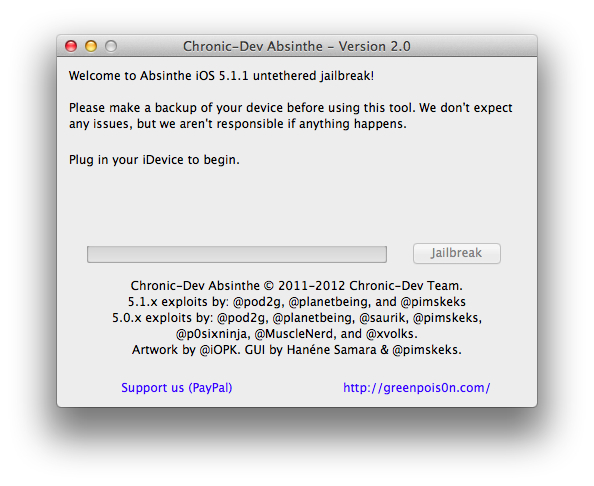
As expected, pod2g, The Chronic Dev Team, and planetbeing have released Absinthe 2.0. This is a cross platform, untethered jailbreak for iOS 5.1.1, across all devices that support this firmware, excluding the newest Apple TV. It is a simple one click solution, with no need to put your device into DFU mode.
After copious amounts of work and many sleepless nights Absinthe 2.0 is finally here to jailbreak your device. This release has been a large collaborative effort between Chronic-Dev Team and iPhone Dev Teams (Jailbreak Dream Team)
This jailbreak supports firmware 5.1.1 ONLY and is again one of the most easiest jailbreaks to use (so easy your grandma could do it ;D)
Absinthe 2.0 supports the following devices:
iPad1,1 – 2,1 – 2,2 – 2,3 – 3,1 – 3,2 – 3,3
iPhone2,1 – 3,1 – 3,3 – 4,1
iPod3,1 – 4,1
(Support for iPad2,4 will be added at a later date)
How To Use Absinthe 2.0:
1. Make a backup of your device in iTunes by right clicking on your device name under the ‘Devices’ menu and click ‘Back Up’.
2. Once your backup is complete return to your device and go to Settings – General – Reset – Erase all Content and Settings. This will make the jailbreak process much faster.
3. Open Absinthe and be sure you are still connected via USB cable to your computer.
4. Click ‘Jailbreak’ and wait…. just be patient and do not disconnect your device.
5. Once jailbroken return to iTunes and restore your backup from earlier. Right click on your device name under the ‘Devices’ menu in the left panel of iTunes and click ‘Restore from Back Up…’ then select the latest backup you created before. (restoring this backup will return all the content previously on your device ie, apps, photos, etc.)
6. Thanks for using Absinthe, enjoy your jailbroken iDevice!
We can expect the servers to be slow, and possibly crash throughout the day, but here are the links to download Absinthe 2.0 (UPDATE: Absinthe 2.0.1 released, updated download links at the bottom of this post):
Enjoy your newly jailbroken iDevice! Remember to be patient with the process. Especially if you decide not to erase all you info and settings. It could take 30 minutes or more. Also, make sure you have lots of disk space on your computer. The jailbreak makes a back up of everything during the whole process, so if your device is full of photos and stuff, it’s going to take a long time. Just follow the directions above, and the process should be somewhat painless.
Let us know in the comments below, what your experience is with the new jailbreak.
UPDATE: One of our readers pointed out that not everybody knows their device by the numbers above, so he went ahead and sorted it out for us. Check this list to see if you can jailbreak with Absinthe 2.0:
iPod:
3,1 = iPod 3G (3th Generation)
4,1 = iPod 4G (4th Generation)iPad:
1,1 = iPad 1
2,1 = iPad 2 (Wi-Fi)
2,2 = iPad 2 (GSM)
2,3 = iPad 2 (CDMA)
3,1 = iPad 3 or New iPad (Wi-Fi)
3,2 = iPad 3 or New iPad (CDMA)
3,3 = iPad 3 or New iPad (GSM)iPhone:
2,1 = iPhone 3Gs
3,1 = iPhone 4 (GSM)
3,3 = iPhone 4 (CDMA)
4,1 = iPhone 4s
The later versoin of the iPad 2 is the only device not supported, but that is coming in a future update. Thanks Taz, for the list.
Update 2: Absinthe 2.0.1 released, new download links below:
Want to see more of our stories on Google?

P.S. Want to keep this site truly independent? Support us by buying us a beer, treating us to a coffee, or shopping through Amazon here. Links in this post are affiliate links, so we earn a tiny commission at no charge to you. Thanks for supporting independent Canadian media!


whats the difference between ipads 2,1 / 2,2 / 2,3 and 2,4 ??
Didn’t work after 2 times. Says it recovery was complete but the actual jailbreak never happened???
Yep same (on my iPad 3), i keep getting that and it says to unplug / replug the device and try again. Guessing the servers are down / slow?
That’s my guess as well. I suppose it means “try again later” when the servers aren’t bottlenecking.
When you get the “recovery complete” message, it just means you had a failed jailbreak attempt, and they are fixing it for you. You just need to try again. Took my 2 tries, and my iPhone 4S is now jailbroken, on iOS 5.1.1.
I will have to try again a bit later! It seems everyone is trying right now
I’m on try number 4 and still get the “recovery complete” message. Very frustrating but will have to try again some other time.
Looks easy enough, will try it sometime. Thanks for the post.
Is it the same process for upgrades? MuscleNerd tweeted “Please do *not* try to “reset all device and settings” if you’re already tethered JB! In which case you should be installing it via Cydia)”
Absinthe froze and I had to restart computer and iphone. No jailbreak thus far.
Didn’t have a freeze but had a weird recovery message and tried twice this morning. Servers must be clearly down as this is a “BIG” deal!
Second attempt went fine
Didn’t work after 4 times, unplug and plug it again. i don’t know why?..
Servers are clearly busy
just tried it on my iPad 3 LTE and it didn’t work. Nothing seems to have happened. Even did a fresh install on 5.1.1
Clearly you haven’t read this thread properly. It doesn’t support ipad2,3
Actually it does say it supports ipad 2,3
Oh right lol. I’m the idiot who didn’t read properly
Sits at “Waiting for process to complete” until it times out, every time. The iPhone reboots just fine but Absinthe is not recognizing that it has finished rebooting. Tried five times. Did a full restore and then tried again, still no luck. Going to have to wait for an update to Absinthe.
iPhone 4S on 5.1.1
Anybody know if there is an unlocked for 5.1.1 yet via cydia
No unlock for iOS 5.1.1.
I feel much better now coz i’m not the only one who did it unsuccessfully~! XD..I hope the solution will be out there in minutes….
Worked with NO PROBLEMS on iPad 3 wifi (not 3G) Cydia is slow (rammed with people, will try later)
what does this mean? can i jailbreak my iPhone 3gs, 4, 4s, and iPads 2 with this or not? what is all that iPhone 2,1 3,1 thing? is this a user friendly oriented website or i have to research the meaning of those version numbers? how do i do that? please help!
nvm, ill go ahead and post the info my self for any confused reader.
this jailbreak will work for the following iPods, iPhones, iPads.
iPod:
3,1 = iPod 3G (3th Generation)
4,1 = iPod 4G (4th Generation)
iPad:
1,1 = iPad 1
2,1 = iPad 2 (Wi-Fi)
2,2 = iPad 2 (GSM)
2,3 = iPad 2 (CDMA)
3,1 = iPad 3 or New iPad (Wi-Fi)
3,2 = iPad 3 or New iPad (CDMA)
3,3 = iPad 3 or New iPad (GSM)
iPhone:
2,1 = iPhone 3Gs
3,1 = iPhone 4 (GSM)
3,3 = iPhone 4 (CDMA)
4,1 = iPhone 4s
iPad 2,4 is a version of the iPad 2 that was released not that long ago. so if you have recently acquired and new iPad 2 maybe this won’t jailbreak won’t work.
iPhoneinCanada.com you can copy this info and pasted it to the entry blog.
Please do!
Thanks, Taz.
bababooie
If your phone is stuck on ‘Waiting for Process to Complete …” just restore from iTunes and then jailbreak.
My phone doesn’t get stuck on ‘waiting for process to complete’…it just gives me a “recovery complete” message. Will try again in a few hours/days when it’s not a huge novelty. Servers must be too busy!
You must update to 5.1.1 before you JB your iPad or it will give you the “device unsupported”
Bowes is right. If you restore from within your device itself, it doesn’t work and just gets stuck at “waiting for process to complete” or says try again later.
Back up your device, restore from iTunes using the 5.1.1 IPSW, then jailbreak, then restore from backup. This worked for me first attempt and took about 1 minute to jailbreak, and 4 minutes to restore backup.
Sorry, I meant Patrick Moore is right. Although Bowes is also.
so.. what you save in time on absinth.. you make up for in time it takes to erase..
I’m on attempt #4. Did everything as instructed, then thought it was because iTunes was still on. Every time Absinthe “failed”, it shut down iTunes. So on the 3rd try I closed iTunes all together and tried it. Process went faster, but still failed. I am on attempt #4 now and shut off my phone and turned it back on. Lets try Absinthe one more time…..process is still working fine……..waiting for reboot…….waiting for process to complete……..being patient……”hmmmm something seems to have gone wrong. If you want to retry jail breaking, unplug your device and plug back in.”
that was attempt #4. No dice.
yeah it’s happening to me too. I’ve tried it like 6 times now. I think the servers are still hammered. May need to try it later this evening or tomorrow. Oh well…
erased Absinthe from my mac ( using app cleaner and made sure I ejected Absinthe in finder ), reinstalled it from the dev team web site…..done! Attempt #5 and it works out….weird I know….now restoring phone from back up made earlier ( which iTunes did not back up all my settings before I reset all settings from within my phone. i.e.: apps, messages, email accounts etc )….
This was an “easy” jailbreak for sure ( not as easy as user land JB mind you ), but it worked out with a few complications ( speed bumps ). If you have been in the JB scene you know that there have always been some hiccup problems within jail breaking and unlocking. Thats always been a reality. A price to pay so that we can mess around with our shiny computer rectangles!
And to all you newbie jail breakers out there….welcome to the club! A place where we wait on teenagers and hackers to give us iDevice freedom!
Congrats to the dev team for continuing this rat race with Apple!
Thanks Rory for the “how to”.
Thanks Gary for having such a rad site!
Sorry for the novel!
iphone 4s keep getting “device is not supported”
I solved the “recovery complete” problem by restoring the phone again and jb’ed once more. I found this solution at redmondpie..com
worked 1st time around 🙂
This is how I got mine to work.
Backup
Update
Set up as new iPhone (no music/photo)
Erase all data
Jailbreak
Restore backup prior update
Hopes this will help newbies like me out there.
my roomate’s ex-wife brought home $19224 the previous month. she is making income on the internet and moved in a $491500 condo. All she did was get lucky and try the instructions laid out on this web page===>> ?????? Job2Seek.blogspot.com
This blog is hosted and in place to support the use of idevices… not ipersonal business interests. It would be courteous of you not to abuse the purpose of this blog by inserting your advertising message. I know that for me it would immediately arouse my suspicion re the integrity of the offering, to see it posted in a manner that feels out of integrity with the objective of this venue.
^ Got to love these noobs replying to spam-bot messages. ROFL!
my buddy’s sister-in-law made $18108 a month ago. she worrks on the internet and bought a $525400 condo. All she did was get blessed and put into action the instructions given on this website ===>> ?????? Job2Seek.blogspot.com
my friend’s aunt made $17398 the previous week. she is making income on the internet and bought a $578000 house. All she did was get lucky and try the steps written on this website===>> ?????? Goo.gl/QfrNG
my roomate’s st ep-mot her brought ho me $1 3342 the previous mo nth. s he g ets pa id on the computer and bought a $369300 condo. All she did was get lucky and profit by the advice uncove red on this web page
?????? (Click At My Name For Link)
5.1.1 on iPhone 3GS
I’m curious about the experience of iPhone 3GS owners with 5.1.1 as i read numerous accounts of people encountering complications after installing 5.0.1… particularly with respect to battery drainage for these older devices. Here is a link to a post on CNet about such issues;
http://news.cnet.com/8301-30686_3-20121675-266/should-iphone-3gs-owners-upgrade-to-ios-5-ask-maggie/
I would appreciate any reports from those of you more knowledgeable in these matters. Cheers
Your article does not add any value over and above greenpois0n.com. I doubt if the writer has actually followed the instructions.
I have had success in JBing my iPad 1, using Absinthe v2.0.1 on a windows XP. This was made complicated by the fact that there is a Mac file loaded uselessly which confuses the process. The worst aspect of the JB process is the use of the same name for folder, zip file and “run” file. I had to change the names of the various items, to avoid getting hopelessly lost. It worked, in the end, but zi wouldn’t expect my grandma to get it done. This is clearly an enthusiastic overstatement, by techies who csn’t communicate in Plain English.
I did try the JB process using my Winows 7 machine. It got nowhere for hours, so I went back to the tried and reliable XP system. I would recommend XP over Win 7 to get the jailbreak done.
You do realize Windows 7 can run in XP compatibility mode right?
Yes – but if i want XP mode, i can use XP straight on highly reliable desktop machines. The Absinthe v2.0.1 documentation requires very careful parsing to decipher properly. It seems to be adequate for those who know exactly what they are doing. For a novice jail breaker, many of the options are not obvious.
But I suppose it is only fair to expect a jail breaker to think his way through the options. After all, what these guys have done is truly spectacular. It is churlish of people like me to criticize. I just hope that the big Aapl doesn’t come up with an offer that will shut them down!
Just did the jailbreak successfully on my iPhone 4s but it didn’t unteather the device it is still unable to activate thealternatle sim
Can anyone help I have the same issue with the 4?
I think i may have blown it… Iphone 3GS has been running IOS4.0, was unlocked and jail broken and running fine. Decided to run the Absinthe 2.0.4 jailbreak…. followed the instructions on this page, backed up, erased all content and sttings and attempted to run jailbreak, however my phone is not being recognized by program, in fact it seems to have frozen in place w the apple logo on a black screen… i had not upgraded to 5.1.1 with itunes prior to doing this procedure… though i had downloaded iPhone2,1_5.1.1_9B206_restore.ipsw… have i bricked my phone?
please help if possible…
achille • a few seconds ago
?
I
think i may have blown it… Iphone 3GS has been running IOS4.0, was
unlocked and jail broken and running fine. Decided to run the Absinthe
2.0.4 jailbreak…. followed the instructions on this page, backed up,
erased all content and sttings and attempted to run jailbreak, however
my phone is not being recognized by program, in fact it seems to have
frozen in place w the apple logo on a black screen… i had not upgraded
to 5.1.1 with itunes prior to doing this procedure… though i had
downloaded iPhone2,1_5.1.1_9B206_restore.ipsw… have i bricked my
phone?
additional info to the above… itunes no longer recognizes the phone… ie it does not show up when i plug it in to computer