
Apple’s AirPort Utility App is Being Removed From the App Store
Apple warns that "functionality is not guaranteed" when using AirPort Utility on iOS 27 or later.
Looks like the ‘long’ wait is over and the Starbucks Canada has finally received support for Passbook. A while ago both the Canadian and US apps were updated for iOS 6, with only the latter receiving support for Passbook. We detailed a workaround on how to get Passbook in Canada with the US app, but that is no longer necessary.
The latest Starbucks Canada app was updated with the following changes this morning:
What’s New in Version 2.5
• My Starbuck Rewards now delivered and viewable on your phone
• Now with Passbook Support
• Bug fixes
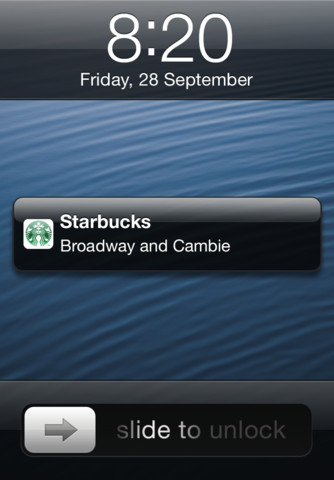
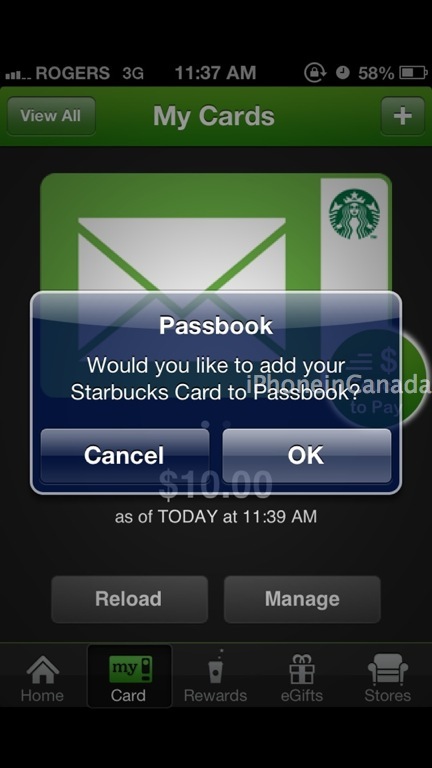
To setup Passbook, sign into your Starbucks account, load up your Starbucks card on your iPhone and it should ask you to add it to Passbook (or tap on Manage–>Add Card to Passbook). Once you are close to a location, you should receive a notification on your lockscreen like you see above. Just slide to reveal your Starbucks card in Passbook. Voila.
Also to note, there have been some changes to the Starbucks Rewards program. Free syrups are no longer offered and no more free coffee with beans purchases. You now will earn a free drink at 12 stars (instead of 15) and your points will expire in 12 months if you don’t use them (thanks @swotam).
Click here to download Starbucks Canada from the App Store.
Thanks to @StarbucksCanada for the DM and everyone for sending this in!
Want to see more of our stories on Google?

P.S. Want to keep this site truly independent? Support us by buying us a beer, treating us to a coffee, or shopping through Amazon here. Links in this post are affiliate links, so we earn a tiny commission at no charge to you. Thanks for supporting independent Canadian media!


Anyone having trouble adding their card? I error out and it asks me to try later, citing network connectivity issues, but I’m on LTE and WiFi.
Me too!! Glad it’s not just me. 🙂
Got it. Maybe the system is overloaded??
I’m getting the same thing. Not sure exactly how to fix it.
I got that error when trying to set up my wife’s phone, I just tried again and it worked the second time. Perhaps just keep trying? I think the network’s probably pretty busy.
Fuck the gay syrups, you can get food now!
Downloaded app before this thread. Went to Starbucks on 600 block W Broadway and it worked great!!! Vancouver, BC
It works, but I work in a tower in Downtown Toronto and I have about 5 Starbucks in a very close proximity. Every 5 minutes (while sitting at my desk) my phone lights up and I get a notification in the lock screen about “Starbucks” but it is 64 flights down! This will probably kill my battery even faster.
i don’t understand what so good about passbook for starbucks? starbucks app can do the same thing right?
The Starbucks app can do the same thing, but Passbook is integrated into the OS and is location-aware.
What this means is that when you arrive at one of your favorite Starbucks stores and pull out your iPhone, there will be a notification on the the screen (like the first image shown in this article) that you can swipe and it will take you directly to the barcode in Passbook. So you don’t have to swipe to unlock your phone, find your Starbucks app, open it, and tap the button on the card page. Just a little bit more convenient.
Now if Tim Hortons would do this I’d have all my coffee joints looked after