
How to Recover and Restore an Apple Watch
Learn how to recover and restore your Apple Watch with an iPhone or iPad, based on Apple's official Support video.
Yesterday Starbucks updated its iPhone app to add Passbook functionality but it did not include Canada (eh?!). As of writing, our American brothers and sisters are having so much fun using Passbook to pay for their lattes and frappuccinos while we have to slum it at Tim Horton’s. Well, that’s about to change.
Looks like you can add Passbook to the Starbucks app in Canada via a quick workaround, as discovered and shared with us by @LarryLarry. Be warned though, it will require the Starbucks app from the US App Store which will require a US iTunes Account.
Once you have downloaded the app, load it, change the country to USA, redeem your eGift and BAM–it’ll ask you to add it to Passbook. Here’s how to make it all work…
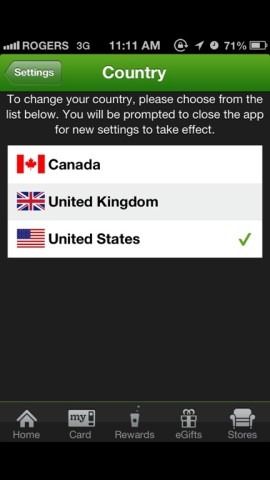
1. Setup a US iTunes Account by following these instructions here or here. With your US account, sign into the App Store and download the Starbucks iPhone app from your iPhone. Launch it, go to Home–>Settings–>Country and change the region the United States.
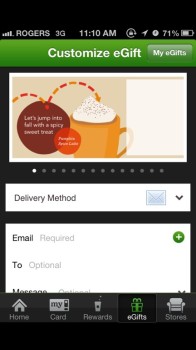
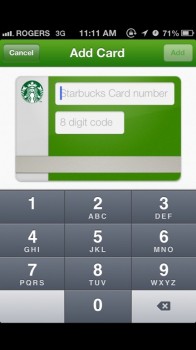
2. Tap on eGifts along the bottom and send yourself an eGift (aww, you’re so nice to yourself); you can also send one via Starbucks.com. When the eGift code arrives via email, enter in the new card number by tapping ‘Card’ and the ‘+’ button.
3. Within My Cards, tap on ‘Manage’ and you will have the option to add your card to Passbook, and also set favourite locations.
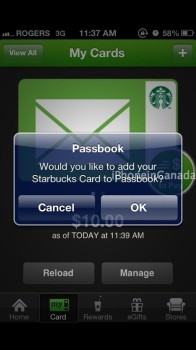
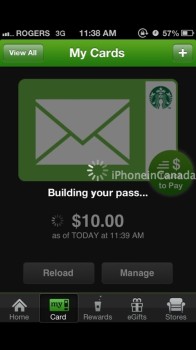
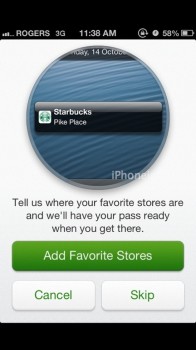
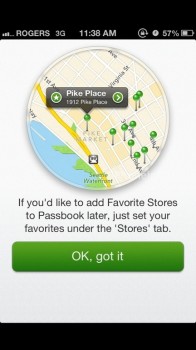
4. Launch Passbook and you should see your Starbucks card there. Go to Starbucks, spend $5 on a latte and yell “BOOM!” while paying with Passbook. Ignore the strange looks you’ll receive because you’re now officially ‘cool’.
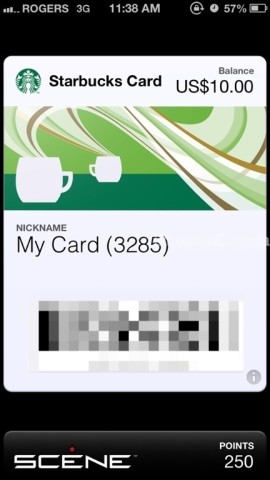
Let us know if this works for you. We initially tried this method with the Starbucks Canada iPhone app, but it wouldn’t work. Downloading the US version worked immediately. Enjoy your coffee!
Want to see more of our stories on Google?

P.S. Want to keep this site truly independent? Support us by buying us a beer, treating us to a coffee, or shopping through Amazon here. Links in this post are affiliate links, so we earn a tiny commission at no charge to you. Thanks for supporting independent Canadian media!


if your anal about your reward points though this kinda messes that up for you no? i mean if you transfer the gifted cards funds to your main card (if you have a gold one for instance) you wont be able to have that in passbook
and i like me my reward coffee’s… dammit
You can sign in with your existing Starbucks account created in Canada, so I don’t think it will be affected?
… true i wasnt thinking… aight imma do this
I don’t think the rewards are tied to the card. Just the user account. You can have multiple cards on an account. The only issue I see is that you will have to only pay with your phone or keep track of multiple cards because you won’t have a physical version of the card in passbook. I’ll be waiting for proper Canadian support.
When you add the card, it gets registered to your Starbucks account, so it should earn rewards into the same pool. You can have multiple cards on one account.
Brilliant tip – and further evidence of there being no reason this wasn’t just rolled out for the Canadian app.
Solution: Pay with cash or even better, credit card. Solved
get zero free machiatos
yay
Wont we get hit with the 90 day policy where we can’t sign back in our Canadian iTunes account on our devices? I vaguely remember me switching accounts on my iPhone (Can->US) last year and when I tried switching back it told me I couldn’t associate this device with another account for a period of 90 days.
We are not changing our itunes settings, just the starbuck app setting
Cross that, I downloaded the American Starbucks app from my PC’s itunes and synched it to my phone instead of doing it from the device. Apparently you can authorize your itunes to multiple account.
Another thing I noticed is that from the App, I have the rest of my cards but only the egift can be ported to the passbook and you can’t transfer funds from different cards with different currencies.
your thinking of automatic downloads , it wont affect your store permanently or 90 days in your case
I followed the instructions and very quickly I had an Starbucks ecard in Passbook. Thanks
Nice! Glad my instructions were clear. 🙂
So I’ve been paying with my Starbucks app for quite a long time now. Other than having to open another app (passbook), is there any benefit to this or can I keep paying with my app as I have been all along?
Got it sent myself $5
The problem with this workaround is that all gift card balances will show in USD, and not converted to CAD.
Can’t send funds from non us Paypal account error
I would like to know how those who made it work could send payment from a non US account?????
I used my Visa through starbucks.com It sent, now i’m stuck when I try to add the damn card!!
Definitely an issue here. I can’t add the damn card to my account. I don’t understand the issue, but it refuses to let me add the card to my account!
i got that far too but did finally add it to passbook, but it removed it very quickly from my account. So now im stuck with a 5 dollar (test AMT) IN PASSBOOK. It will not add it via the website nor the app.
Mine won’t get that far. I wonder if it’s because I had a canadian card in there already? I’ve contacted support because i sent a 15 and a 5 card and neither of them show up anywhere now.
So I sent off An email to Starbucks indicating I could not add my egift, I left the card number info in my request, 20 min later I tried to add the card again through the Starbucks.com website and it worked. No more “Whoops error”.
First you get dinged a 2.5% currency conversion fee to get the US egift and then a likely 2.5% currency conversion to pay with the US egift when using the passbook. I don’t think I need to pay a premium to have this functionality.
can we confirm if this is the case?
You can gift yourself a Canadian card, then redeem it with the US app.
brilliant!
Everything works as you said. .. Except that when I touched the manage tab there was no option for passbook. I didn’t create a new account for this card nor did I sign in with my Cdn account. Do I need a US acct?
Did you download the Starbucks app from the US App Store?
Great tutorial, thanks a lot! One word to add though, you need to be signed into an starbucks account for “add to passbook” to appear. Easy enough to do, but it got me scratching my head for quite a while. ; )
A side effect to being signed into the US Starbucks localization is that my TD Visa debit card which has proven useless within Canada actually WORKS (!) to recharge my Starbucks account….so now I can recharge straight from my bank account instead of being forced to use PayPal.
Nice!
Really wanted this to work but it doesn’t. Tried every which way to send myself an e-Gift but that just doesn’t seem possible with a Canadian credit card. I do have an American account (got it years ago when I moved to Canada), but somehow they are blocking me. No credit card, nor Paypal works. Phewy.
Have you tried the Starbucks Canada iPhone app? No workaround needed 🙂