NAVIGON has announced it has updated its iOS GPS apps to include Bluetooth audio support for directions along with Wikipedia integration. This means you can now hear directions over your car’s speakers and it will fade out music before it announces instructions. As for Wikipedia enhancements, points of interests will now show icons where you can tap and detailed information will be revealed. Full change log below:
What’s New in Version 2.4
– Voice instructions can be broadcasted through the car’s speakers. This function requires the iPhone to be connected with the car’s bluetooth handsfree kit.
– Wikipedia POIs can be downloaded for free and transform the app into a travel guide.
– Glympse functionality has been further improved.
– Additional Foursquare functionality.
– Easy switch between car- and pedestrian navigation.
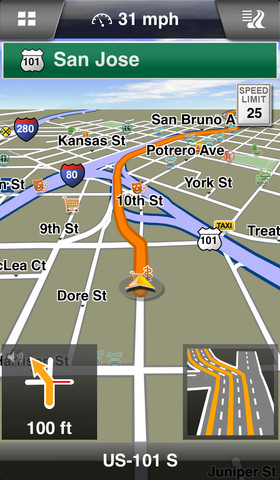

Also, the company has announced a sale on its GPS apps, with NAVIGON North America (USA & CAN) currently listed for 25% off, at $44.99 (regularly priced at $59.99). NAVIGON Canada is currently $10 off at $39.99, but we’d pay the extra $5 to get US maps in the North America edition. NAVIGON maps are downloaded to your iPhone or iPad and do not require an internet connection to function, therefore working as dedicated GPS units.
What’s your favourite GPS app at the moment?



Save your money. Navigon is an unreliable piece of garbage, and inferior to the completely free Google Maps. I own and used Navigon for over 2 years, and am glad to be free from it.
Except you need a data connection for Google Maps. Doesn’t really help if I’m crossing the border.
Good thing is you can download only the provinces and states you need. Download others later for a road trip etc.
I agree. I was happy when they introduced this featuer because having 1.7GB of all North American maps was not a fun this on my 8GB first iPhone years back
I’ve used it since day one and its great. Google maps is only good within Canada. I travel to USA a lot and google maps must use data there whereas navigon doesn’t.
Definately my go to GPS application when data connection cannot be used. Only problem is that maps may be kind of old. But totally worth it. For what it does it does great
Navigon is the best app purchase that I ever made 3 years ago. The voice navigation is very clear and descriptive which helps when travelling down unfamiliar roads. And of course no data required!
The biggest problem is that the database is about a year old and new roads are not on there. Eg: New portion of Hwy 26 from Barrie to Collingwood. An extra $13 for map updates every 3 months
Waze is still my go to daily navigation app to get around the city
Why doesn’t Apple make it possible to download its maps in a offline navigation mode? That would finnaly make it a killer app. Come on apple start making your map app more useful…… For the rest of us.
Navigon North America is my answer to worry free navigation for my trips to US (no data connection) or in the mountains (no data connection)
Yea I don’t see how you can compare Google Maps to Navigon. Google Maps has it’s uses, but for me be able to plan a route and import it for Turn-by-Turn navigation is key, and only Navigon has that capability right now. Here’s a tutorial I wrote on how to do it… http://adventuregpx.com/tutorials/route-planning-on-the-iphone/