With the recent release of iTunes 11.1 two days ago, a new bug has emerged which has prevented users from deleting podcasts, and previously played older podcasts have reappeared via iCloud, first brought to our attention by iPhoneinCanada reader Corey.
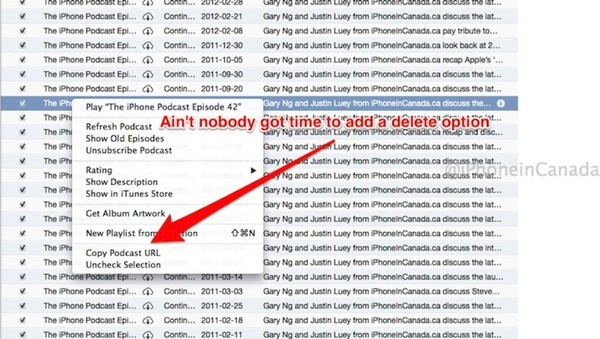
The issue is widespread and customers have started numerous threads in the Apple Support Communities offering detailed accounts of the frustrating issue:
I installed the iTunes version that came out yesterday, and now any podcasts I’ve listened to and deleted have suddenly reappeared, with an iCloud icon against them. But delete doesn’t work.
Selecting them and pressing delete has no effect. For downloaded, locally stored items, pressing delete throws up the usual dialog, but if I go ahead and delete, the file is deleted locally, but the item remains in iTunes but with the iCloud icon added.
Right-clicking gives no option to remove it from the list, and I can’t see any option in Preferences to prevent this behavior. Nor can I see anything relevant to it in the iCloud control panel.
This messes up the list big time, with some podcasts showing two years of items. What are they thinking?
From what we’ve heard, beta versions of iTunes 11.1 do not appear to be suffering from this issue. Anyone else dealing with this right now?



You can delete the downloaded podcast just not the list of available podcasts.
no, you can delete it from being downloaded and playable but IT and EVERY OTHER OLD PODCAST will be visible on your list leaving your podcasts page filled with HUNDREDS of old podcasts you’ll never listen to
great update, morons!
This is a big pain in the butt. As mentioned, old podcasts show in your list which means scrolling and scrolling. I like to manually manage my podcasts and losing the ability to delete aged podcasts from my list was key for me. I hope Apple pushes out an update soooon!
I have one podcast that I have been listening to since 2008 and now all 252 episodes have shown back up on my iTunes feed. Talk about clutter.
I used to be able to chose “download all” if I missed a few weeks. No longer.
Now, there is no distinction between those episodes that I downloaded, listened to and moved to trash and those episodes that I have not listened to at all. Both are show up in the same way in iTunes.
you can delete them…you are just looking at the wrong view. the list view is a list of all podcasts available, not just the ones you have played, etc. Note the iCloud icon next to the ones you have deleted from your system…they are still available to download again in the future. go to the My Podcasts view to see only the ones you have downloaded.
Some of us *liked* to use the list view and don’t want to use the My Podcasts view.
Agreed. The My Podcasts view is not a good alternative. There was a lot I liked about the List view, especially the compact view and the ability to select multiple podcasts from multiple feeds at one time. I like to build playlists from my podcasts, and it’s a lot more cumbersome to do that with the new update.
Another glitch I’m noticing with a few feeds: after I listen to and delete an episode, the next time I refresh that episode downloads again and is often marked with zero plays. For whatever reason, on occasion the play count is properly set to one, but the episode still downloads.
Pretty soon not only the listeners will be complaining. Hopefully it won’t be long before some major podcasters start to give Apple the gears as well.
It’s not just me then that is having this problem. I always managed and sorted my Podcasts from the List view, but now it is just a cluttered mess. I tried everything to try to delete old Podcasts with no luck at all. Not sure I like the “My Podcasts” way of managing what goes on to my iPod. Is there any possibility Apple will offer a fix for the problem or is this an intended design feature that we are now stuck with?
Yes. This is ridiculous. I refuse to use iTunes in this manner. Apple should restore it to the method it was previously. This is total garbage.
I too have had icloud deletion issues (I haven’t had to delete podcasts). The problem is with Pages files keep on reappearing when icloud is enabled for documents on the imac. Funny is this though… the files go away when the document feature is disabled on the imac Mountain Lion!
I actually delete podcasts from iPhone: From your list of podcasts, tap on the one you wish to delete. On this next screen perform the “swipe” motion to delete. Alternatively, you can try FonePaw iOS Transfer to remove podcasts.