
Apple’s AirPort Utility App is Being Removed From the App Store
Apple warns that "functionality is not guaranteed" when using AirPort Utility on iOS 27 or later.
Developed for iOS by DAP Logic, DD-WRT and DD-WRT HD are the only apps available in the App Store that allow users to monitor and manage their DD-WRT compatible routers using their iPhone, iPod touch and iPad devices. Those who aren’t aware, DD-WRT is a Linux-based free aftermarket firmware for wireless routers, that contains special features and optimizations designed to improve on the router’s standard firmware.
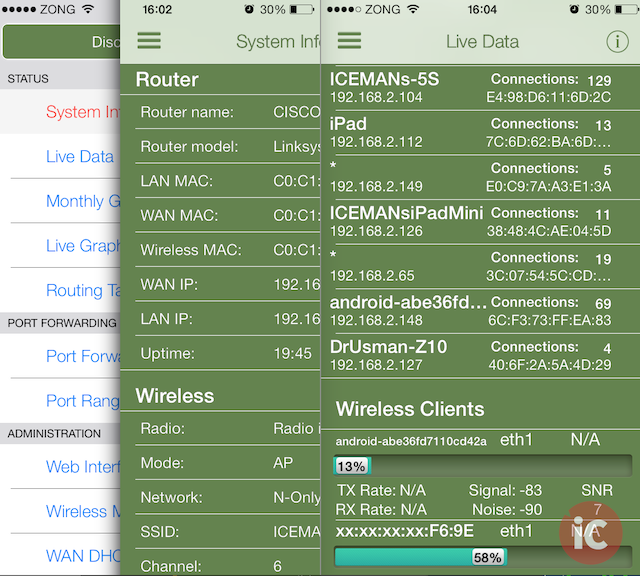
Previously, users needed to access their DD-WRT routers from their iPhones and iPads through Safari using a not-so-friendly web UI. But with these native apps, managing a DD-WRT compatible router on your network with an iOS device, both locally and remotely, has literally become seamless. Initial setup is a breeze and once your up and running, you’ll be presented with a fully optimized UI that gives your full control over your router with access to stats like System info, Wireless clients, LAN clients, Traffic and Bandwidth graphs, Routing tables, Memory and so much more.
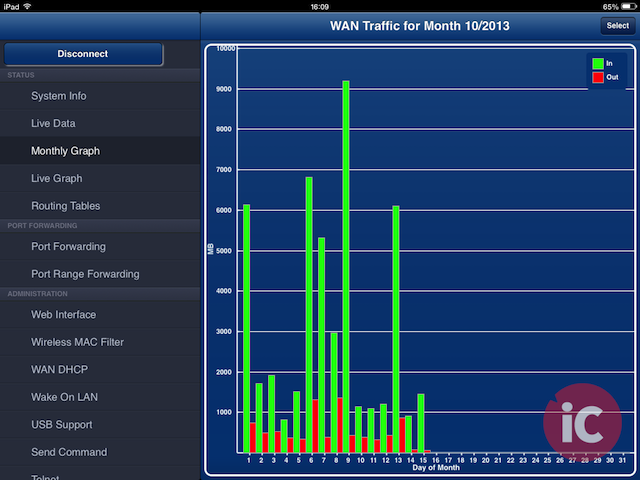
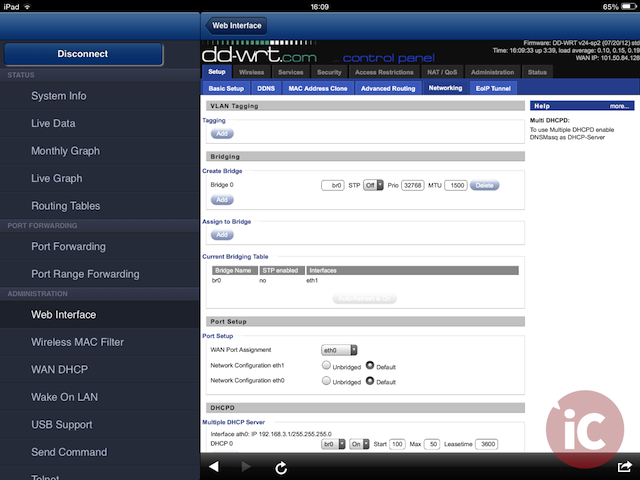
The apps let you change virtually every single setting on your DD-WRT router through its extremely easy and well organized interface. These settings include Port forwarding and Port Range forwarding (add/edit/delete/enable/disable port forward rules), Wireless MAC filter, Wireless on/off, DHCP Release/Renew and even allows you to send commands remotely such as Wake on LAN or Reboot router etc. The apps’ most recent update has also added the ability to add home screen icons that instantly issue Wake on LAN commands or Reboot your router wit a single tap. Furthermore, the app provides direct links to web interface pages as well.
Overall, I couldn’t be more satisfied with these highly useful apps for any DD-WRT router owner. Both iPhone/iPod touch and iPad versions work flawlessly and be grabbed for $3.99 each. For those who want to follow the apps’ development, hit up this forum link.
Promo Codes GIVEAWAY:
We have 4 App Store promo codes each (total 8 codes) for DD-WRT / DD-WRT HD to give away. You can enter the contest via Twitter for free by following these steps:
NOTE: If you also leave a comment below, this will increase your chances of winning. Don’t forget to leave your Twitter ID with it.
WINNERS ANNOUNCED:
Congratulations to our winners!
Please tweet to @DrUsmanQ for your choice of DD-WRT for iPhone/iPod touch or DD-WRT HD for iPad App Store promo code. Codes will be sent on first come, first serve basis.
Want to see more of our stories on Google?

P.S. Want to keep this site truly independent? Support us by buying us a beer, treating us to a coffee, or shopping through Amazon here. Links in this post are affiliate links, so we earn a tiny commission at no charge to you. Thanks for supporting independent Canadian media!


Love DD-WRT have been using for years. Can’t wait to try this app. @danoftheisle
You’ll love it 🙂
This looks great! @CMfly
This looks great, and something I could definitely use. @dieselboy28
Nice, I had been looking for something like this for a while. Twitter ID kaphely
As a long time user of DD-WRT I recommend it to everybody!
Love DD-WRT @jfmarteljunk
This is an AMAZING giveaway from you guys! I wish a great luck for anybody who wins it, including myself if I do! 🙂 Thank you for sharing this with the community.
I would love to get the promo code for these great apps. @1smarty1
DD-WRT lets me do so much more with a cheaper router that would otherwise require an “enterprise” router, or a computer dedicated to such a purpose. @wenslayer
How have i never heard of this before. DDWRT is awesome and a native app is so slick. no more zooming around the gui! (@grahamrose)
Tweeted & followed. Can’t wait to try this app. @bajofuego81
followed via @machineglow2
Just a quick tip for people: if you switch the DD-WRT theme to “brainslayer”, you can load the DD-WRT UI fine in iOS Safari. everything works including the bandwidth charts and usage charts…
Want one!
@simon_says_21