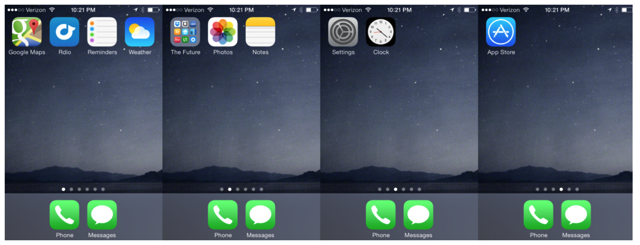
Medium’s Jake Knapp has published an interesting article detailing how he spent a whole year with a “distraction-free iPhone”, turning his smartphone into a much simpler device. “It distracted me from my kids. It distracted me from my wife. It distracted me anytime, anywhere”, he says. So, to get better control without giving up his iPhone altogether, he “decided to try an experiment”.
“I deleted my mail account. I uninstalled every app I couldn’t handle. I thought I’d try it for a week. A month went by, then two, and I was loving my newfound freedom. The biggest victory was when my wife made her own iPhone distraction-free.
I still get a lot of people asking: am I still doing it? Some of those people are probably too impatient to read this long boring intro. So for all you skimmers out there, here’s the answer in big letters: Yes, I’m still doing it. Over one year later.”
The author has also encouraged users to try going distraction-free for 24 hours, by following these steps:
Step 1: Remove Safari
You can’t delete Safari, but you can do this: Go into Settings, then Restrictions. Turn ‘em on, and then you can turn off Safari.
Step 2: Remove Mail
Since you can’t turn the Mail app all the way off on your iPhone, the easiest thing to do is delete your email account in Settings.
Step 3: Remove “infinity” apps
Instagram, Facebook, Twitter, even the New York Times?—?all of these have a potentially endless supply of new and interesting stuff so delete them from your iPhone.
Step 4: Consciously decide what to keep
Having a blank desktop on the phone is surprisingly calming. Once you’ve cleared off so much stuff, you’d want to keep it clean. The author shares his list as:
- Phone
- Messages
- Camera
- Apps that make me feel like I live in the future, kept in a folder inventively called “The Future”, e.g Dropbox, Google Maps, Uber, Rdio, Instacart etc.
- Useful things I rarely use, like a New York subway map or the compass.
- Useless things you can’t delete, like Passbook and Game Center.
So, if you decide to give the experiment a go for 24-hours or so, let us know how it worked for you!



If you pick your phone over your wife and kids maybe a therapist is better solution than this “distraction free” jargon.
That’s a nasty thing to say. Most people are on their phones for no better reason than they have it on their person.
I have no problem putting my phone down for my wife and kids. They’re my life, my phone is an accessory.
Interesting concept. I might just try it!
What’s the point of an iPhone as opposed to a traditional non-smart phone then? A camera and its picture album?
Go back to a flip phone.
That is the worlds’ most expensive feature phone ever!
Here is another idea, when you get home, put the phone away and spend time with family!!
Here is an idea… Go back 7 years, buy a Nokia and hold on to it….
Times like this I like to break out my Zack Morris cellphone.
So, what happened to battery life?
Are there any other unexpected observations?