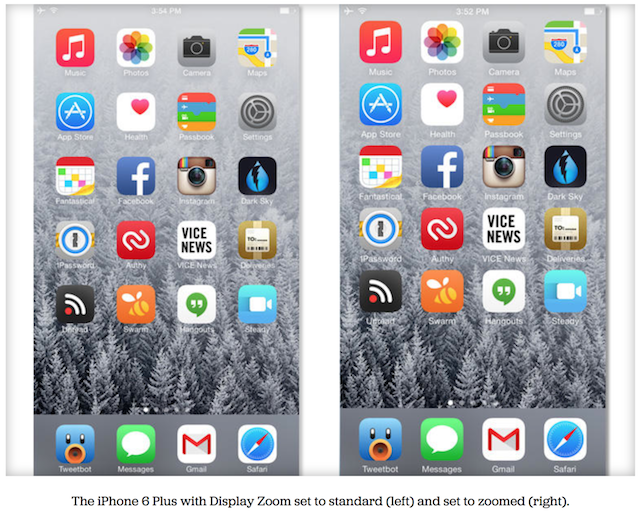
Both the iPhone 6 and iPhone 6 Plus prompt their users on initial device setup whether they want to use ‘standard’ or ‘zoomed’ view, thanks to the new Display Zoom feature. To make it easy for you to decide which mode will suit you best, the folks over at CNET has put up an easy explanation of the two display modes, detailing how the standard view uses the layout Apple intended for each respective device, while zoomed provides for larger icons, text and buttons.
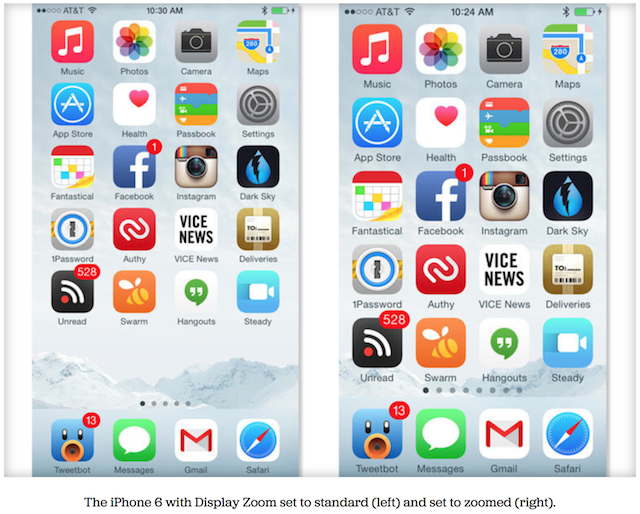
To put things in perspective, the source explains that the “iPhone 6 Plus in zoomed mode displays the equivalent of what’s displayed on the iPhone 6”. This means that the amount of content on the iPhone 6 in zoomed mode, is pretty much equivalent to that of the iPhone 5s. Best thing is that whichever mode you chose during initial setup, you can always go back and change to the alternative Display Zoom setting.

To change your Display Zoom setting:
- Launch the iOS Settings app.
- Scroll down and select Display & Brightness.
- Select the View option under the Display Zoom section.
- Preview and select your preferred setting.
- The setting will restart your iPhone and upon reboot, the content on your iPhone will be bigger or smaller, depending in your selection.
The Display Zoom feature combined with Reachability, makes it much easier to use a larger-screened iPhone. Let us know which zoom setting works for you best and why.



I just for the 6 and most Apps look blurred. I thought that big players would update the App in advance but only App I have that updated is Twitter. All other ones look odd.
Yeah, I can’t wait for apps to be updated. The blurriness is noticeable. It will take time though, Apple’s approval process is probably backlogged.
Actually the status bar text doesn’t look like retina on zoom mode even on Native Apps. Does anyone know the reason?
It’s also good to note that while in zoomed mode you don’t get landscape springboard, or the dual column apps.
Standard view for me. Zoomed seems to sacrifice the sharpness a bit which I for one don’t like not to mention if I wanted to see it as a normal 6, I would have bought that one instead. I agree the apps take time and will inevitably come. One of the reasons I went Plus is because Apple kept plugging this phone rather than the 6 and mentioning how they will use the extra screen real estate for apps going forward. Developers will end up utilizing that space and when those apps are ready, those of us on the Plus will fully get to enjoy.