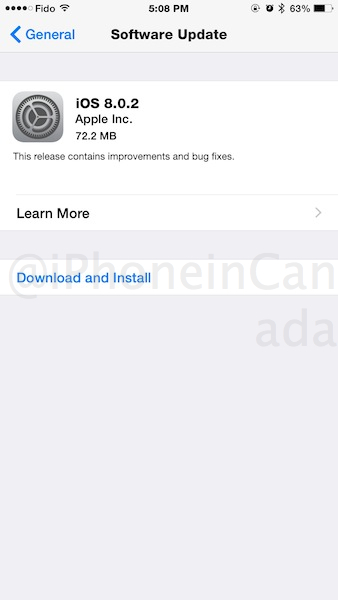
Apple has just released iOS 8.0.2 for download, which fixes the broken cellular connectivity and Touch ID issues from yesterday’s pulled iOS 8.0.1 update, available as an over-the-air update:
Full iOS 8.0.2 download links are below:
- iPad 2 (Wi-Fi) (iPad2,1) version 8.0.2 (Build 12A405), Download
- iPad 2 (GSM) (iPad2,2) version 8.0.2 (Build 12A405), Download
- iPad 2 (CDMA) (iPad2,3) version 8.0.2 (Build 12A405), Download
- iPad 2 (Mid 2012) (iPad2,4) version 8.0.2 (Build 12A405), Download
- iPad mini (Wi-Fi) (iPad2,5) version 8.0.2 (Build 12A405), Download
- iPad mini (GSM) (iPad2,6) version 8.0.2 (Build 12A405), Download
- iPad mini (CDMA) (iPad2,7) version 8.0.2 (Build 12A405), Download
- iPad 3 (Wi-Fi) (iPad3,1) version 8.0.2 (Build 12A405), Download
- iPad 3 (GSM) (iPad3,2) version 8.0.2 (Build 12A405), Download
- iPad 3 (CDMA) (iPad3,3) version 8.0.2 (Build 12A405), Download
- iPad 4 (Wi-Fi) (iPad3,4) version 8.0.2 (Build 12A405), Download
- iPad 4 (GSM) (iPad3,5) version 8.0.2 (Build 12A405), Download
- iPad 4 (CDMA) (iPad3,6) version 8.0.2 (Build 12A405), Download
- iPad Air (Wi-Fi) (iPad4,1) version 8.0.2 (Build 12A405), Download
- iPad Air (GSM) (iPad4,2) version 8.0.2 (Build 12A405), Download
- iPad Air (CDMA) (iPad4,3) version 8.0.2 (Build 12A405), Download
- iPad mini Retina (Wi-Fi) (iPad4,4) version 8.0.2 (Build 12A405), Download
- iPad mini Retina (GSM) (iPad4,5) version 8.0.2 (Build 12A405), Download
- iPad mini Retina (CDMA) (iPad4,6) version 8.0.2 (Build 12A405), Download
- iPhone 4s (iPhone4,1) version 8.0.2 (Build 12A405), Download
- iPhone 5 (GSM) (iPhone5,1) version 8.0.2 (Build 12A405), Download
- iPhone 5 (CDMA) (iPhone5,2) version 8.0.2 (Build 12A405), Download
- iPhone 5c (GSM) (iPhone5,3) version 8.0.2 (Build 12A405), Download
- iPhone 5c (CDMA) (iPhone5,4) version 8.0.2 (Build 12A405), Download
- iPhone 5s (GSM) (iPhone6,1) version 8.0.2 (Build 12A405), Download
- iPhone 5s (CDMA) (iPhone6,2) version 8.0.2 (Build 12A405), Download
- iPhone7,1 (iPhone7,1) version 8.0.2 (Build 12A405), Download
- iPhone7,2 (iPhone7,2) version 8.0.2 (Build 12A405), Download
- iPod touch 5G (iPod5,1) version 8.0.2 (Build 12A405), Download
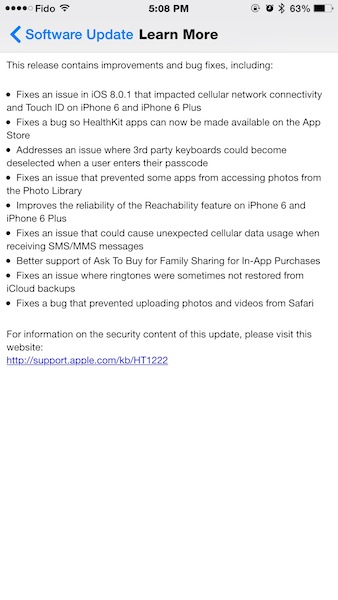
Below is a screenshot of the changelog:

Let us know how this update works for you! 🙂
Update: Just updated our iPhone 6 Plus and everything works (cellular, Touch ID). This update looks good to go.
…more to follow



After the horror stories of 8.01 is it normal that I’m afraid of downloading this update hahaha!
I will wait for you Gary! By all means go first 😉
I’m backing up to iCloud as we speak, I’ll let you know.
Well I took the plunge. So far so good. I can make calls 🙂 testing out other features.
Well? Does it work? 😉 any bugs or reasons not to update this time? And – does anyone have their phone plugged in to their car stereo via USB? During the breif cellular connection free hours that I had 8.0.1 on my iPhone 6 I had it plugged in to my car stereo so I could listen to a podcast, and after about 15 minutes it displayed ‘accessory not supported’ and stopped charging. It seems to be working fine on 8.0
I can confirm that 8.0.2 makes the iPhone 6 more picky about lightning cables. What a pain. But – I’ve called ‘the source’ and for $7 you can get unlimited replacements on their brand of cable for a year. There’s the solution to the ‘disopsable’ apple cables
The update doesn’t show up for me. I downloaded 8.0.1 and couldn’t get it verified. Now I’m stuck with the download and don’t know how to clear it. Does this mean I have to restore from back up?
My 5S was stuck on 8.0.1 as well. Hard reset did the trick!
How the hell did they test it in a day?? Or like crowd funding, this is going to be crowd testing
I’m sure with all the negative publicity they burned the midnight oil to push out a release
Usually cut of media and the haters out there, true apple fan boys believes in apple rather than doubt, they test this thoroughly. Most people reporting probably don’t know how to follow instructions at all. They must have recently switched from scum Droid and don’t know their way around
I updated to 8.01 on my 5 with no issue. Just updated to 8.0.2 with no issue…no iPhone 6 🙁
Just updated my iPhone 5S to 8.0.2 and seems fine. I’m in a hotel and WiFi actually seems faster now via SpeedTest
Just updated mine. It’s all good. Wifi connects a lot quicker.
I got a No Service.
Went to Settings-Carrier and set to Automatic and its all good. Set it back to static and still good.
Lost some of my contacts after update wth!!!
Fuk u, apple is perfect, u probably didn’t follow directions, stupid noob
Updated my IPad and iPhone 6 OTA no issues at all.
My iPhone 5S was on 8.0.1 (working fine) and then tried to update to 8.0.2 last night but said it could not after completed downloading. Figured do hard reset and now my iPhone 5S won’t turn on. Gets stuck on Apple logo screen and won’t go further (eventually just turns off on its own); tried several times. Connected to computer and iTunes can’t even see it. Guess will have to contact Apple. Ugh!
I encountered same problem. 2 different lightning cables used for attempted charging and also tried direct connection to mac book pro mid 2014 Mavericks and computer now does not see the iphone
No issues here, do you guys even know how to follow simple instructions? You can’t expect apple to hand feed you. Not apples fault for the updates, it’s usually users like you
Works well! No issues so far on iPhone 6
Scared to update my iPhone 6 🙁
No issues on iPhone 5.
Iphone 6, no issues.
Installed on my Plus last night and have no issues all day. On another note, I have not noticed ANY improvements at all. Still having major issues with 3rd Party Keyboards.
Stop spreading lies, apple is perfect, the update has no problems, u must have jailbreak or drop u r phone, or u might be a hater, fagdroid
Gary, why write “iPhone7,1” and “iPhone7,2” instead of “iPhone 6 Plus” and “iPhone 6” respectively, like you have with the other firmwares?
Those are numbers from Apple and how they identify firmware for the new iPhone 6 models. I’ll be sure to add which model they pertain to next time.
The bracket says their identity though, i.e. iPhone 5S (GSM) (iPhone6,1)
I have an IPad, and it won’t download. I agreed to the terms, and the agreement window won’t disappear.
does anyone notice laggyness and freezing, appstore loading slow etc with ios 8.0.1
No issues as most people said below, must have been your fault for not reading properly
Why do people lie that there is a problem with ios? It’s perfect, ios 8 has no problems, shame on u Gary for bad mouthing apple, why do u believe the haters and the fagdroids, u are an apple user in a apple blog, shame on you for spreading lies.