
Apple’s AirPort Utility App is Being Removed From the App Store
Apple warns that "functionality is not guaranteed" when using AirPort Utility on iOS 27 or later.
Montreal-based Transit App has updated their app to now include support for the new iPhone 6 and iPhone 6 Plus displays, plus also iOS 8, as you can now add a widget to show nearby lines and upcoming arrivals in real-time (if available).
What’s New in Version 3.2
– iOS 8 Widget! The three lines at the top of your nearby list will now appear in the Notification Center as a Transit Widget. You can instantly see the next two arrivals in real-time (if available) right from Notification Center. Switch directions by tapping a line. To enable the widget after updating to iOS 8, tap “Edit” at the bottom of notification center and tap the “+” next to the Transit icon.
– Support for iPhone 6 and iPhone 6 Plus display size!
– Support for bike sharing in Houston, Austin, San Antonio, Denver, Milwaukee, Madison, Salt Lake City, Kansas City, Honolulu County, HI and Broward County, Fl
– Our European expansion continues with support for London and Berlin (and Hamburg and Ulm too!) Eager to see a city added? Visit our wish list at thetransitapp.com/wishlist and up-vote your transit agency!
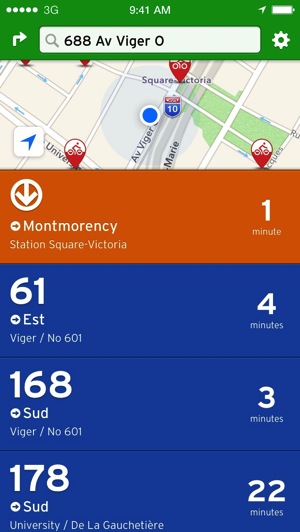
Back in June, the app added a slightly new redesign and also added information for bike sharing.
Click here to download Transit App version 3.2 in the App Store.
Want to see more of our stories on Google?

P.S. Want to keep this site truly independent? Support us by buying us a beer, treating us to a coffee, or shopping through Amazon here. Links in this post are affiliate links, so we earn a tiny commission at no charge to you. Thanks for supporting independent Canadian media!


Thanks for the info, I didn’t realize it added a widget, now I don’t have to open the app.
is the widget working for you? not working for me.
yes it is, and you can tap on a rout and it give you the info for the other direction. did you turn it on through the pull down?
The widget doesn’t work for me either. It just says nearby lines and then nothing.