
Apple’s AirPort Utility App is Being Removed From the App Store
Apple warns that "functionality is not guaranteed" when using AirPort Utility on iOS 27 or later.
Dropbox-owned Mailbox has released an update to bring optimized screen support for the iPhone 6 and iPhone 6 Plus, along with adding the ability to customize your swipes, to go with push and email rendering fixes.
What’s New in Version 2.3.1
– Customize your swipes
– iPhone 6 and 6 Plus optimized UI
– iOS 8 push notification fixes
– Email rendering fixes
To customize your swipes, within Mailbox go to Settings, then Swipes. From here, just tap on one of the swipes below to choose which actions you want to take:
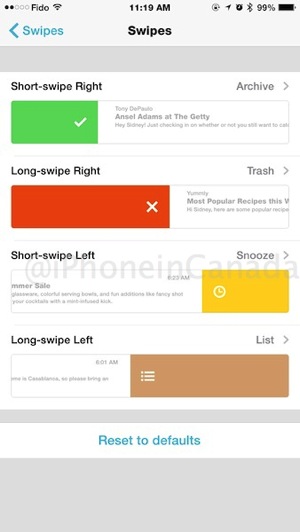
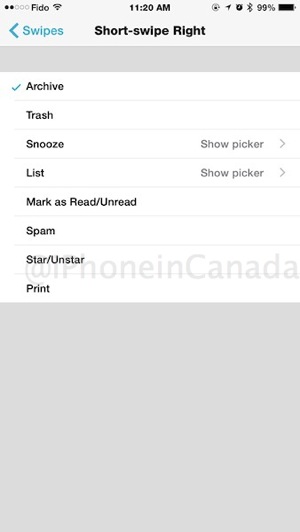
Adding a swipe for Spam is handy for the long-swipe left, as we rarely use Mailbox for make lists.
Mailbox currently only works for those with Gmail and iCloud accounts. Remember, if you have an iCloud account and are using Apple’s 2-step security, you will need to generate an app-specific password for it to work.
Click here to download Mailbox for iOS—it’s free. Let us know how you like this update!
Want to see more of our stories on Google?

P.S. Want to keep this site truly independent? Support us by buying us a beer, treating us to a coffee, or shopping through Amazon here. Links in this post are affiliate links, so we earn a tiny commission at no charge to you. Thanks for supporting independent Canadian media!

