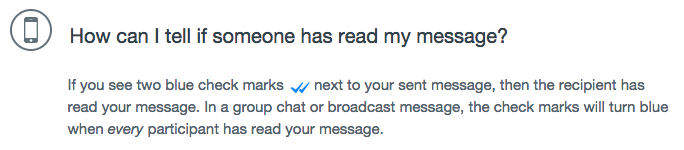
WhatsApp Messenger has received a quiet backend update to now show read receipts when you’re chatting with contacts, shown by new blue checkmarks. The details were noted in an update to the app’s iPhone FAQ page, which explained the addition of read receipts:
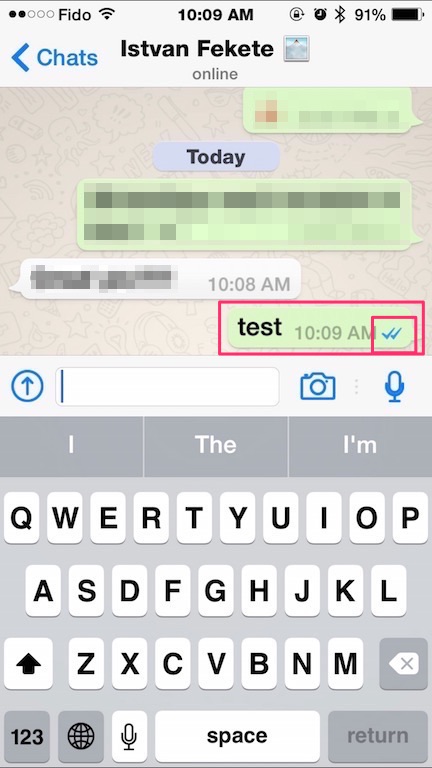
Here’s how it looks like in a chat:

WhatsApp says if you do not see double blue checkmarks, it could be because your recipient has not opened the conversation, is using an outdated version of WhatsApp or experiencing connection issues.
How to turn off WhatsApp read receipts? After looking through Chat Settings, there doesn’t seem to be an option for that. So if you aren’t a fan of read receipts, you’re out of luck.
On a side note, WhatsApp still desperately needs an update for the iPhone 6 and iPhone 6 Plus screens.
Let us know how you’re liking these read receipts in your WhatsApp chats
Click here to download WhatsApp for iPhone, it’s free for the first year, then $0.99/year thereafter.
[via 9to5Mac]


This double checkmark read receipt is there from ages.
It just meant delivered not read – this is new.
No as far as I am aware there is two checkmarks. If u get one it means delivered and two means read. If I am not wrong it’s there from at least year or more.
It’s been there forever, but like I said, the second check always meant delivered to the persons device not read. First check meant sent.
Yeah, but not the blue ones. Double checkmarks denoted it was received, not read.
ForceGoodFit – great for Whatsapp on 6 and 6+.
You can also swipe your message from right to left to see the exact delivery and read time.