
How to Disable Facebook Auto-Enhance Feature for Photos on iOS
A couple of days back, Facebook started enhancing photos automatically that are uploaded to the social network using an iPhone or iPad, using smart algorithms in an attempt to make them look better. However, if you don’t like the new feature, there’s an easy way to disable it completely (via iPhoneHacks).

Simply follow these steps to stop Facebook from automatically enhancing your uploaded photos:
Step 1:
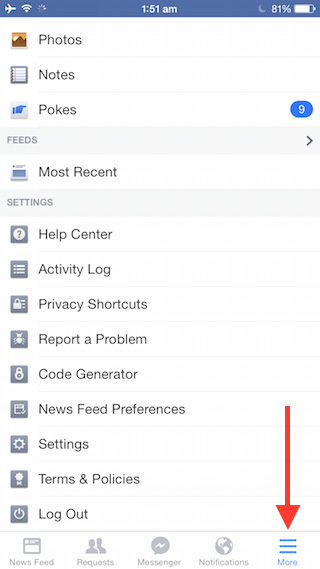
Tap the More tab at the bottom right corner in the Facebook app.
Step 2:
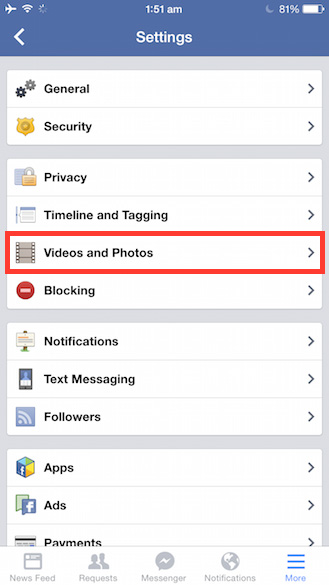
Scroll down and navigate to Settings > Videos and Photos.

Step 3:
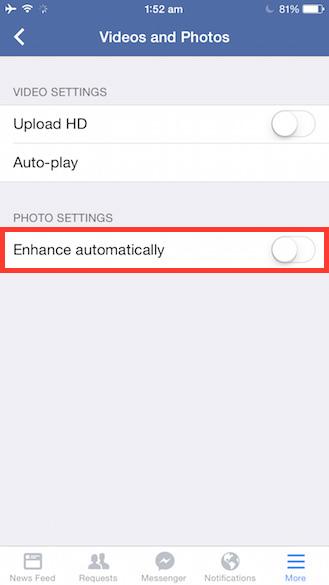
Tap on the toggle for Enhance Automatically to disable it.

That’s it. Enjoy!
Want to see more of our stories on Google?
P.S. Want to keep this site truly independent? Support us by buying us a beer, treating us to a coffee, or shopping through Amazon here. Links in this post are affiliate links, so we earn a tiny commission at no charge to you. Thanks for supporting independent Canadian media!