
Apple’s AirPort Utility App is Being Removed From the App Store
Apple warns that "functionality is not guaranteed" when using AirPort Utility on iOS 27 or later.
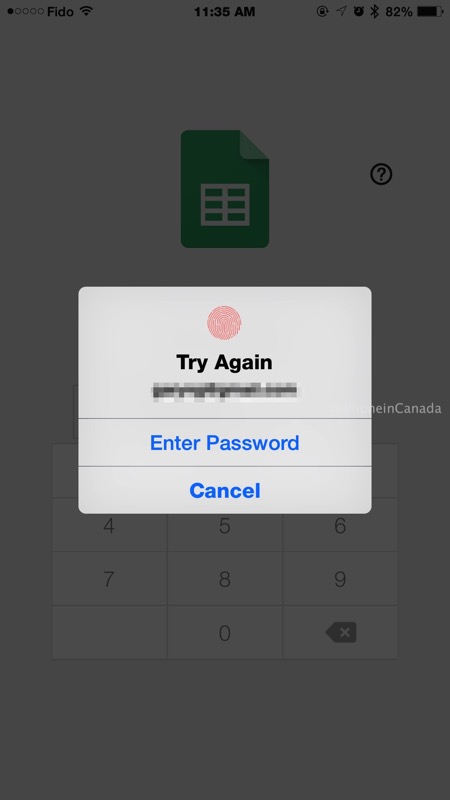
Google today has updated its Docs, Sheets and Slides iOS apps with some minor changes, but the big one being the support of Touch ID now for passcode lock, making it much easier to unlock documents instead of entering your 4-digit PIN.
Google Docs gains spellcheck, Google Sheets adds the ability to hide rows and columns, while Sheets adds the option to group objects together for faster editing. The full change log is below:
What’s New in Version 1.2.6448
* Spellcheck
* Touch ID support for Docs passcode lock
* Bug fixes and performance improvementsWhat’s New in Version 1.1.7297
* Hide rows and columns
* Touch ID support for Sheets passcode lock
* Bug fixes and performance improvementsWhat’s New in Version 1.0.5754
* Group objects together for quicker editing
* Touch ID support for Slides passcode lock
* Bug fixes and performance improvements
Here’s what it looks like (don’t mind the ‘Try Again’ message, I was taking a screenshot):
Download links: Google Docs, Google Sheets, Google Slides
Want to see more of our stories on Google?

P.S. Want to keep this site truly independent? Support us by buying us a beer, treating us to a coffee, or shopping through Amazon here. Links in this post are affiliate links, so we earn a tiny commission at no charge to you. Thanks for supporting independent Canadian media!

