
Apple’s AirPort Utility App is Being Removed From the App Store
Apple warns that "functionality is not guaranteed" when using AirPort Utility on iOS 27 or later.
Day One for iOS has been updated to bring 1Password support for logging into Day One accounts via the app’s settings. Once logged in, a user’s Day One account allows them to publish unique web entries and share them on social networks.
What’s New in Version 1.17.1
– Added support for using 1Password when logging into a Day One account.
– Fixed issue with “Last Photo Taken” option when adding a photo to an entry.
– Fixed issue where some international regions with 12-hour time wouldn’t use photo metadata when setting an entry’s date/time to photo’s date/time.
– Day One Sync performance improvements.
– Other minor improvements.
Here’s a screenshot of the 1Password integration within Day One for logging into your account:
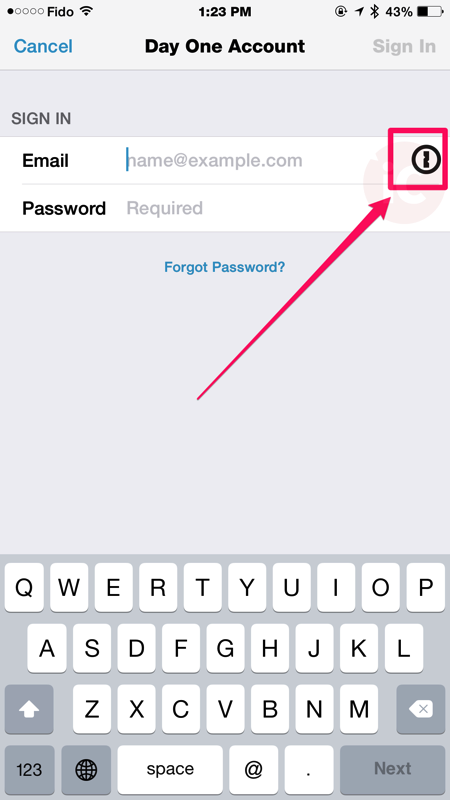
Every time I see an app add support for 1Password, I feel giddy inside as it makes life so much easier for existing users of the password manager.
Click here to download Day One for iOS in the App Store.
Want to see more of our stories on Google?

P.S. Want to keep this site truly independent? Support us by buying us a beer, treating us to a coffee, or shopping through Amazon here. Links in this post are affiliate links, so we earn a tiny commission at no charge to you. Thanks for supporting independent Canadian media!


Glad I’m not using LastPass…