This morning Apple unleashed watchOS 2 for Apple Watch users. This highly anticipated update was originally scheduled to release last week with iOS 9, but was delayed due to a bug. So to everybody’s surprise, it was released today, and it appears the heavy initial demand is causing errors.
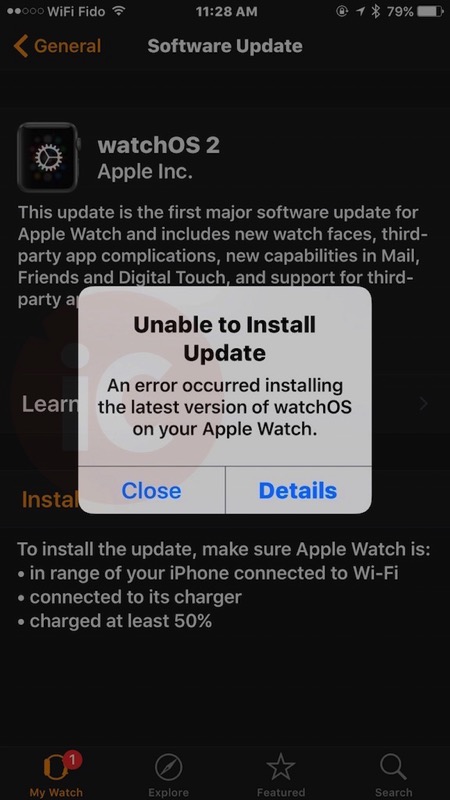
Our own update has not gone very smoothly, as we were greeted by the ‘Unable to Install’ error, which explains “an error occurred installing the latest version of watchOS on your Apple Watch.”
This popped up a couple times, and it took a few tries for the download to start again. We also at one point were greeted with the ‘watchOS 1.0.1’ screen which said ‘Your software is up to date’, which appeared to imply the update was pulled for a split second.
Anyways, right now the update has completed its ‘preparing’ stage and is back in its ‘verifying’ stage. I am sure it will install without any issues (after more attempts and endless waiting), but for those out there waiting and waiting, you may have better luck trying the update later on when Apple’s servers aren’t being crushed with heavy demand.
How has your watchOS 2 update gone so far?
Update: As many have suggested, rebooting your iPhone and Apple Watch may help. It worked for us!



installed without a hitch
Once again…. Patience is the word of the day!!!!
Do I have to install 1.01 first before I can install 2.0? My watch still says 1.01 is the latest update for some reason.
No problems with the update for my Apple Watch. Have iPhone 6+ 128 Gig with iOS 9
No luck installing for last 3 hours.. it goes from preparing to 1.5 hours of verifying, then i decided to reboot the watch.. and it is now back to downloading on my iphone.. sigh
Mine is good to go, had a few “not connected to wifi” moments, even though I was…did a hard reset on both phone and watch and it installed right away. So glad they added resume to previous activity now…such a pain before. Otherwise I’m not impressed with the new watch faces – still not enough customization in what’s displayed.
Rebooting the phone did the trick!
you’re installing it wrong
Clearly. That’s the first thing I asked myself!
Went smooth on the first try. 😀