

TVA Sports Just Locked in 12 More Years of NHL Hockey in French
Quebecor just locked in another 12 years of French-language NHL hockey, inking a sublicensing deal with Rogers that keeps TVA Sports as the main place to watch the league in French from the 2026-27 season through 2037-38. That sits beside the 12-year Prime Video Wednesday Night Hockey pact Rogers handed Amazon in July, which already...


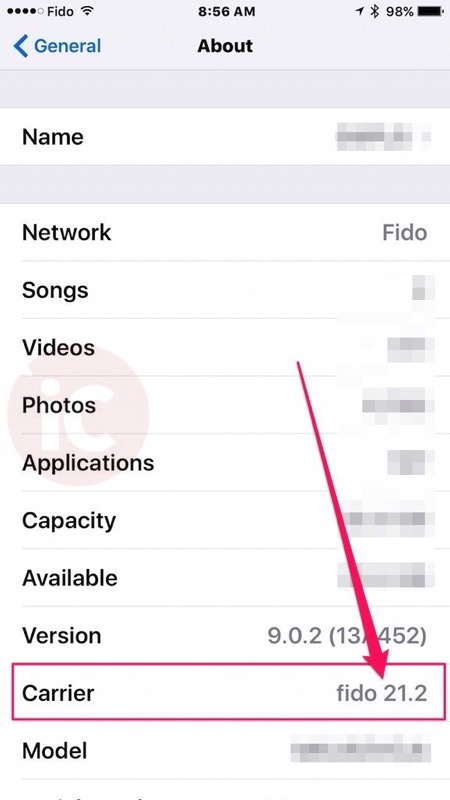
I got this update a few days ago, then immediately tried enabling wifi calling but still no luck 🙁
im on carrier version 22.0
im also on beta though
I now have working wifi calling, though only in airplane mode(wifi) aparrently.
wifi calling will only switch on when your cell coverage goes beneath a certain threshold
I’m on iOS 9.1 beta 3 Rogers carrier update shows version 22.0 and don’t even have the option for enabling / disabling wifi calling on my settings !!
which phone do you have?
6s plus
I had wifi calling working right when iOS9 came out, rogers tech actually called me to ask what steps I did to get it working… I had called in earlier saying it wasn’t working….. Mind you since this last carrier update, Im unable to make regular cellular calls….. stupid Robbers
Still no luck here as well. I still get the daily emails from Rogers saying they’re looking at it though. 🙂
All,
I am with fido and had several issues to enable wifi calling
the day the new phone launched.. Then I chatted with someone useless who couldn’t
do anything.
Basically it lets you turn on, enable, give confirmation but
after you enter e911 info the button was still off.
Called fido tech support, took 30 minutes for the girl to
figure out there is a SPECIAL CODE they have to add to your account for wifi
calling button be green and working.
Mine works from last week.
As soon as I enter the house I go into wifi calling mode as
there are only 1-3 bars on my new ip6s+.
Also one more thing I noticed, since I am always on wifi
calling mode at home, the data I use is recorded under cellular usuage. Please check
everyone.
Dataman shows I used 600mb but iphone carrier settings
usuage shows 2gb so far. This could be a ios bug, not sure.
So call fido tech support and ask them to add the code,
looks like not all agents know about this.
is bell canada getting wifi calling?
Yes. It’s out and only available for iPhone 6s and iPhone 6s Plus.
thx. i have the 6. so i guess not for me….
Not only that. Bell bastard only allow WIFI calling to selected phone plans. I am on grandfather plan, and they force me to change it if I want the feature. I wish I can move back to Fido
I guess that’s why my wifi-calling on my 6s on Bell with the grandfathered Enbridge20 plan doesn’t work. Unlimited data is great but it feels like the 3G is getting slower and now losing functionality…
this is just plan wrong. i thought that the iphone 6 had the capability to do this but now i understand that it is a money grab. since i go month to month, i think i will leave them as soon as a good plan comes out. thanks for the information andrew lee
I now get to enter my e911 details and accept the agreement but then when it tries provisioning it fails.. I have read that i need to get rid of 1Number so maybe that is still an issue.
For information after lots of phone call with Fido support, to have wifi calling working your phone need to be one bought in Canada or USA.
My French iphone doesn’t work, my new iphone bought in Canada is working.
Just a warning for people with retention plans with valuepacks on Rogers. When you turn on wifi calling, it some how removes the value pack and re-adds just call display without any notice or anything on your account. Happened to all 3 lines of mine, unfortunately those value packs are not in the system anymore and cannot be re-added.
I’m on Cityfone with Rogers 21.2. No luck on enabling wifi calling. I might have to call them to enable this. But not looking forward to waiting and potentially talking to a csr that has no idea about wifi calling.
Everyone who’s having an issue has had One Number turned off, right? Once they did that for me, worked as expected. Can’t have both.
I have WiFi calling enabled and it is provisioning. But every number I dial, the system is asking me to put 1 in front of the number, blah, blah. Is it normal, and is there any way to fix this without changing all the numbers in my address book?