
ChatGPT for Teens Launches with Study Mode, Strict Parental Controls
OpenAI has launched ChatGPT for Teens alongside a new parental resource hub with custom controls, study tools, and urgent safety alerts.
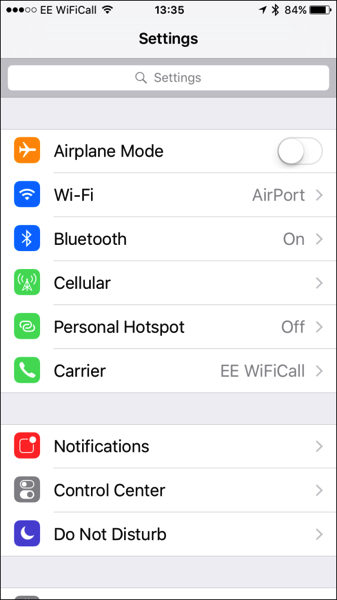
Starting with iOS 9, Apple has made it possible to search the Settings app. While the new feature is certainly handy and a welcome addition to the ever growing list of features in iOS, most people don’t seem to know about it. Here’s a simple guide to show you how to search in the iOS 9 settings app (via McElhearn):
Step 1:
Tap the Settings icon on the homescreen to launch it.
Step 2:
When the Settings app opens, you won’t see the Search field initially since it’s hidden by default. To reveal it, simply drag the window down a bit and it will appear.
Step 3:
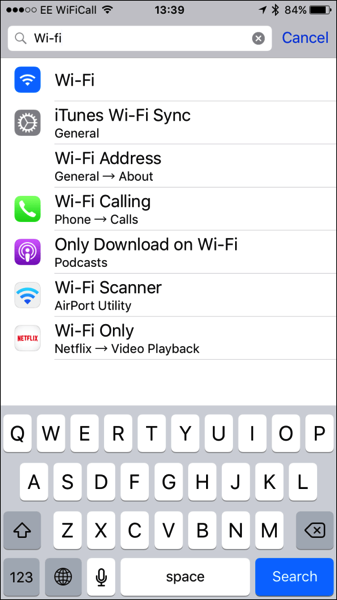
Now as you type into the Search field, you’ll start seeing the results as shown below; just tap one to view it.
That’s it, enjoy!
Want to see more of our stories on Google?

P.S. Want to keep this site truly independent? Support us by buying us a beer, treating us to a coffee, or shopping through Amazon here. Links in this post are affiliate links, so we earn a tiny commission at no charge to you. Thanks for supporting independent Canadian media!


thanks for the reminder. forgot about this feature