
Microsoft Announces Copilot Refresh With Autonomous Agents, Built-In Office and App Creation
Microsoft's new Copilot refresh centers on three pillars, including Home, Code, and Autopilot.
The iOS version of Google’s Waze navigation app has been updated with “planned drives,” allowing drivers to schedule commutes up to several days ahead of time and accommodate for traffic.
The feature, currently exclusive to iOS, can be invoked by picking a destination, and tapping an icon in the app’s ETA panel. Users can see peak traffic hours along their route, and as with an app like Google Calendar, get timed notifications to leave based on live traffic conditions.
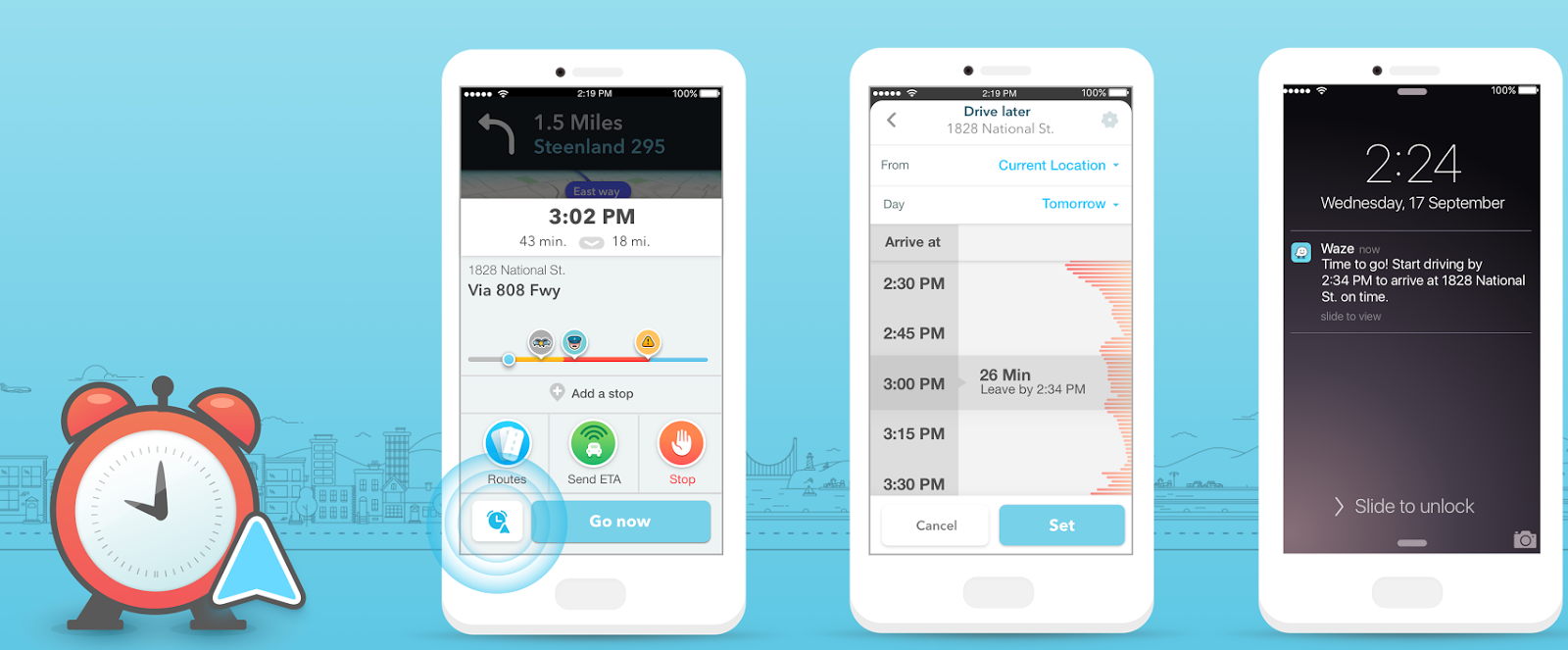
While trips can be created manually, the app can also automatically import events from Facebook or the iOS Calendar app, scraping them for times and addresses. Once on the road users can still use standard Waze features, like adding detours to places like gas stations and restaurants.
In a separate improvement, the traffic bar will now show a reason for an ongoing traffic jam, if available, such as an accident. When making a call on an iPhone, the updated app will automatically mute its own audio.
Waze for iOS is available as a free download from the App Store. The app requires any device running iOS 7.0 or later.
[via Waze Blog]
Want to see more of our stories on Google?

P.S. Want to keep this site truly independent? Support us by buying us a beer, treating us to a coffee, or shopping through Amazon here. Links in this post are affiliate links, so we earn a tiny commission at no charge to you. Thanks for supporting independent Canadian media!


Waze is going to the dogs. They eliminated the reporting event view feature and are now focussing more on social media integration.
For those that didn’t know, What the reports feature did was allow you to see in detail what events, say, an accident, road closure, or police trap was within your selected area before going on the road. Obviously, the feature was removed due to pressure from some US law enforcement agencies complaining that Waze was warming people about police presence.
Additionally, Waze data is based on crowdsourcing data. I recall when the Knight Street Bridge in Vancouver was closed for a long time, yet no Waze user reported it. Again, no data in, no data out ie. garbage in, garbage out. Their automatic traffic info system is extremely out of date and even the Waze moderators are unhappy about.
If you want to set a route, use Google or Apple Maps, Waze in the Vancouver area is horrible.
Haven’t used Waze in ages. Google Maps is my choice for routes.