Microsoft and Starbucks have announced a new ‘Starbucks for Outlook’ add-in, which brings a shortcut to the email app to quickly and easily setup calendar invites for meetings:
Outlook now makes it easier for you to have that personal connection by enabling you to meet your customers, business partners or study group at your favorite Starbucks location, all with a few clicks from your Outlook inbox.
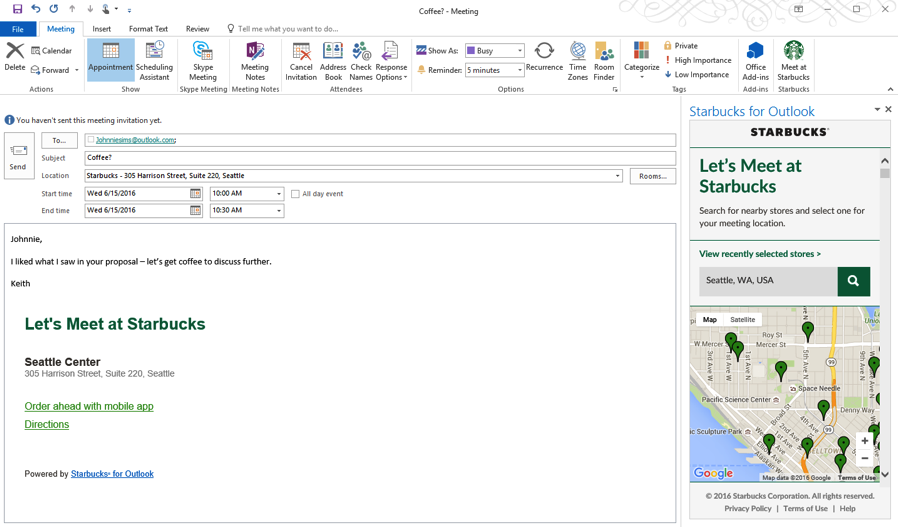
Once users install the add-in within Outlook, here’s how to setup a meeting at Starbucks:
1. Select “Meet at Starbucks” from the meeting request ribbon.
2. Enter a location in the add-in on the right side aof the meeting request.
3. Select location from map or scroll down and select location from list.
4. Select store by clicking “Select Store”. The store address will be inserted into the meeting invitation and it’s ready to send.

Starbucks says the Outlook add-in is currently only available for Outlook.com, Outlook 2013/2016, and web users who are using either Exchange 2013/2016, or Office 365. However, the company did mention they are working to bring this feature to Mac and iOS users “in the coming months.”
For those that have business meetings at Starbucks and use Outlook, it’s not a bad feature, that is if you can find a location that isn’t jam-packed all the time.




#vancouverlife
So true
Thanks for sharing this Gary. Definitely helpful #vancouverlife add-on. My workplace just upgraded to Office365 and Outlook and I just added it. As well as adding the Yelp add-on, does the same but for anything Yelp can find. I hope Yelp will add that as well.
Cheers! Downtown has sooo many locations now