Apple has just released iOS 11.0.3 with some bug fixes for iPhone, iPad and iPod touch. Here’s what’s new according to release notes:
- Fixes an is where audio and haptic feedback would not work on some iPhone 7 and iPhone 7 Plus devices
- Addresses an issue where touch input was unresponsive on some iPhone 6s displays because they were not serviced with genuine parts
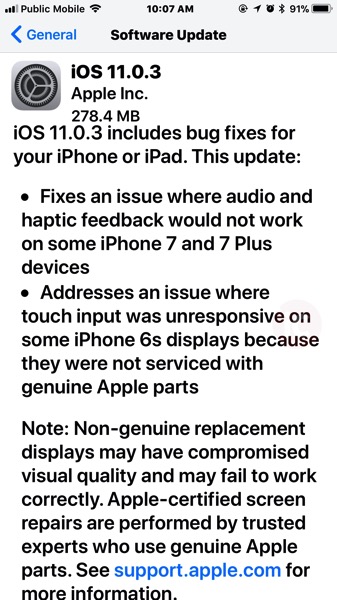
Apple also notes at the update “non-genuine replacement displays may have compromised visual quality and may fail to work correctly. Apple-certified screen repairs are performed by trusted experts who use genuine Apple parts.”
The update for iPhone 7 Plus comes in at 278.4MB.
Directly download links for iOS 11.0.3 (Build 15A432) below:
- iPad Air (Wi-Fi) (iPad4,1) — Download
- iPad Air (Cellular) (iPad4,2) — Download
- iPad Air (China) (iPad4,3) — Download
- iPad mini 2 (Wi-Fi) (iPad4,4) — Download
- iPad mini 2 (Cellular) (iPad4,5) — Download
- iPad mini 2 (China) (iPad4,6) — Download
- iPad mini 3 (Wi-Fi) (iPad4,7) — Download
- iPad mini 3 (Cellular) (iPad4,8) — Download
- iPad mini 3 (China) (iPad4,9) — Download
- iPad mini 4 (Wi-Fi) (iPad5,1) — Download
- iPad mini 4 (Cellular) (iPad5,2) — Download
- iPad Air 2 (Wi-Fi) (iPad5,3) — Download
- iPad Air 2 (Cellular) (iPad5,4) — Download
- iPad Pro (9.7”, Wi-Fi) (iPad6,3) — Download
- iPad Pro (9.7”, Cellular) (iPad6,4) — Download
- iPad Pro (Wi-Fi) (iPad6,7) — Download
- iPad Pro (Cellular) (iPad6,8) — Download
- iPad 5 (Wi-Fi) (iPad6,11) — Download
- iPad 5 (Cellular) (iPad6,12) — Download
- iPad7,1 (iPad7,1) — Download
- iPad7,2 (iPad7,2) — Download
- iPad7,3 (iPad7,3) — Download
- iPad7,4 (iPad7,4) — Download
- iPhone 5s (GSM) (iPhone6,1) — Download
- iPhone 5s (CDMA) (iPhone6,2) — Download
- iPhone 6 Plus (iPhone7,1) — Download
- iPhone 6 (iPhone7,2) — Download
- iPhone 6s (iPhone8,1) — Download
- iPhone 6s Plus (iPhone8,2) — Download
- iPhone SE (iPhone8,4) — Download
- iPhone 7 (iPhone9,1) — Download
- iPhone 7 Plus (iPhone9,2) — Download
- iPhone 7 (iPhone9,3) — Download
- iPhone 7 Plus (iPhone9,4) — Download
- iPhone10,1 (iPhone10,1) — Download
- iPhone10,2 (iPhone10,2) — Download
- iPhone10,4 (iPhone10,4) — Download
- iPhone10,5 (iPhone10,5) — Download
- iPod touch 6G (iPod7,1) — Download
…more to follow


Does it fix the clash of clans update problem!!!!! Dang it, I’m losing out at upgrading my yards 😛
What update problem?? #checksclashrightaway
If you start up the game, it will tell you that there’s an update. If you click the update button, it opens up the app in the App Store, but doesn’t let you update, it will only let you open it. So if you click open, the cycle just repeats itself. Checked online to see if it was just me, but it’s not. Some people have uninstalled and reinstalled with no luck. I’m just waiting it out. #thissucks
reboot your iPhone. it worked for me.
Thanks, it worked. Gotta make up for lost time!
My update installed via the App Store. Game loads fine so far…
Now if they could just fix the keyboard in landscape mode…
Don’t think the keyboard spacing is a glitch.
I would think they did this to accommodate the iPhone X that’ll also be using iOS 11. If the keyboard went right to the edge with that phone, it would be a bit rough hitting the Q and P on the keyboard as it would be essentially against your palms.
I have no proof of this, It’s just what I think.
This downsized keyboard is annoying, I keep hitting ‘return’ when i mean to hit ‘space’… I hope you’re wrong. haha
I hear ya. This might be something worth submitting product feedback to Apple about, perhaps a possible toggle switch in the options.
It’s a long shot, but at least you can get your voice out.
I’m not going to be excited about these update until I see “Performance tuning and optimizations for older devices” added to the release notes.
^ THIS !!!
My iPhone 6 lags as hell ever since I updated to iOS 11. Expected improvements with 11.0.1 but by the time I decided to revert to 10.3.3, Apple litteraly stopped signing it. 🙁