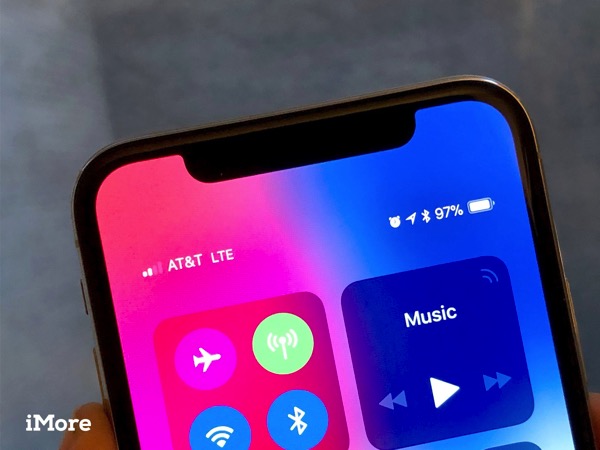
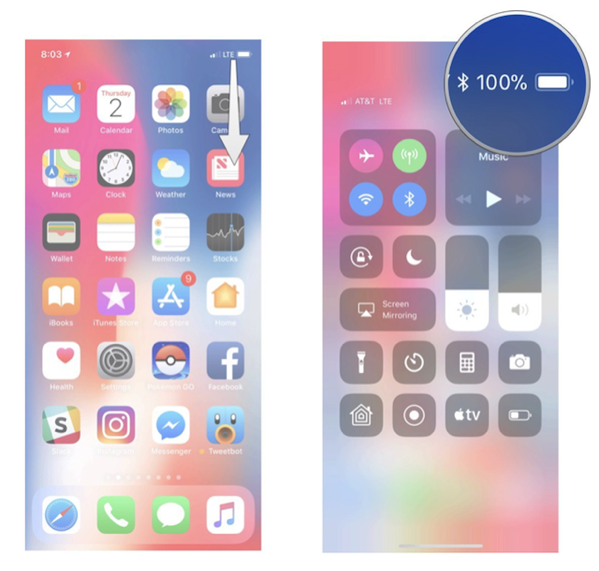
Previously, if you wanted to show the remaining battery percentage on your iPhone, all you needed to do was go to Settings > Battery and toggle on the Battery Percentage feature. However, no such toggle exists in the iPhone X. In order to be able view the battery percentage on the iPhone X, you need to follow these steps, as shown by Rene Ritchie via iMore:
Step 1:
Touch your finger to the top right “horn” (or ‘ear’) where the battery icon is.
Step 2:
Now swipe down to reveal Control Center

Screenshot via iMore
Step 3:
The battery percentage will now show on the top right.
Step 4:
Swipe up again to exit Control Center.
While the battery percentage won’t show all the time now like before, it now is just a swipe away. All you need to do is repeat the Control Center process whenever you want to see the battery percentage on your iPhone X. The lack of a battery percentage may be a good thing, as it’ll definitely help you reduce ‘battery anxiety’.



Ahhhhh…. I wish there was an option to personalize the notch…. Ex: Instead of seeing a real battery icon, to see the %… That would be useful 🙂
Or have a small icon like the one on the watch!
I’ll miss not seeing the % on the screen without a swipe!
That will be back in a future update…. people will be annoyed with that
I would gladly trade the battery icon for the % number because there is not enough room to display both
Someone should be fired. Apple was criticized for it’s simplicity. The X is becoming too complex to use. First it’s the forced shutdown and reboot sequence and now something so simple like wanting battery percentage.
If Apple insists on complicating user options, they’d better fully integrate Siri to do all these things including uninstalling and closing apps.
What is so complicated with the forced shutdown and reboot sequence ?
Can’t teach an old dog new tricks I suppose, eh 😛
iOS used not to have battery percentage and people hated it! That’s why when the feature came out everyone was so happy. This is definitely a step backwards.
Customizing the notch seems like the right move. For example, I only care about cell reception when I’m about to make a phone call. Other than that, just tell me if I’m on LTE or not.
Why couldn’t they just put it inside the battery indicator…?
There’s a great idea! That would be great.
Quite an inconvenience, that battery percentage is extremely valuable right there on the home screen.
The moment I saw that percentage would not be seen unless in control centre I was put off. Not a good idea. Not a deal breaker but it will be very annoying.
I’d rather have the percentage than the battery icon.