Apple recently addressed a bug that caused the letter “i” to autocorrect to “A[?]” with the release of iOS 11.1.1 and now, hundreds of iPhone users are reporting that the word “it” is autocorrecting to “I.T” on iOS 11 and later.
According to MacRumors, when affected users type the word “it” into a text field, the keyboard first shows “I.T” as a QuickType suggestion. After tapping the space key, the word “it” automatically changes to “I.T” without actually tapping the predictive suggestion (shown below).
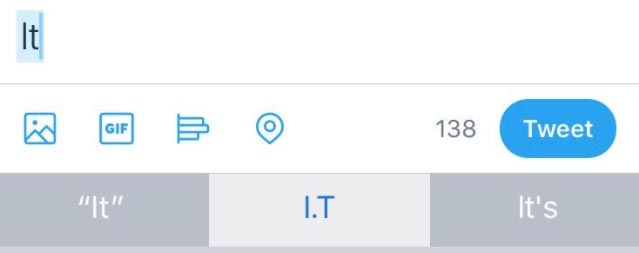
Increasing number of iPhone users running iOS 11 or later have been sharing their frustration regarding this autocorrect bug on forums, Twitter and other discussion platforms on the web for the past couple of months. One affected user has even shared a video that shows the issue can cause the word “is” to be autocorrected to “I.S” as well.
Many users claim the apparent autocorrect bug persists even after rebooting the device and performing other basic troubleshooting.
A temporary workaround is to tap Settings > General > Keyboard > Text Replacement and enter “it” as both the phrase and shortcut, but some users insist this solution does not solve the problem.
A less ideal workaround is to toggle off auto-correction and/or predictive suggestions completely under Settings > General > Keyboard.
Check out the following video showing the autocorrect bug in action and tell us if you’ve been experiencing this on your iPhone or iPad as well.




I keep getting “if” autocorrected to “IDF” ????
iOS 11 auto correct has been really bad for me. Not sure what’s going on by typing too quickly can be a travesty
I’m lucky that this does not affect any of my devices running iOS11 but how can this affect only a portion of same/similar devices running the exact same copy of firmware? Funny.
I don’t seem to be having any of those issues on my iPhone 7 but I am running the 11.2 beta.
Use gboard by Google best keyboard for iPhone has swipe and u can minimize they keyboard for one hand typing too!