Did you recently switch to the $60/10GB plan being offered by Rogers/Fido, Bell/Koodo and Telus/Koodo in BC, Alberta or Ontario?
Some Telus customers who recently switched over to the promo $60/10GB plan are experiencing issues with Personal Hotspot on their iPhone not working. Personal Hotspot allows iPhone users to tether their data connection to any wireless device, such as Mac, PC, iPad or anything else.
Another issue is related to VoLTE, as voice calls drop to 3G instead of staying on LTE.
If you’re one of these people experiencing these issues on Telus, here is a fix, according to Twitter user @Kektex. It’s related to the Telus APN setting on iPhone, which appears to change after customers switch to the new $60/10GB plan.
Here’s how to fix your Personal Hotspot and LTE signal issues for Telus users:
1. On your iPhone, go to:
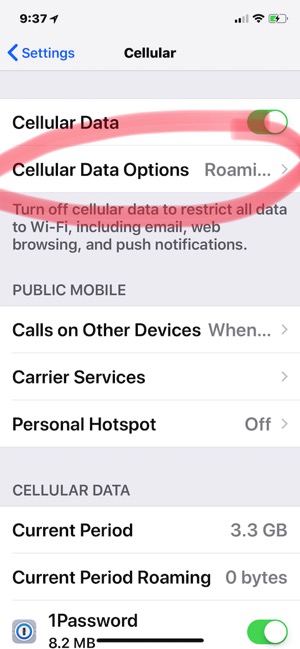
Settings > Cellular > Cellular Data Options…
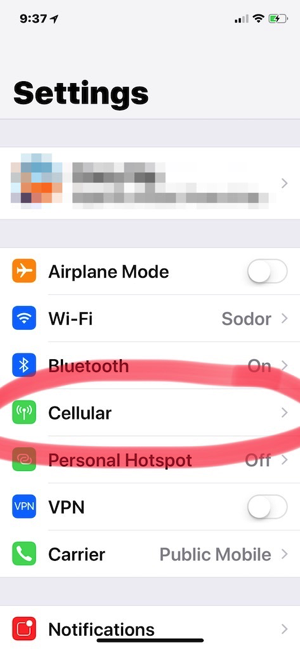

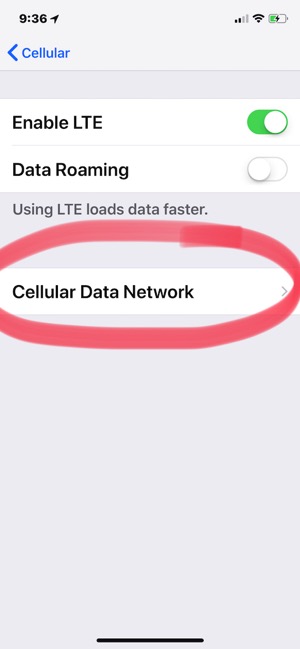
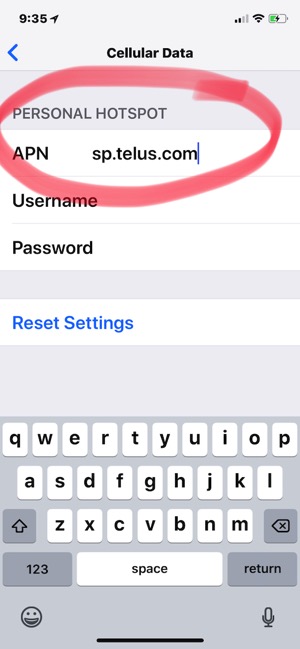
…then Cellular Data Network > Cellular Data.
Under Personal Hotspot, change the APN field from isp.telus.com to sp.telus.com
Once that’s done, go back to Settings and wait a few minutes, and Personal Hotspot should return. Try powering off your phone and turning it back on too, if nothing shows up.
Once you’ve made this change, Personal Hotspot should be fixed. You may also want to try signing out and back into your iCloud account too.
If anything, a Telus carrier update will be pushed at some point to fix this issue for customers. The suggested fix has worked for some iPhone in Canada readers.
For those experiencing voice calls falling back to 3G instead of LTE, ensure ‘Voice & Data’ is toggled ON under ‘Enable LTE’ under Cellular settings.
Let us know if it works for you and if you’re suffering from this iPhone Personal Hotspot issue on Telus.



Lol. Took me 3 hours of google searching to figure this out yesterday. Then all of my iMessages were only showing numbers instead of names after I signed out and back into iCloud …. another 30 minutes of searching for the answer. Settings- Contacts- Short Name- toggle short name off.
thanks !
Your welcome. ? lol
This also fixed WiFi calling for me.
I wish I knew this sooner, I ended up just using the online chat with Telus. She made a change on their end and told me to reboot my phone and it worked after that. Although my settings still say isp.telus.com
Thanks. The hotspot works. Switch over on two days ago and hotspot does not working. Telus *611 cannot be reached after 2 1/2 hours. Gave up. Gonna try again this morning at 9:00 an. Must be due to this issues.LOL
Still have calls coming in at very low volume even when my phone volume is a max. Have to answer call on speaker phone to hear the caller. Not sure if this fix will help. too early (6:38 am) to call anyone
Thanks for helping to fix this issue.
This absolutely worked, wish I had seen this posted before waiting on hold for 2.5 hours for no solution.
Thanks. That worked.