
Apple’s AirPort Utility App is Being Removed From the App Store
Apple warns that "functionality is not guaranteed" when using AirPort Utility on iOS 27 or later.
Starbucks today updated its iPhone app with a holiday update, bringing a new themed splash screen showing red and green, while also letting customers add gift cards using their device’s camera.
Ahead of the holiday gift cards onslaught, when you tap the Cards tab and tap “+ Add card”, there is now an option to scan your gift card by tapping the barcode icon as shown below:
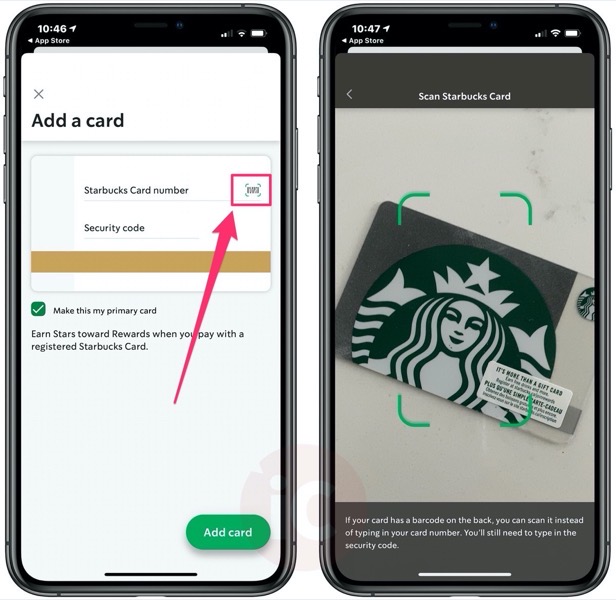
Starbucks explains, “If your card has a barcode on the back, you can scan it instead of typing in your card number. You’ll still need to type in the security code.”
It’s also possible to send Starbucks digital gift cards via iMessage.
Click here to download Starbucks for iPhone in the App Store. The update also addresses some login issues and fixes bugs as well.
Want to see more of our stories on Google?

P.S. Want to keep this site truly independent? Support us by buying us a beer, treating us to a coffee, or shopping through Amazon here. Links in this post are affiliate links, so we earn a tiny commission at no charge to you. Thanks for supporting independent Canadian media!

