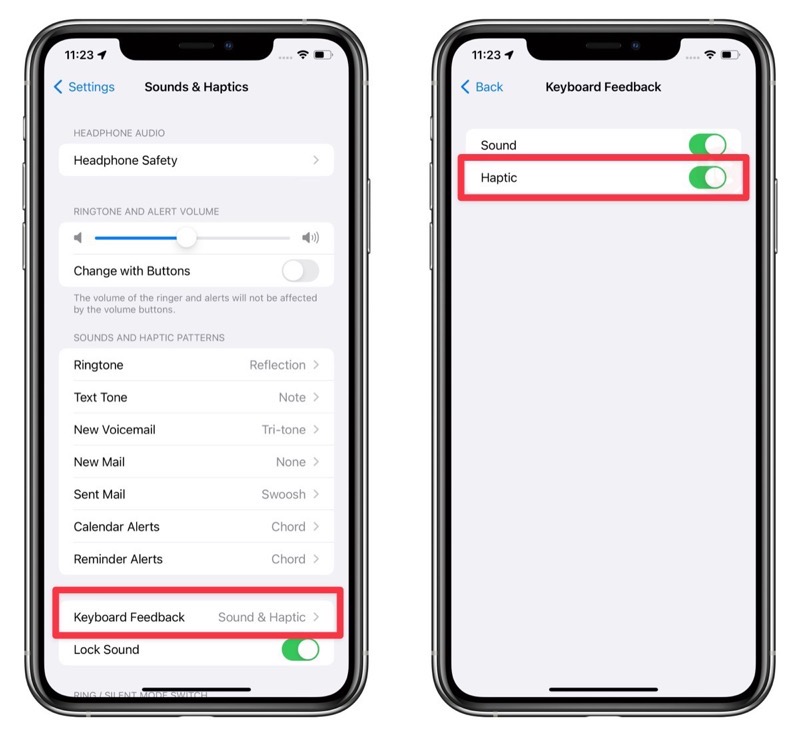
As part of keyboard updates in iOS 16, a feature that has finally arrived is haptic feedback, long available on Android and also Google’s Gboard keyboard for iOS (since 2019).
How to enable haptic keyboard feedback on your iPhone in iOS 16? All you have to do is enable a toggle in settings—here’s how to do it (check out our screenshot above as well):
1. Go to Settings > Sound & Haptics > Keyboard Feedback
2. Tap on the toggle for ‘Haptic’
Now, according to Apple, you can “feel confirmation when you type.” The haptic feedback is very subtle and just enough to feel some feedback as you type.
Other new keyboard updates coming in iOS 16:
- New Shuangpin layout – An additional layout called Changyong is now available for Shuangpin users.
- QuickPath for Traditional Chinese – QuickPath is now supported for typing Traditional Chinese using Pinyin.
- Cantonese input – Users can now input Cantonese words and phrases using Jyupting and other phonetic methods.
- Sichuanese dialect support – Type words and phrases in Sichuanese more easily when using the Simplified Chinese Pinyin keyboard.
- New languages for autocorrect: English (New Zealand), English (South Africa), and Kazakh.
- New languages for emoji search – Albanian, Armenian, Azeri, Bangla, Burmese, Estonian, Filipino, Georgian, Icelandic, Khmer, Lao, Latvian, Lithuanian, Marathi, Mongolian, Punjabi, Tamil, Urdu, and Uzbek (Latin).
- New languages for keyboard layout: Apache, Dzongkha, Samoan, and Yiddish.



I wish they would enable QuickPath on the full sized keyboard in iPadOS, and not just with the floating keyboard.
I had this on my jailbroken iPhone many years ago. Really miss it. About time.