
Apple Podcasts Subscriptions Are Finally Getting Video
Apple Podcasts Subscriptions are getting video, letting creators sell subscriber-only video, ad-free viewing, early access and bonus content.
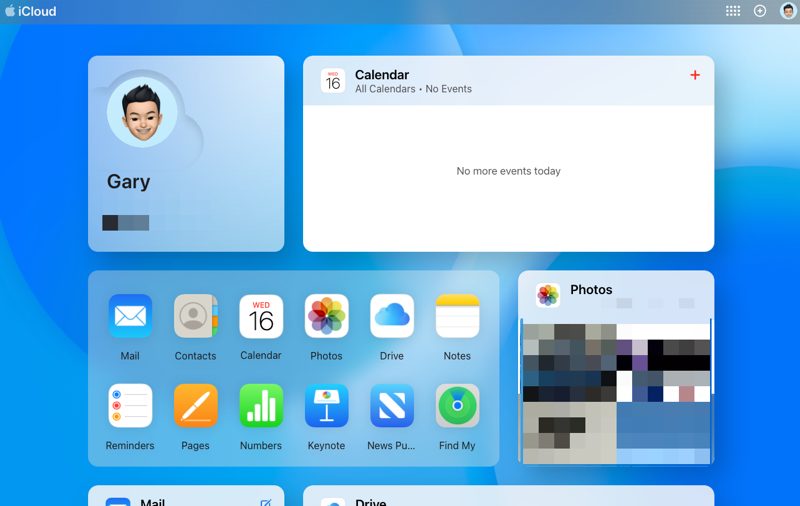
There’s a new version of Apple’s iCloud.com website that has debuted today, after weeks of beta testing, reports MacRumors.
The new layout features customizable tiles that can be added and removed, similar to editing apps on an iPhone Home Screen.
An option to ‘Customize Home Page’ at the bottom of the screen turns the tiles into ‘jiggle mode’, where you can tap a “-“ button to remove them.
While in ‘jiggle mode’, tapping ‘Add Tile’ in the upper left corner brings up the question, “Which tile do you want to add?”. From here, you can pick from Photos, Mail, Drive, Notes, Calendar, Numbers, Pages, Reminders, Keynote, Hide My Email, Custom Email Domain and a customizable ‘Apps’ tile.
The bottom of the iCloud.com website now shows your iCloud storage plan, how much storage is used and how much is remaining, along with Data Recovery options.
Overall, it’s a much cleaner look compared to before and those that rely on iCloud.com may find this new design easier to use than before.
Want to see more of our stories on Google?

P.S. Want to keep this site truly independent? Support us by buying us a beer, treating us to a coffee, or shopping through Amazon here. Links in this post are affiliate links, so we earn a tiny commission at no charge to you. Thanks for supporting independent Canadian media!


Nice… I was wondering why I had so little space left on my iCloud, apparently my old iPad Air that I use only downstairs, miraculously started doing iCloud backups without me telling it to, disabled, deleted and space freed up. Much better now.