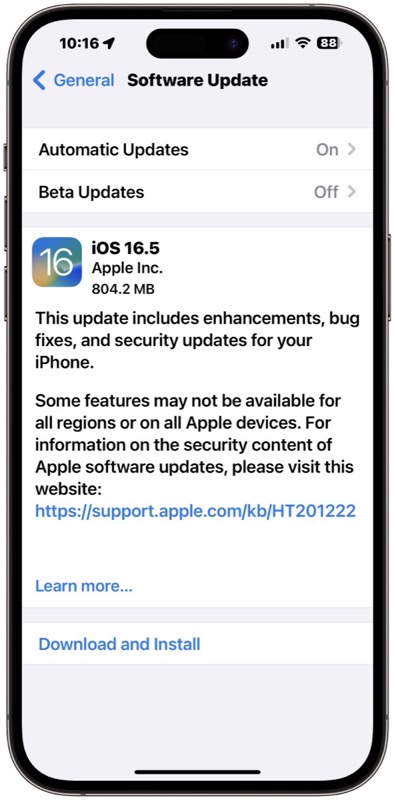
Apple has released iOS 16.5 for the masses, now available for iPhone users. The update says it “includes enhancements, bug fixes, and security updates for iPhone.” This final release comes after two RC versions made available for developers to test.
This latest iOS 16.5 update comes in at 804.2MB for the iPhone 14 Pro Max. This update brings the new Pride wallpaper for Pride month, a Sports tab in Apple News and fixes issues related to Spotlight, Podcasts on CarPlay, and Screen Time.
Also available today are iPadOS 16.5 for iPad, watchOS 9.5 for Apple Watch, macOS Ventura 13.4 for Mac, tvOS 16.5 for Apple TV and HomePod Software 16.5.
Apple has also released iOS 15.7.6, macOS Big Sur 11.7.7 and macOS Monterey 12.6.6 for older devices.
You can update your iOS device by going to Settings > General > Software Update.
Direct iOS 16.5 and iOS 15.7.6 downloads are below:
- iOS 16.5 (Build 20L563) for:
- Apple TV 4 (AppleTV5,3) — Download
- AudioAccessory5,1 (AudioAccessory5,1) — Download
- iOS 15.7.6 (Build 19H349) for:
- iPad mini 4 (Wi-Fi) (iPad5,1) — Download
- iPad mini 4 (Cellular) (iPad5,2) — Download
- iPad Air 2 (Wi-Fi) (iPad5,3) — Download
- iPad Air 2 (Cellular) (iPad5,4) — Download
- iPhone 6s (iPhone8,1) — Download
- iPhone 6s Plus (iPhone8,2) — Download
- iPhone SE (iPhone8,4) — Download
- iPhone 7 (CDMA/GSM/LTE) (iPhone9,1) — Download
- iPhone 7 Plus (CDMA/GSM/LTE) (iPhone9,2) — Download
- iPhone 7 (GSM/LTE) (iPhone9,3) — Download
- iPhone 7 Plus (GSM/LTE) (iPhone9,4) — Download
- iPod touch 7G (iPod9,1) — Download
- iOS 16.5 (Build 20F66) for:
- iPad Pro (9.7”, Wi-Fi) (iPad6,3) — Download
- iPad Pro (9.7”, Cellular) (iPad6,4) — Download
- iPad Pro (Wi-Fi) (iPad6,7) — Download
- iPad Pro (Cellular) (iPad6,8) — Download
- iPad 5 (Wi-Fi) (iPad6,11) — Download
- iPad 5 (Cellular) (iPad6,12) — Download
- iPad Pro 2 (12.9”, Wi-Fi) (iPad7,1) — Download
- iPad Pro 2 (12.9”, Cellular) (iPad7,2) — Download
- iPad Pro (10.5”, Wi-Fi) (iPad7,3) — Download
- iPad Pro (10.5”, Cellular) (iPad7,4) — Download
- iPad 6 (Wi-Fi) (iPad7,5) — Download
- iPad 6 (Cellular) (iPad7,6) — Download
- iPad 7 (Wi-Fi) (iPad7,11) — Download
- iPad 7 (Cellular) (iPad7,12) — Download
- iPad Pro 3 (11”, Wi-Fi) (iPad8,1) — Download
- iPad Pro 3 (11”, Wi-Fi, 1 TB) (iPad8,2) — Download
- iPad Pro 3 (11”, Cellular) (iPad8,3) — Download
- iPad Pro 3 (11”, Cellular, 1 TB) (iPad8,4) — Download
- iPad Pro 3 (12.9”, Wi-Fi) (iPad8,5) — Download
- iPad Pro 3 (12.9”, Wi-Fi, 1 TB) (iPad8,6) — Download
- iPad Pro 3 (12.9”, Cellular) (iPad8,7) — Download
- iPad Pro 3 (12.9”, Cellular, 1 TB) (iPad8,8) — Download
- iPad8,9 (iPad8,9) — Download
- iPad8,10 (iPad8,10) — Download
- iPad8,11 (iPad8,11) — Download
- iPad8,12 (iPad8,12) — Download
- iPad mini 5 (Wi-Fi) (iPad11,1) — Download
- iPad mini 5 (Cellular) (iPad11,2) — Download
- iPad Air 3 (Wi-Fi) (iPad11,3) — Download
- iPad Air 3 (Cellular) (iPad11,4) — Download
- iPad11,6 (iPad11,6) — Download
- iPad11,7 (iPad11,7) — Download
- iPad12,1 (iPad12,1) — Download
- iPad12,2 (iPad12,2) — Download
- iPad13,1 (iPad13,1) — Download
- iPad13,2 (iPad13,2) — Download
- iPad13,4 (iPad13,4) — Download
- iPad13,5 (iPad13,5) — Download
- iPad13,6 (iPad13,6) — Download
- iPad13,7 (iPad13,7) — Download
- iPad13,8 (iPad13,8) — Download
- iPad13,9 (iPad13,9) — Download
- iPad13,10 (iPad13,10) — Download
- iPad13,11 (iPad13,11) — Download
- iPad13,16 (iPad13,16) — Download
- iPad13,17 (iPad13,17) — Download
- iPad13,18 (iPad13,18) — Download
- iPad13,19 (iPad13,19) — Download
- iPad14,1 (iPad14,1) — Download
- iPad14,2 (iPad14,2) — Download
- iPad14,3 (iPad14,3) — Download
- iPad14,4 (iPad14,4) — Download
- iPad14,5 (iPad14,5) — Download
- iPad14,6 (iPad14,6) — Download
- iPhone 8 (CDMA/GSM/LTE) (iPhone10,1) — Download
- iPhone 8 Plus (CDMA/GSM/LTE) (iPhone10,2) — Download
- iPhone X (CDMA/GSM/LTE) (iPhone10,3) — Download
- iPhone 8 (GSM/LTE) (iPhone10,4) — Download
- iPhone 8 Plus (GSM/LTE) (iPhone10,5) — Download
- iPhone X (GSM/LTE) (iPhone10,6) — Download
- iPhone XS (iPhone11,2) — Download
- iPhone XS Max (iPhone11,4) — Download
- iPhone XS Max (China) (iPhone11,6) — Download
- iPhone XR (iPhone11,8) — Download
- iPhone 11 (iPhone12,1) — Download
- iPhone 11 Pro (iPhone12,3) — Download
- iPhone 11 Pro Max (iPhone12,5) — Download
- iPhone12,8 (iPhone12,8) — Download
- iPhone13,1 (iPhone13,1) — Download
- iPhone13,2 (iPhone13,2) — Download
- iPhone13,3 (iPhone13,3) — Download
- iPhone13,4 (iPhone13,4) — Download
- iPhone14,2 (iPhone14,2) — Download
- iPhone14,3 (iPhone14,3) — Download
- iPhone14,4 (iPhone14,4) — Download
- iPhone14,5 (iPhone14,5) — Download
- iPhone14,6 (iPhone14,6) — Download
- iPhone14,7 (iPhone14,7) — Download
- iPhone14,8 (iPhone14,8) — Download
- iPhone15,2 (iPhone15,2) — Download
- iPhone15,3 (iPhone15,3) — Download



It would be nice if Apple allowed us to delete ALL of their wallpaper designs to save room on our phones.