Grok Bot can now work with several of the apps already on your Mac, including Messages and Mail. The AI assistant’s latest update adds access to Notes, Reminders, Calendar, Location and Contacts as well, letting it do more than answer questions in a chat window.
The November 12 announcement follows last month’s Grok Bot app integrations on iPhone and Android. That rollout did not include iMessage, while Mac access to Mail and Notes had not yet been officially announced. This time, the company explicitly names the Mac and both apps.
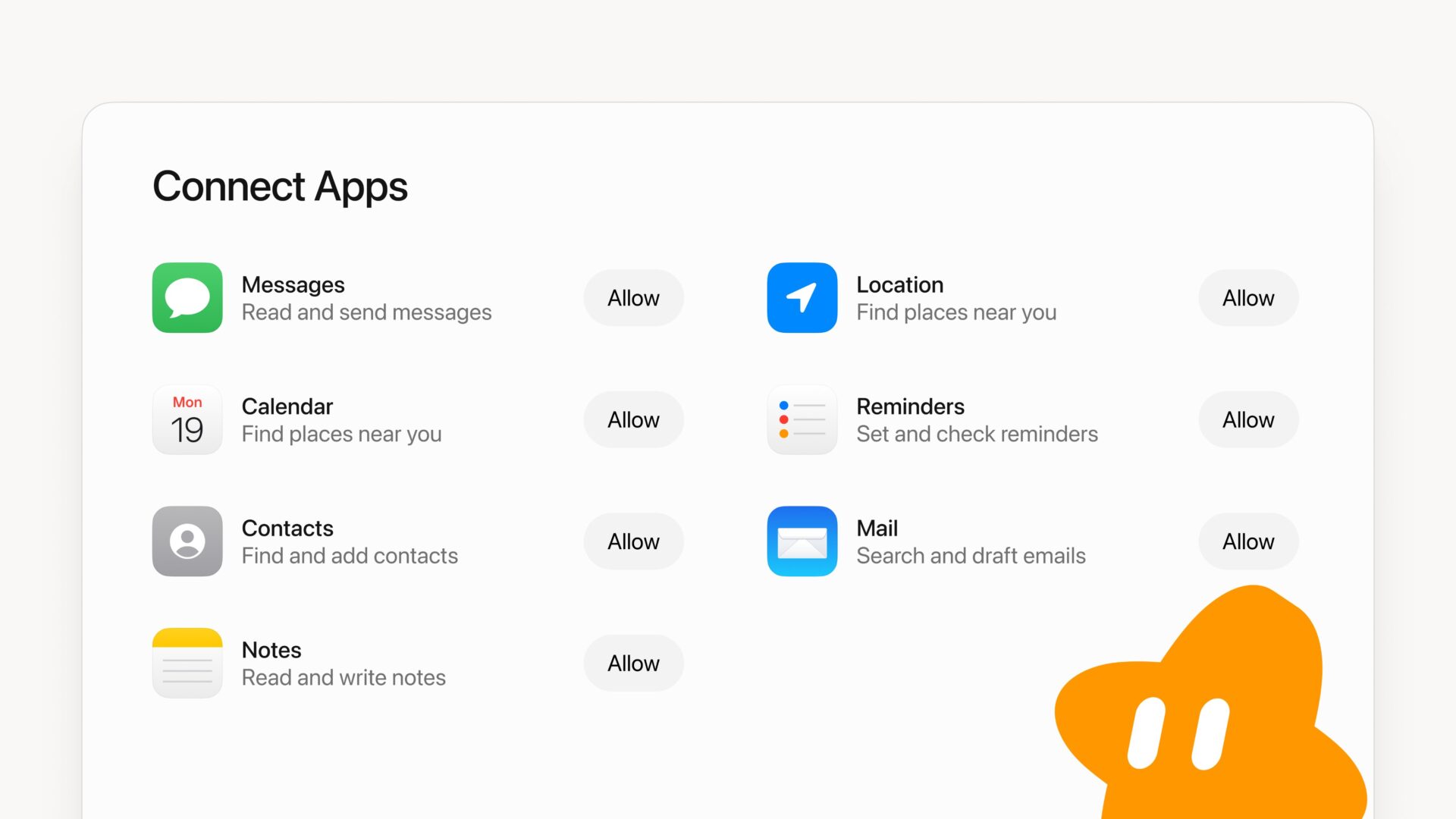
The official “Connect Apps” screenshot shows separate Allow buttons for each connection. Messages is described as supporting reading and sending messages, while Mail can search and draft emails. Notes supports reading and writing notes, Reminders can set and check reminders, Contacts can find and add contacts, and Location can find places nearby. Calendar is also included, although the graphic repeats Location’s description beneath it rather than explaining its functions.
The update brings the assistant closer to the information you already keep in Apple’s apps. Instead of copying text from a note into a chatbot, a connected assistant can work with that note directly. The difference between Mail and Messages also matters: the graphic promises email drafts, not automatic email sending, while Messages explicitly lists sending as a capability.
Those Allow buttons are worth paying attention to. You can decide which connections you want to grant rather than treating access to your messages, contacts and notes as one all-or-nothing choice. Start with the apps you actually need the assistant to use, and review anything it prepares before relying on it.
Grok Bot has steadily been adding ways to get work done across devices, including starting a voice chat from the iPhone’s Action Button. The latest change is specifically about Mac app access, not an announcement that the earlier iPhone iMessage limitation has been lifted.
The official announcement does not specify a minimum macOS version, a separate Canadian rollout date or any new pricing for these connections. In replies, the Grok Bot account directs users asking for help with setup back to their own Bot.
Would you let Grok Bot work with your Mac’s Messages and Mail, or would you start with Notes and Reminders?