You wanted to be different from everyone else by getting an iPhone. Now that you have your unlocked iPhone in Canada, how are you going to make your new toy unique and original? That’s easy, all you need to do now is change your iPhone’s wallpaper or theme. Let’s get started on how we do this on our iPhones, with the help of a 3rd party application called “Summerboard”!
How to Change Your iPhone Wallpaper or Theme
1. Open Installer, go to All Packages, and then install “Summerboard” (Version 3.0 if you’re on 1.1.1 or 1.1.2; or, “Summerboard Old” if you’re on firmware version 1.0.2). Restart your iPhone. Summerboard is a program that will let you download themes and change your iPhone’s wallpaper.
2. Next, launch Summerboard (the icon reads SMBPrefs) from your Springboard. Go to Theme, and select one of the provided themes. If you want to use the theme wallpaper, go to Theme Wallpaper and change the box to “On”. Otherwise, your chosen wallpaper will be your background.
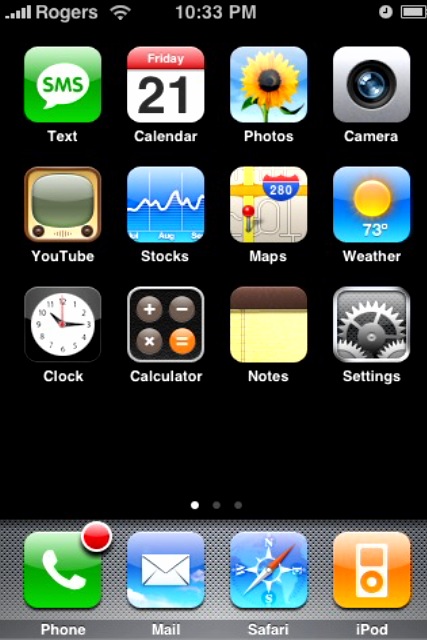
Here is the default iPhone Springboard:

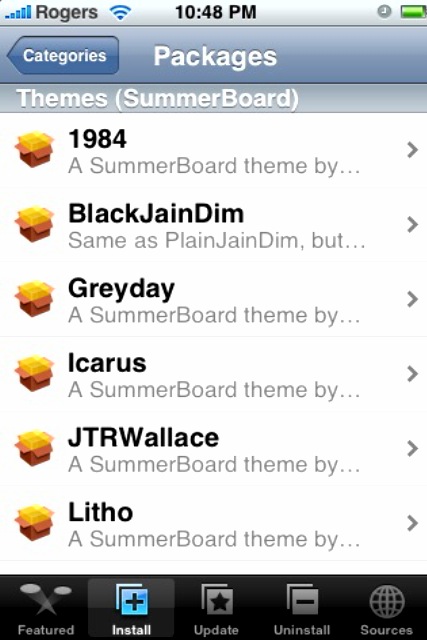
3. Within Installer, if you go to “Themes (Summerboard)” and you will see a long list of cool looking themes:
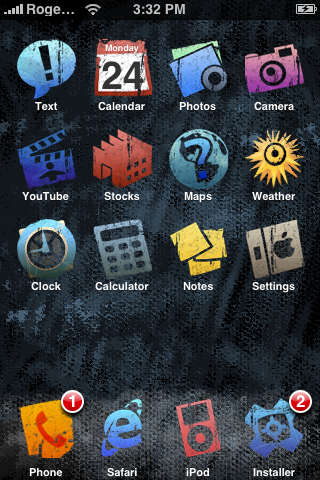
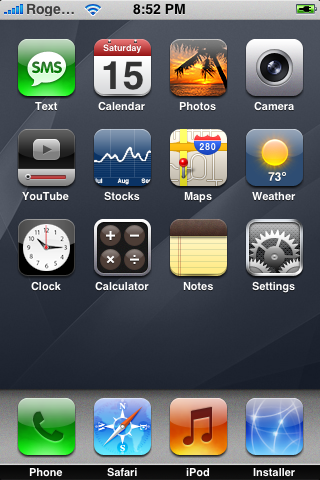
Here are a couple examples of what your iPhone can look like when you customize the themes and wallpaper through Summerboard:
Couple notes: some people have experienced a slowdown with your iPhone by installing Summerboard (including more crashes when using Safari). I have experienced this myself with 1.1.1, so I have Summerboard uninstalled. I like the default iPhone theme. But for you, feel free to choose whatever theme or wallpaper you desire!
PS – Sorry about the lack of update yesterday, I have been working full time so that means my spare time is at a minimum right now! Stayed tuned for more though! 🙂
If you enjoyed this post, please subscribe to my RSS feed, so you won’t miss any updates!



It is so eazy! 🙂
T__T i cant do it
its worksssss
i dont have the installer program on my phone. I also cant find summer board. im trying to put my pictures on my home screen. my phone is a fido Iphone. HELP!!!
thank you so much!
Kang
you have to jailbreak it first, noob
Internet should ban retarded people. They makes me sick
Kang is wet behind the ears.
FUCK you hi5, everyone needs to start learning somehow. The internet should ban ignorant fuck-ups like you that bash on poor beginners so that you feel better. Asshole. How would you feel if you tried to learn something new and someone said “you need to get out cuz ur retarded”? FUCK YOU ASSHOLE. I hope the moderator looks at your sorry ass’ smart comment before deleting mine. FUCKING people i swear if i could reach at you through the internet i’d smash your face on your screen.
u got dissed asswhole i agree with JIM
Whoeh i am an ass.
Does this work for 2.1 Iphones as wel, I did jailbreaked it.
thankh you i can do it
i would like to change my screen saver/theme,i do not want my new sms to show on the screen reveiling the wole detail, how do i go about this. pls help .
thanx
uhh i dowloaded it, i have version 1.1.4 something like that and when i go to themes to selec one, there are none o.o!
and i tried downloading some..
anyone help?
i cant find springboard on my 3g
First of all the springboard it was screen you see when you phone is on, like the desktop
i use cydia ( you get this by jailbreaking your phone, use Quickpwn), and my phone it up todate with all of the recent releases.
right know you can download Winterboard and install that, it will allow you to customize your phone, as for the themes, you also need to download those via cydia them open Winterboard to activate them.
thanks for the tips. this tips can help me problem
how do u change the theme im young and clueless and screw u retarded fuctard kang suck my balls…..>=-l
hahahaha JIM very well said i came here to search about themes but after reading your comment on hi i was laughn ….very well said keep it up bro i am with you 🙂
Great tutorial…thanks for the post. Came across a site which had some pretty cool wallpapers.
http://www.iphonewallpaperbabes.com
Great tutorial…thanks for the post. Came across a site which had some pretty cool wallpapers.
http://www.iphonewallpaperbabes.com
thanks for shared..
News Gadget New | Cell Phone Review
It is so eazy! 🙂
T__T i cant do it
its worksssss
i dont have the installer program on my phone. I also cant find summer board. im trying to put my pictures on my home screen. my phone is a fido Iphone. HELP!!!
thank you so much!
Kang
you have to jailbreak it first, noob
Internet should ban retarded people. They makes me sick
Kang
you have to jailbreak it first, noob
Internet should ban retarded people. They makes me sick
FUCK you hi5, everyone needs to start learning somehow. The internet should ban ignorant fuck-ups like you that bash on poor beginners so that you feel better. Asshole. How would you feel if you tried to learn something new and someone said “you need to get out cuz ur retarded”? FUCK YOU ASSHOLE. I hope the moderator looks at your sorry ass’ smart comment before deleting mine. FUCKING people i swear if i could reach at you through the internet i’d smash your face on your screen.
u got dissed asswhole i agree with JIM
Whoeh i am an ass.
Does this work for 2.1 Iphones as wel, I did jailbreaked it.
thankh you i can do it
Kang is wet behind the ears.
i would like to change my screen saver/theme,i do not want my new sms to show on the screen reveiling the wole detail, how do i go about this. pls help .
thanx
uhh i dowloaded it, i have version 1.1.4 something like that and when i go to themes to selec one, there are none o.o!
and i tried downloading some..
anyone help?
i cant find springboard on my 3g
First of all the springboard it was screen you see when you phone is on, like the desktop
i use cydia ( you get this by jailbreaking your phone, use Quickpwn), and my phone it up todate with all of the recent releases.
right know you can download Winterboard and install that, it will allow you to customize your phone, as for the themes, you also need to download those via cydia them open Winterboard to activate them.
thanks for the tips. this tips can help me problem
how do u change the theme im young and clueless and screw u retarded fuctard kang suck my balls…..>=-l
hahahaha JIM very well said i came here to search about themes but after reading your comment on hi i was laughn ….very well said keep it up bro i am with you 🙂
how to change it back to the original/default themes? i need your response thank you
you fucking idiot how about you explain what “installer” is and how to get it, i hope you die.
Are u sure it easy ?
i dont like iphone