
How to Recover and Restore an Apple Watch
Learn how to recover and restore your Apple Watch with an iPhone or iPad, based on Apple's official Support video.
How did you unlock your brand new shiny iPhone? Well, most people out there have used ZiPhone, but now there are a few more options out there. One of the latest ones is called iLiberty+ and it’s for Windows and Mac users. Let’s see how easy it is to use this unlocking utility for your iPhone!
How to Unlock and Activate your iPhone (or iPod Touch) with iLiberty+
1. Connect iPhone to computer. Download iLiberty to your desktop from here and install the program.
2. After the install, launch iLiberty+. The Standard tab should be showing. If your iPhone is BRAND NEW on 1.1.4, tick all the options (Jailbreak/Activate/Unlock/Setup Installer).
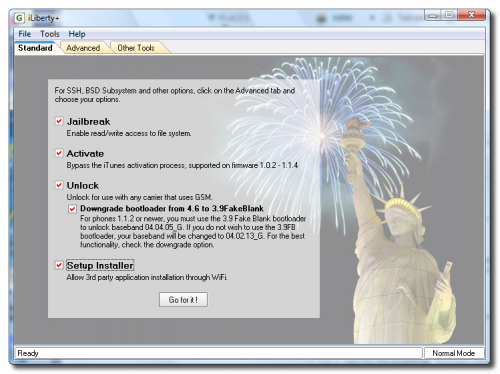
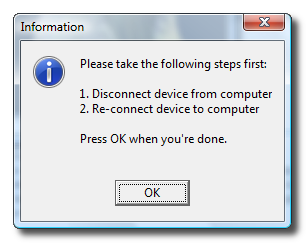
3. Click GO FOR IT– a message will ask you to disconnect and connect your iPhone. Do that, then press OK.
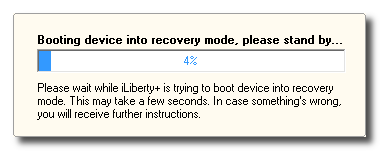
4. A status bar will appear and show your progress. Once it’s finished, voila! Slide to unlock! That’s it!
With so many options out there to unlock new iPhones, this is the perfect time to buy one. Get yours today! Need help? Read my iPhone FAQ or join in on discussions on the iPhone in Canada forums!
Thanks to iClarified for the guide and screens. Using a Mac? Click here for the Mac tutorial! Cheers everyone! 🙂 Let me know how this works for you in the comments.
If you enjoyed this post, please subscribe to my RSS feed, so you won’t miss any updates! You can also subscribe via email and have daily updates sent to your Inbox!
Want to see more of our stories on Google?

P.S. Want to keep this site truly independent? Support us by buying us a beer, treating us to a coffee, or shopping through Amazon here. Links in this post are affiliate links, so we earn a tiny commission at no charge to you. Thanks for supporting independent Canadian media!


Great how to…., Thanks mate! 🙂
I used iLibertyX (the Mac equivalent of iLiberty+) to jailbreak/activate/unlock my iPhone. Worked like a charm once I realized I had to select the “downgrade bootloader” option (which, in iLibertyX, lacks the helpful explanation of why you would want to do that). I also couldn’t get the “Install Cydia BSD Subsystem” payload to download but it was easy to install Cydia afterwards via Installer.
I unlocked my iPhone using Zibri’s method and I believe I will continue to update using his software due to its reliability. I would advise the same to others since it worked fine for me!
I have the Ipod Touch 8GB version with 1.1.4 firmware. So i supposed i don’t need to downgrade to another version. I tried using iLiberty but nothing happens. As mentionned in different how-to’s i just need to select jaibreak and click the go for it button. The button in question isn’t activated so when i click on it there’s no response. What am i doing wrong? The instructions seem pretty easy enough. I also checked You tube videos on how to do it and it all looks easy so i don’t understand what’s wrong.Do i need to be connected to iTunes while doing it?
Any suggestions out there? Thanks.
Great how to…., Thanks mate! 🙂
Great how to…., Thanks mate! 🙂
Great how to…., Thanks mate! 🙂
I used iLibertyX (the Mac equivalent of iLiberty+) to jailbreak/activate/unlock my iPhone. Worked like a charm once I realized I had to select the “downgrade bootloader” option (which, in iLibertyX, lacks the helpful explanation of why you would want to do that). I also couldn’t get the “Install Cydia BSD Subsystem” payload to download but it was easy to install Cydia afterwards via Installer.
I used iLibertyX (the Mac equivalent of iLiberty+) to jailbreak/activate/unlock my iPhone. Worked like a charm once I realized I had to select the “downgrade bootloader” option (which, in iLibertyX, lacks the helpful explanation of why you would want to do that). I also couldn’t get the “Install Cydia BSD Subsystem” payload to download but it was easy to install Cydia afterwards via Installer.
I unlocked my iPhone using Zibri’s method and I believe I will continue to update using his software due to its reliability. I would advise the same to others since it worked fine for me!
I unlocked my iPhone using Zibri’s method and I believe I will continue to update using his software due to its reliability. I would advise the same to others since it worked fine for me!
I have the Ipod Touch 8GB version with 1.1.4 firmware. So i supposed i don’t need to downgrade to another version. I tried using iLiberty but nothing happens. As mentionned in different how-to’s i just need to select jaibreak and click the go for it button. The button in question isn’t activated so when i click on it there’s no response. What am i doing wrong? The instructions seem pretty easy enough. I also checked You tube videos on how to do it and it all looks easy so i don’t understand what’s wrong.Do i need to be connected to iTunes while doing it?
Any suggestions out there? Thanks.
I have the Ipod Touch 8GB version with 1.1.4 firmware. So i supposed i don’t need to downgrade to another version. I tried using iLiberty but nothing happens. As mentionned in different how-to’s i just need to select jaibreak and click the go for it button. The button in question isn’t activated so when i click on it there’s no response. What am i doing wrong? The instructions seem pretty easy enough. I also checked You tube videos on how to do it and it all looks easy so i don’t understand what’s wrong.Do i need to be connected to iTunes while doing it?
Any suggestions out there? Thanks.