
Apple’s AirPort Utility App is Being Removed From the App Store
Apple warns that "functionality is not guaranteed" when using AirPort Utility on iOS 27 or later.
TD Canada has updated their iPhone and iPad apps to include a much requested and anticipated feature: photo chequing. TD Mobile Deposit allows users to snap cheque images from iPhone or iPad to make deposits, part of an overall update for iOS 8 as well.
What’s New in Version 6.1
How we’ve made it better:
•TD Mobile Deposit: Deposit your cheques by taking a photo with your smartphone in a snap. Visit the TD Mobile Deposit page to see how it works. www.td.com/mobiledeposit
•iOS8 compatible
•Minor Updates
Users just select the account they want deposits to be made, enter the cheque amount, then take images of both the front an back of the cheque:
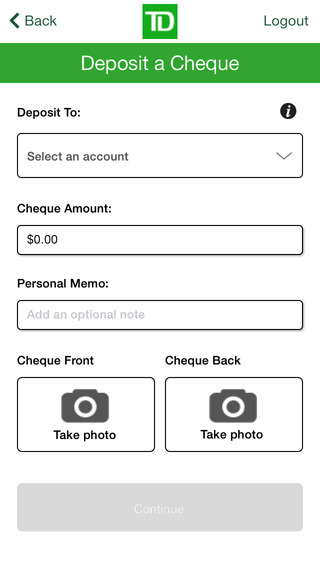
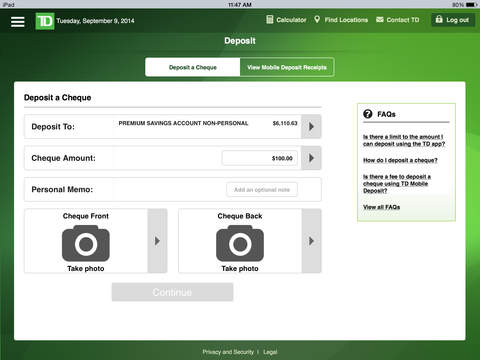
TD Canada finally joins CIBC and Tangerine, along with a plethora of credit unions that have already implemented photo chequing. TD Canada Trust for iPhone received a 6.0 update back in late July, and in less than two months, photo chequing has finally arrived.
Download links: TD Canada for iPhone, TD Canada for iPad. Let us know how this new feature works for you.
Update: Is the TD app frozen when you try to register? Try deleting and reinstalling the app, as that has worked for some (thanks Chris).
Want to see more of our stories on Google?

P.S. Want to keep this site truly independent? Support us by buying us a beer, treating us to a coffee, or shopping through Amazon here. Links in this post are affiliate links, so we earn a tiny commission at no charge to you. Thanks for supporting independent Canadian media!


Wonder when Scotia is gonna catch up
times out when trying to register account to allow it
Same here – times out every time. Another blunder from TD to go along with their TERRIBLE new Easyweb format.
Try deleting and reinstalling the app. That allowed me to finally register.
confirmed, this works, thanks chris
Doesnt work. Hangs on register. Youd think a bank with this size and resources could actually test their crapware before releasing.
In light of the now-yanked iOS 8.0.1 update, this comment is now rather ironic.
Weird, Scotiabank acquired ING (now Tangerine) and the later released the snap a cheque feature 6 moths ago.
Right? And the Tangerine app works GREAT. I really don’t understand why it’s taken TD this long to get a functioning app.
I had to delete and reinstall, too. But after that, worked fine. And I actually had a cheque to deposit.
“Before you submit the images through TD Mobile Deposit, you will sign your name and write on the back of the item ‘For Deposit Only, Account # ________'”
and:
“You agree that immediately ater you deposit an item through TD Mobile Deposit, you will write the date and ‘Deposited’ on the ront of the item. You agree that you will keep the item in a safe and secure place for fourteen (14) days following the date of the deposit and will promptly sned the item to us upon TD’s request. Upon the expiry of this fourteen (14) day period, you agree that you will promptly destroy the item.”
That was exhausting. But I did save myself a trip to the bank.
Sounds like that was a lot of work! 😉