Lately I had a couple friends who just picked up some new 2013 27-inch iMac desktops and upon setting up their machines—they noticed incredibly slow 802.11ac Wi-Fi internet connectivity, despite their iOS devices at home on the same network having no issues with Apple’s latest Airport Extreme.
After some research online, it appears the problem of slow Wi-Fi on your Mac within OS X Mavericks is a widespread problem, given the numerous and lengthy threads within the Apple Support Communities forums.
After troubleshooting solutions to fix my friend’s Wi-Fi (changing router channels; hard resets; Shaw cable modem resets, etc)—one solution in this thread ended up working right away: deleting your home network’s SSID and then re-adding it.
Immediately, Speedtest.net tests showed an instant fix as his Shaw 25 plan resulted in download speeds of 22 Mbps, compared to just 6 Mbps down prior to deleting the WiFi network!
Here’s how to fix your slow WiFi connection via the method mentioned above:
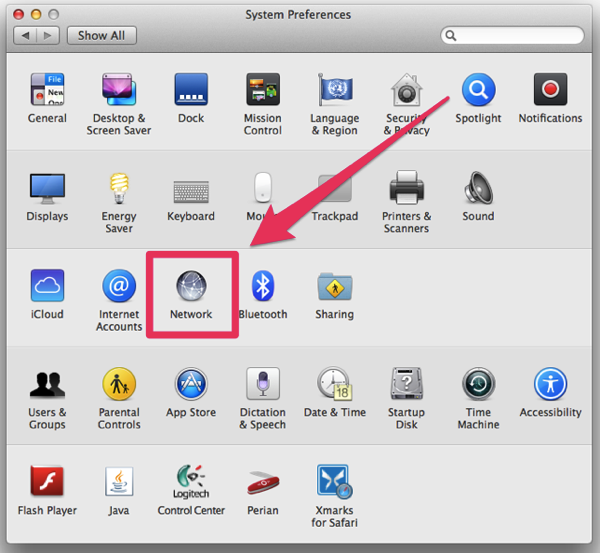
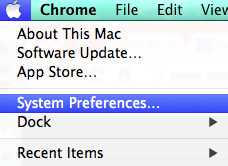
1. Go to Apple > System Preferences > Network

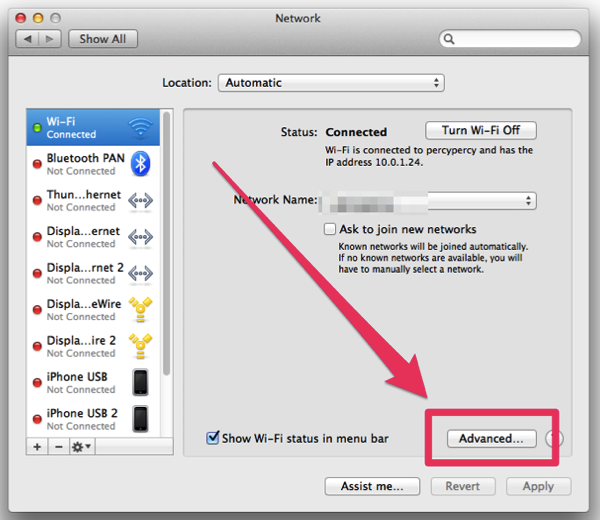
2. Click on ‘Advanced’, then turn your Wi-Fi off.


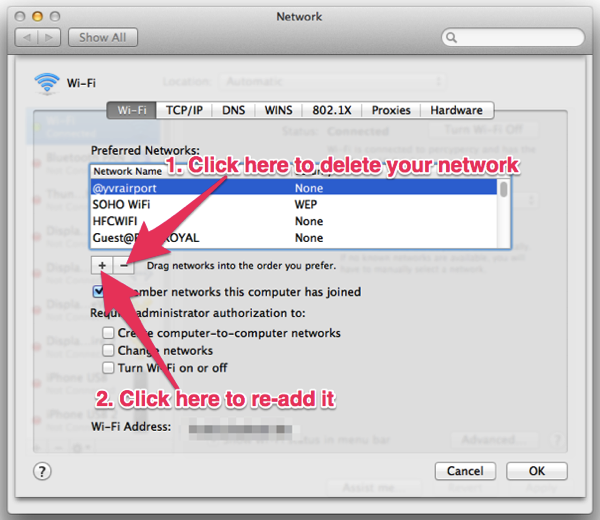
3. Find your existing network name in the list of preferred networks, then click the “—“ button to delete it. Click “+” and re-add it. Click ‘OK’ when done, then click ‘Apply’.
4. Turn WiFi back on (you should automatically connect to your network) and/or reboot your mac.
Once that’s done, your WiFi should be significantly improved, but your mileage may vary. Interestingly enough, this fix unfortunately did not work on his 2009 21.5-inch iMac running OS X Mavericks.
One More Solution to Fix your Slow WiFi on your Mac
One other solution which has worked to help fix the Wi-Fi speeds of my 2012 MacBook Air was to disable Bluetooth, as crazy as it sounds. Doing that just worked and allowed my down speeds to go back to ‘normal’ in OS X Mavericks.
Let us know if any of the solutions above help fix your slow Wi-Fi issues on your Mac in OS X Mavericks. Slow Wi-Fi is definitely a #firstworldproblem that is excruciatingly painful and frustrating. Let’s hope a future Mavericks update will addresses these Wi-Fi issues.




i had this problem with my imac 27″ and i believe i stopped safari (not just closed it, but stopped it from the menu bar). it has worked fine after that.
if you are using an Airport Extreme and have not bridged the modem/router you are wasting your time in trying to fix the issue. When you bridge the modem/router you turn it just to a modem. Turning off Wifi on the modem/router does nothing except turn off wifi.
I have the 2013 27 inch iMac and haven’t seen any speed issues whatsoever.
fixed my issue @ office.. thanks buddy
Deleting and adding my network worked. Turning off Bluetooth kept me from typing in blocks like this one.
Do you have a Bluetooth keyboard?
None of this worked for me, on a 2011 iMac. Problem even occurs after a totally clean reinstall of Mavericks. Lousy throughput on wifi, to the point of it being unusable. After spending some time testing, here’s what is happening in my case : when the iMac wifi adapter is switched on, all other wifi-connected devices on the network suffer the same issue (even non-Apple devices). With the iMac wifi adapter switched off, it all goes away 🙂 Everything works. So, I would conjecture that actually, the Mavericks wifi stack is making the WLAN adapter dump ‘garbage’ of some description onto the wireless LAN that is upsetting things all around.
Wiping again, and going back to Mountain Lion, where I shall stay!
I am about to throw my Mac in rubbish bin!! Nothing works!
Im having these issues w/ a late 2013 rMBP.. Also my first Apple product…
Since updating my MBAir to Mavericks, turning Bluetooth on kills my WiFi. Its like its forgotten my home network every time the system sleeps and then takes a couple minutes to reconnect each time. Deleting and re-adding the network in System Settings didn’t help.
worked!
Awesome 🙂
Nope, nothing. Thanks for the detailed post, but this just didn’t work on my 2012 Macbook Air.
That was brilliant! Deleting and adding my network was just the ticket to fix my slow internet connection. Thank you.
Thank you so much! The bluetooth worked for me! Nothing else worked…I even took it to the apple store
YES! It worked, thank you!
Nice!
Amazing thanks!!
My wife and I both have 17 macbook pros. She’s still fighting poor network performance. I just replaced my mac with a Linux laptop and my problems are all gone.
I have issues with my new rMBP 15″ 2014. Seems like the problem is with the bluetooth/wifi card which I guess is on the same card as in the once in the intel NUCs… Well, I need to be able to use bluetooth, is there any other solution? My network speed varies greatly. Sometimes I can’t even watch youtube clips without choking the connection.
I actually had to delete ALL of the saved networks in System preference as well as remove all my Airport network passwords from the login keychain for this to work for me. Its FINALLY fixed the problem.
worked like a charm!
Thanks, woking fast now. before it would take minutes or not even load…..awesome.
Thank you!
Wow! Disabling the BlueTooth worked…Who Knew…..Thanks!
This IS super crazy, but turning off bluetooth worked. What stupid-ass bug is this?
Deleting and adding the networked worked the first time on my MBP 2013 and I was thrilled, but reverted to slow speed on the next use. Deleting and adding doesn’t seem to make any difference now at all to the speed. I bought the BT keyboard and trackpad to improve my posture and help with back pain. Now I’m having to turn BT on and off and lean across the BT keyboard to reach the MBP keyboard which is elevated and on an angle on a stand. Probably even worse for my back.
the deleting and adding is only temp.
and since i have a bluetooth keyb and mouse turning that of isnt working for me eighter.
so what i did is give my imac a static IP
that seems to be working for now
Thank you! I hate apple’s thought-terminating cliche of “it just works” because it often doesn’t and apple support staff are know-nothing clowns who just say “well that’s strange, I’ve never heard of that problem before” and don’t actually help fix anything. This solved my problem and I am grateful.
Cheers!
this totally worked for me