Twitter launched this morning ‘night mode’ for their iOS app, which allows users to enable a new dark-themed skin, which is helpful for surfing the social network at night. This update is out over-the-air and not through an iOS update.
Here’s how to turn on night mode in Twitter for iOS:
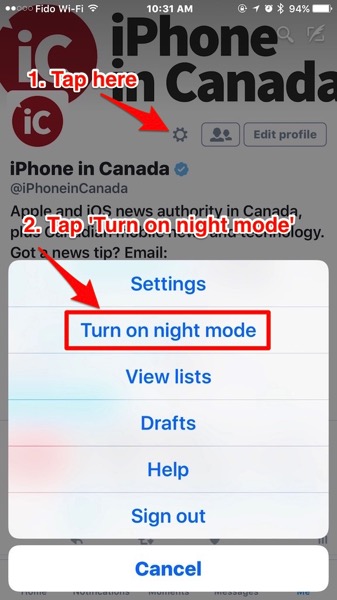
Tap on your ‘Me’ tab, then tap the Settings (gear) icon up top. Next, tap ‘Turn on night mode’ when it appears in the menu (if you’re not seeing this, force quit Twitter and relaunch it; on iPhone or iPad, double tap the Home button, then ‘swipe’ up on the Twitter app to force close it):
Once enabled, you’ll see a night mode theme for Twitter, showing white text on a dark background, as shown below:

To disable night mode, just tap the Settings icon again, then select ‘Turn off night mode’.
Coupled with Night Shift Mode in iOS 9.3, the addition of night mode for Twitter’s iOS app should make browsing tweets in bed much easier on the eyes. Let us know how you like it.




Night Shift doesn’t show up in the settings menu for me.
It’s rolling out still, try force quitting Twitter if you haven’t already or try again later.
I don’t know how to force quit Gary. At least I don’t think I know how to force quit. Thanks for the quick reply though Gary, it’s appreciated. I can wait I guess.
Double tap the Home button on iPhone, then ‘swipe’ the Twitter app ‘up’ for it to force quit.
Okay I’ll try that. Thanks for the help.
Month later, still can’t turn it on