
OnePlus Watch 3 Now Available in Canada for $449
OnePlus Watch 3 is officially available in Canada for $449 and comes with an improved battery life.
Do you listen to your iPhone or iPod with your headphones while driving in the car? Personally, I don’t but I’ve seen many people do it. Not only is that an inconvenient way to listen to your music it also looks a little weird when you pull up to a red light. The next best thing is to obviously get a FM transmitter for your iPhone! This brings us to today’s Griffin iTrip Autopilot for the iPhone 3G/3GS review!
What is the Griffin iTrip Autopilot?
This little device achieves two goals: first, it will allow you to transmit music from your iPhone to any open FM radio station so you can listen to it in your car; secondly, it will also charge your iPhone at the same time! The quality really depends on the clarity of the open FM radio station you’re able to find, but the Autopilot does the hard work for you. We’ll get onto that later in the review.
Here are the main features of the Griffin iTrip Autopilot:
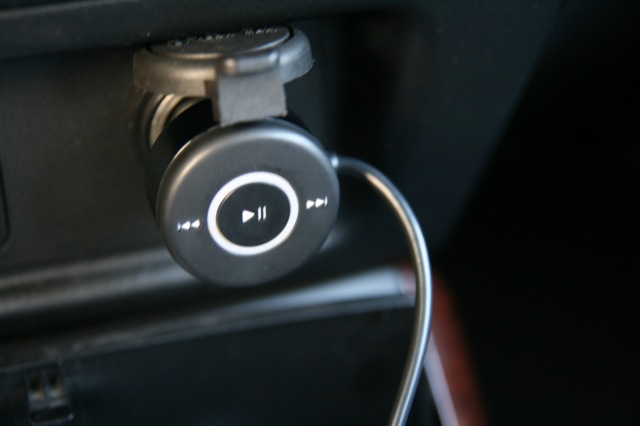
– AutoPilot controls iPod playback from your dash or console’s cigarette lighter with the touch of a finger.
– Industry-leading SmartScan does all the work — scans the radio dial for the three best frequencies then saves them automatically to 3 programmable presets for easy recall at the touch of a button.
– New SmartSound Plus technology delivers clear sound under real-world conditions.
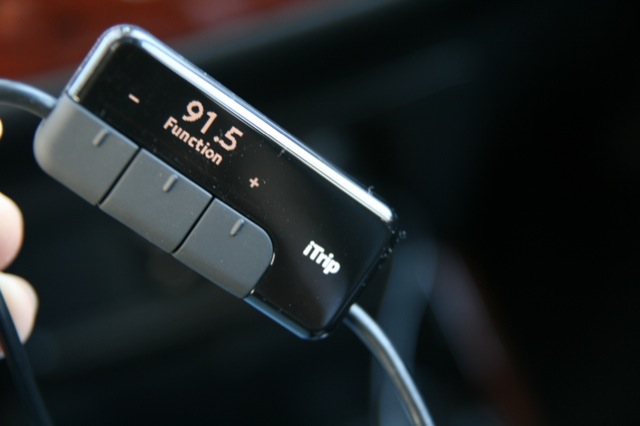
– High-contrast display is easy to read.
– Three-stage light ring changes color to indicate the charging status of your iPod.
– RDS technology shows song information on RDS-enabled car radio display.
So How is the Sound Quality?
Setting up the iTrip Autopilot is dead easy. Plug in the cigarette lighter inside your car, then attach the other end to your iPhone. Then, on the iTrip you let the SmartScan feature hunt out the best frequencies for you. Tune your radio to those FM stations, launch some music on your iPhone and voila! You’re listening to your entire music library in the car!
The music quality is pretty good if you find a clear FM station out of the city. Obviously it’s not the best (beware audiophiles) but you can listen to all your songs in the car! If the station isn’t clear, you can also rearrange the position of the iTrip to get in tune with your car’s antenna. I had no problems using the device in Vancouver. The iTrip’s sound quality will depend on your car’s FM antenna, availability of open FM stations, and where you live.
What I liked about the Autopilot was the cigarette lighter controls. Being able to pause and skip forward/reverse is very handy when you’re driving. Also, having my iPhone 3G being charged at the same time is awesome too. If you don’t have a music library, just install FlyCast and stream online radio using your iPhone’s data! There are pretty good stations out there. This is when you can take advantage of that 6GB data plan folks (or choose a new value data pack to save money)!
Conclusion: You Want This in Your Car
The Griffin iTrip Autopilot not only works for the iPhone 2G/3G/3GS, but it works for pretty much all iPods too. Check the website for compatibility. The retail price on this unit is $99CDN and I’ve seen it on sale at the Apple store and other electronics stores too. It does seem a bit steep but if you factor in FM transmitter, touch controls, and the ability to charge your iPhone in an all in one device that might urge you to buy it. I’ve tested it and I love it–highly recommended (add this to the Top iPhone accessories Wishlist this Christmas!). Check out the gallery below:


Want to see more of our stories on Google?

P.S. Want to keep this site truly independent? Support us by buying us a beer, treating us to a coffee, or shopping through Amazon here. Links in this post are affiliate links, so we earn a tiny commission at no charge to you. Thanks for supporting independent Canadian media!

A hundred bones is a little steep for an FM Transmitter…..looks great, but nah.
Good review – I agree though on the price – seems a bit much for a transmitter!! I always preferred the kits that can hard wire the device into your stereo – I got sick of my FM transmitter and just stopped using it all together
And don’t get in the eyesight of your local Police Officer with those headphones on while driving either, it’s only slightly illeagal!!
G’day and Merry, Merry to all! Ho Ho Ho……!!!
Are there any car stereo decks that are iPhone compatible? I see many that have a front aux input or say USB iPod ready… Would those be another alternative to the fm transmitter?
Yes they are a gr8 alternative … i bought the 09 civic an it has an aux input so i bought a cable for it bout 3-5 dollars i think .. an voila connect 1 end into aux .. the other end into the headphone jack an u got ur speakers playing music from your iphone…. though u need to control the music thru ur phone an not thru the system. !
kkk but hold up.. does it charge your iphone too?
Nope it doesnt charge the phone ….
no freebie fm transmitter ? 🙂
I used to rock an iTrip for my iPod back in the day. It’s pretty solid but you’ll notice a considerable amount of interference in a large city like Toronto even at the low frequency FM range. I have a tape deck as part of my ride now, so I just use a tape line-in to my headphone jack on my iPhone for better audio fidelity.
Nice album you’re listening to btw…
I’ve had one of these for a few months now and it works great with my 3G iPhone. the sound quality is much better than previous generation iTrip models that I had for my iPods.
one minor complaint – sometimes when manually switching to another song via the iPhone controls, the RDS song name display doesn’t get updated.
also, here’s a tip: there’s a hidden “international” mode which lets you pick transmit frequencies 87.7 to 87.9 (normally not selectable). Press the function->mode button then hold the middle button until the Griffin logo jiggles. then you’re in international mode. you may find these stations clearer.
this can solve all of your problems,…CAR CHARGER WINDSCREEN MOUNT HOLDER for iPhone….
I got one from ebay for 10$ and it works perfectly….
just mount it, to your windshield and connect it to the AUX channel of your Car radio, and voila! There is also charger for the iPhone present so you have best of both worlds here…
heres the link on ebay….
http://cgi.ebay.com/ws/eBayISAPI.dll?ViewItem&ssPageName=STRK:MEWNX:IT&item=390010345438
forgot to add something…
I also tested what happens if you have incoming call while connected to AUX via headphone jack,… just use speakerphone on iPhone, and it works perfectly, also if you want to make the call procedure is the same,… when using speakerphone it uses the built in iPhone speaker, and not the headphone jack, so don`t be afraid that all of the neighborhood will hear your conversation LMAO
Can you use the tape deck while charging your phone using iTrip connected to the cigarette lighter?
how come even if the itrip is plugged in, my 3gs is still playing the music over its own speakers instead of transmitting it to the car stereo?
how come even if the itrip is plugged in, my 3gs is still playing the music over its own speakers instead of transmitting it to the car stereo?
A hundred bones is a little steep for an FM Transmitter…..looks great, but nah.
Good review – I agree though on the price – seems a bit much for a transmitter!! I always preferred the kits that can hard wire the device into your stereo – I got sick of my FM transmitter and just stopped using it all together
And don’t get in the eyesight of your local Police Officer with those headphones on while driving either, it’s only slightly illeagal!!
G’day and Merry, Merry to all! Ho Ho Ho……!!!
Are there any car stereo decks that are iPhone compatible? I see many that have a front aux input or say USB iPod ready… Would those be another alternative to the fm transmitter?
Yes they are a gr8 alternative … i bought the 09 civic an it has an aux input so i bought a cable for it bout 3-5 dollars i think .. an voila connect 1 end into aux .. the other end into the headphone jack an u got ur speakers playing music from your iphone…. though u need to control the music thru ur phone an not thru the system. !
no freebie fm transmitter ? 🙂
I used to rock an iTrip for my iPod back in the day. It’s pretty solid but you’ll notice a considerable amount of interference in a large city like Toronto even at the low frequency FM range. I have a tape deck as part of my ride now, so I just use a tape line-in to my headphone jack on my iPhone for better audio fidelity.
Nice album you’re listening to btw…
I’ve had one of these for a few months now and it works great with my 3G iPhone. the sound quality is much better than previous generation iTrip models that I had for my iPods.
one minor complaint – sometimes when manually switching to another song via the iPhone controls, the RDS song name display doesn’t get updated.
also, here’s a tip: there’s a hidden “international” mode which lets you pick transmit frequencies 87.7 to 87.9 (normally not selectable). Press the function->mode button then hold the middle button until the Griffin logo jiggles. then you’re in international mode. you may find these stations clearer.
kkk but hold up.. does it charge your iphone too?
Nope it doesnt charge the phone ….
this can solve all of your problems,…CAR CHARGER WINDSCREEN MOUNT HOLDER for iPhone….
I got one from ebay for 10$ and it works perfectly….
just mount it, to your windshield and connect it to the AUX channel of your Car radio, and voila! There is also charger for the iPhone present so you have best of both worlds here…
heres the link on ebay….
http://cgi.ebay.com/ws/eBayISAPI.dll?ViewItem&ssPageName=STRK:MEWNX:IT&item=390010345438
forgot to add something…
I also tested what happens if you have incoming call while connected to AUX via headphone jack,… just use speakerphone on iPhone, and it works perfectly, also if you want to make the call procedure is the same,… when using speakerphone it uses the built in iPhone speaker, and not the headphone jack, so don`t be afraid that all of the neighborhood will hear your conversation LMAO
I bought this and was disappointed, crackly static at any setting on the band – the only way it is clear is if I hold my hand on the transmitter unit directly 2-3 inches in front of my car radio – obviously not acceptable.