It’s always good to have a passcode on your iPhone, because you never know when it could fall into the wrong hands and have your sensitive information revealed. Using a strong passcode will prevent the stress of relying on Find my iPhone should your precious baby get stolen or lost.
The maker of the free app Big Brother Camera published some anonymously collected stats of the most common iPhone passcodes. The results might shock you as ‘1234’ topped the charts of the most commonly used passcode! The developer Daniel Amitay goes on to describe the flaw of formulaic passwords:
Formulaic passwords are never a good idea, yet 15% of all passcode sets were represented by only 10 different passcodes (out of a possible 10,000). The implication? A thief (or just a prankster) could safely try 10 different passcodes on your iPhone without initiating the data wipe. With a 15% success rate, about 1 in 7 iPhones would easily unlock—even more if the intruder knows the users’ years of birth, relationship status, etc.
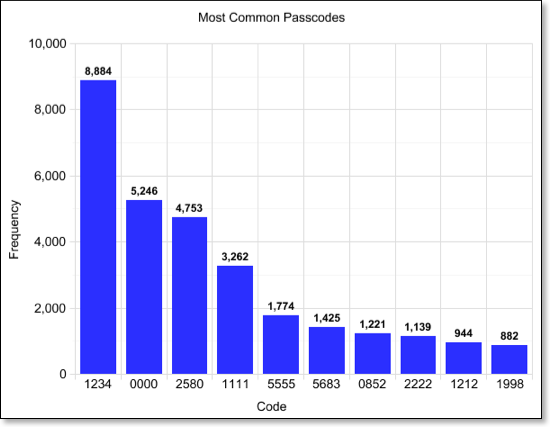
Did your passcode make the Top 10? What’s your passcode (don’t worry I won’t tell)? I’m glad my choice of ‘4321’ is still safe!
[Daniel Amitay via Lifehacker]


Passcode?
Passcode?
2850 😀
I don’t use one. If my iPhone is out of my hands, with or without a passcode, it is a problem.
2850 😀
I don’t use one. If my iPhone is out of my hands, with or without a passcode, it is a problem.
No 2112? Either RUSH fans don’t use iphones or passcodes, or they are too clever for that. 🙂
I don’t use a passcode.
No 2112? Either RUSH fans don’t use iphones or passcodes, or they are too clever for that. 🙂
I don’t use a passcode.
No 2112? Either RUSH fans don’t use iphones or passcodes, or they are too clever for that. 🙂
I don’t use a passcode.
another sneaky one… is to turn off simple passcode… and use Spacebar as the password… so spacebar and unlock… its even quicker then the simple passcode and no one realizes that you tapped the spacebar 😉
another sneaky one… is to turn off simple passcode… and use Spacebar as the password… so spacebar and unlock… its even quicker then the simple passcode and no one realizes that you tapped the spacebar 😉
another sneaky one… is to turn off simple passcode… and use Spacebar as the password… so spacebar and unlock… its even quicker then the simple passcode and no one realizes that you tapped the spacebar 😉
Smart!
Smart!
Smart!
another sneaky one… is to turn off simple passcode… and use Spacebar as the password… so spacebar and unlock… its even quicker then the simple passcode and no one realizes that you tapped the spacebar 😉
Smart!
4565
4565
Why is 5683 so significant?
Why is 5683 so significant?
It’s the spelling for LOVE
It’s the spelling for LOVE
Why is 5683 so significant?
It’s the spelling for LOVE
5683 = love
5683 = love
How? 5 equals L in what way and so on..
How? 5 equals L in what way and so on..
How? 5 equals L in what way and so on..
We’re too clever. 🙂
We’re too clever. 🙂
Turn off the numbers and use a number/word combination with some form of punctuation in the middle like: crash,1929 or 1929:crash. The symbols make cracking your password even harder. Good advice for any place you need a password, not just your iPhone.
Turn off the numbers and use a number/word combination with some form of punctuation in the middle like: crash,1929 or 1929:crash. The symbols make cracking your password even harder. Good advice for any place you need a password, not just your iPhone.
Look at the letters on the number pad and you’ll see it. 😉
Look at the letters on the number pad and you’ll see it. 😉
Space is a good idea. 🙂
I have an idea too. But you can not use this in the lock screen or you can’t access your phone.
Install emoji on your phone (or just wait for the iOS 5). Open notes (or a text field). Then switch to emoji keyboard. Go to the place where you use the password, and select your password. When people wan to try your password they can’t, because they can’t reach the emoji layout on the password screen. When you want to enter password, just open a text file and switch to emoji. Then go to password screen and you will see emoji layout, but if you change keyboard layou on this screen you have to go to the text field again.
I hope I can explain.
Space is a good idea. 🙂
I have an idea too. But you can not use this in the lock screen or you can’t access your phone.
Install emoji on your phone (or just wait for the iOS 5). Open notes (or a text field). Then switch to emoji keyboard. Go to the place where you use the password, and select your password. When people wan to try your password they can’t, because they can’t reach the emoji layout on the password screen. When you want to enter password, just open a text file and switch to emoji. Then go to password screen and you will see emoji layout, but if you change keyboard layou on this screen you have to go to the text field again.
I hope I can explain.
I don’t get it Gary! Maybe a Mac keypad? I’m on a PC. 5 is blank while 6 has -> 8 has up arrow and 3 has PgDn. Also, these 4 don’t make a shape of a heart… what else is there?
I don’t get it Gary! Maybe a Mac keypad? I’m on a PC. 5 is blank while 6 has -> 8 has up arrow and 3 has PgDn. Also, these 4 don’t make a shape of a heart… what else is there?
Wow. Okay, look at a *phone*’s number pad. You know all those  easy-to-remember phone numbers like 1-800-ROGERS1 (example only)? Those letters correspond to numbers on a phone dialpad.
Before smartphones, and even now with really cheap dumb phones, T9 (texting with 9 keys) is the only way to write text messages.
Wow. Okay, look at a *phone*’s number pad. You know all those  easy-to-remember phone numbers like 1-800-ROGERS1 (example only)? Those letters correspond to numbers on a phone dialpad.
Before smartphones, and even now with really cheap dumb phones, T9 (texting with 9 keys) is the only way to write text messages.
Wow. Okay, look at a *phone*’s number pad. You know all those  easy-to-remember phone numbers like 1-800-ROGERS1 (example only)? Those letters correspond to numbers on a phone dialpad.
Before smartphones, and even now with really cheap dumb phones, T9 (texting with 9 keys) is the only way to write text messages.
LOL!!! Thank you hub2. I was thinking PC and even the iP4’s keyboard for web etc… not as a *phreaking* phone. I hate talking on phones and don’t even think of this sweet device as a phone. LOL I spend maybe 30 seconds a week on it when the wife calls to pick up a bag of milk. :GÂ Thanks again…. d_oh!
LOL!!! Thank you hub2. I was thinking PC and even the iP4’s keyboard for web etc… not as a *phreaking* phone. I hate talking on phones and don’t even think of this sweet device as a phone. LOL I spend maybe 30 seconds a week on it when the wife calls to pick up a bag of milk. :GÂ Thanks again…. d_oh!
9999
9999
6580 is mine.. ))) lol
6580 is mine.. ))) lol
Yeah man me too, I don’t have enough time to type password, and there’s not much in my phone anyways just numbers lol