It seems indie iPhone developers have some obsesion with the Palm Pre’s UI. Not too long after the Pre was released, we started seeing Pre inspired themes in Cydia. In fact, we here at iPhoneinCanada wrote about how to “Make Your iPhone Look Like a Palm Pre“, including changing the font, with “Font Swap”.
Then, just last week, we saw the must coveted feature of the Pre arrive on the iPhone with “ProSwitcher“. This app, in conjuction with “Backgrounder” gives iPhone users the Pre’s backgrounding apps capability, with “cards”, and everything.
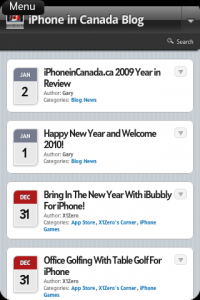
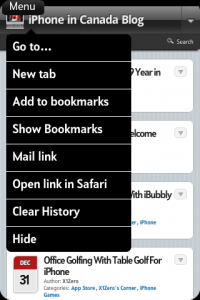
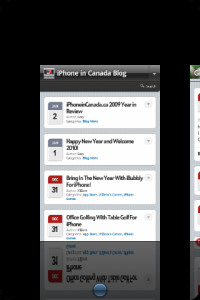
Now, we have “ZapBrowser”, which imitates the Pre’s web browser. It features full screen, tabbed browsing, with the card style of the WebOS. This browser is pretty fast, with a simple UI. You have a menu button, at the top, that gives you access to your bookmarks, new tabs, with easy buttons to open links in Safari, or to email them. When you have a couple of tabs open, you get a little blue button, bottom center, to access your “cards”, and swith between tabs.
Actual browsing is comparable to Mobile Safari. Speeds are pretty close, when loading pages. Multitouch, copy/paste, and landscape mode are all supported.
Check out this quick demo video I whipped up:
Overall, this browser is an okay alternative to Mobile Safari, especially if you’re going for the Palm Pre look and feel. ZapBrowser is available for jailbroken iPhones, in the Cydia Store, for $1.99. You may have seen this in Cydia as “PreBrowser”, but the name has been changed to “ZapBrowser”, most likely due to Palm complaining. 😉
Thanks for reading again this week. Check out Green Candy for more iPhone releated tips and tricks, and follow me on Twitter @rorypiper.
Want to see more of our stories on Google?
P.S. Want to keep this site truly independent? Support us by buying us a beer, treating us to a coffee, or shopping through Amazon here. Links in this post are affiliate links, so we earn a tiny commission at no charge to you. Thanks for supporting independent Canadian media!
Subscribe
5 Comments
Oldest
NewestMost Voted
Dusty
16 years ago
Nice video dude. I was curious how this worked out. So far safari is good enough for me but if I ever feel like paying a bit, I can try ZapBrowser.
Wow that sounds interesting and lovely, i am really impressed by its features, really nice, thanks a lot for sharing this with us. Would like to purchase it as soon as possible.
1His_Nibs1
16 years ago
You might want to update the link “Make Your iPhone Look Like a Palm Pre“ as the info in there is no longer relevant. I can't find the 'Prelude” font or the “PREtentious” theme.
1His_Nibs1
16 years ago
You might want to update the link “Make Your iPhone Look Like a Palm Pre“ as the info in there is no longer relevant. I can't find the 'Prelude” font or the “PREtentious” theme.
Final Fantasy VII Remake Intergrade, The Séance of Blake Manor and Mouthwashing are among the games coming to Xbox Game Pass over the next two weeks, with a handful of new indie titles and a cleaned-up Plants vs. Zombies joining them. That's according to Microsoft, which shared the second October 2026 Game Pass wave on...


Nice video dude. I was curious how this worked out. So far safari is good enough for me but if I ever feel like paying a bit, I can try ZapBrowser.
Wow that sounds interesting and lovely, i am really impressed by its features, really nice, thanks a lot for sharing this with us. Would like to purchase it as soon as possible.
You might want to update the link “Make Your iPhone Look Like a Palm Pre“ as the info in there is no longer relevant. I can't find the 'Prelude” font or the “PREtentious” theme.
You might want to update the link “Make Your iPhone Look Like a Palm Pre“ as the info in there is no longer relevant. I can't find the 'Prelude” font or the “PREtentious” theme.