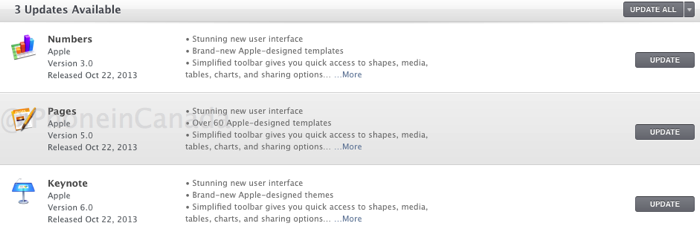
Earlier today Apple announced its entire iLife and iWork suite of apps would go free for eligible Mac and iOS users. However, it turns out there’s a problem for legacy users who previously purchased iWork ’09 or iLife ‘11 version on a DVD.
These users are not seeing a “free” upgrade in the Mac App Store, which has resulted in numerous frustrated users in the Apple Support Communities. What’s the solution to this madness?
You should be able to download the latest versions of iLife and iWork in the Mac App Store, according to Macworld. An Apple spokesperson told the site there’s currently a bug which is causing older customers to unable to get the upgrades for free.
If you own iLife ’11 or iWork ’09 apps (or v1 iOS apps) and you got them from the Mac App Store or iOS App Store: You should be able to download the latest versions for free by going to the app page on the Mac or iOS App Store.
If you own iLife ’11 or iWork ’09 apps for the Mac but did not purchase them from the Mac App Store: You should be able to download the latest versions for free by going to the Mac App Store and tapping Update, though you may need to first visit the Purchases screen, where you might see a box called “You Have [number] Apps to Accept.” This ties apps you have on your computer to both your Apple ID and a hardware identifier on your computer, and it should allow you to download free updates to these programs from any computer associated with your Apple ID.
If you don’t own any of these original versions from iLife ’11 or iWork ’09 (or 1.0 iOS versions) or older Mac versions, you will need to buy iMovie and iPhoto at full price (Mac: $15; iOS: $5), while GarageBand is free for all. iWork apps are $20 each on the Mac, while iOS version are $10.
If you are purchasing a new Mac or iOS device, you will get all iLife and iWork apps for free, as we explained earlier:
1. If you purchased a qualifying Mac on or after October 1, 2013, that did not include Pages, Numbers and Keynote, you can download them free in the Mac App Store (OS X Mavericks required).
2. If you purchased your Mac on or after October 22, 2013, you need to submit your Up-to-Date request within 30 days of the date you purchased your Mac to qualify for the Up?To?Date Program.
3. If you’re already running OS X Mavericks, you can update iLife and iWork for free in the Mac App Store.
Other iLife ’11 and iWork ’09 upgrades fixes to try
One possible fix if you installed iWork via the DVD is to reinstall the iWork 9.3 update found here, which triggers the Mac App Store to recognize your free upgrades after you sign out and back into your account.
Another fix for those who bought iWork on DVD:
1. Launch the Mac App Store. Go to Featured > Quick Links > Account
2. Enter your Apple ID password and then click ‘Reset All Warning for Buying and Downloading’ at the bottom of the page, then click ‘Done’.
3. Check the ‘Updates’ tab again and iWork and iLife updates should appear now.
As of writing, iWork updates are now appearing for us (we were on ’09 versions) in the Updates tab within the Mac App Store, whereas they did not earlier this evening (Apple might have fixed this already).
Some users who upgraded and paid were refunded after contacting Apple:
Let us know if you are able to download your upgrades!



How do you get the iOS versions for free?
Still not able to see any updates for pages, keynote and numbers in MAS (Mac Apple Store). The funny thing is that when I upgraded to Mavericks, I launched MAS and it showed no available upgrade for Pages (for example) but then I launched Pages itself and a message popped up (a Pages kind of message, not from MAS) saying that there was an update. I did click on “update” and it launched MAS but then MAS said that all apps are already updated.
I don’t understand this issue, I tried all alternatives (re-installation of iWork 9.3, resetting notifications in MAS, check Purchases on MAS, and so on) without success.
Hope someone can help me out with this. I don’t want to pay almost 20$ per program having an original retail DVD copy of iWork.
Best
Have you tried making a new temporary admin account on your Mac and checking for the updates there?
I have iWorks 9 as well and no updates for me too.
Did the instruction below and nothing…
1. Launch the Mac App Store. Go to Featured > Quick Links > Account
2. Enter your Apple ID password and then click ‘Reset All Warning for Buying and Downloading’ at the bottom of the page, then click ‘Done’.
3. Check the ‘Updates’ tab again and iWork and iLife updates should appear now.
itWorks! Thank you very much
After updates, I have the old iWork apps and I have separately the new ones showing up.
What’s the best way to uninstall or delete the old version? Just click and delete old one?Use my App Delete App to uninstall?
Before you do delete the old ones, try out the new ones and make sure they have all the functionality you need. They stripped a LOT of features out; the list for Pages alone is here: https://discussions.apple.com/thread/5468056?tstart=0
I got it to work by signing out of the store and then back in.
I followed of all of the above steps and realized toward to end that I did have the updated iWork apps. They were in my applications all along. Or you can simply look it up on Spotlight search and the new app icons should come up. Hope this helps. 🙂
I had the DVD versions installed, and have been updating ok until Mavericks. I see the updates in MAS, but it tells me that they were purchased with a different ID.
Aperture update went fine, but I bought that on MAS.
I will have to try the possible solutions tonight.
Not working for me still. Running iWork ’09 and went to the updates tab but nothing shows up. I also tried going to the apps individually to see if they were listed as free or an update. Nothing seems to be working. Anyone got a fix?
Try upgrading to Mavericks first. I created a new account and tried buying to see if it would just update on an account with no apple id setup and it complained that 10.9 was required. Granted my iLife Apps show up under updates as incompatible so who knows 🙁